Computers / Tablets
User Manual for TCL TAB 10L 8491X Tablet
Quick start guide for the TCL TAB 10L 8491X tablet. Learn how to set up your device, connect to Wi-Fi, manage contacts, use Gmail, and navigate the home screen.
Table of contents
Manual images
Click an image to enlargeQuick Start Guide
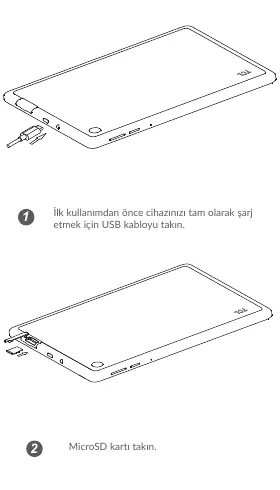
Before using your tablet for the first time, it is recommended to fully charge the device using the provided USB cable. You can also insert a MicroSD card into the designated slot to expand storage.
Home Screen and Navigation
The home screen allows quick access to your favorite apps, shortcuts, folders, and widgets. You can swipe horizontally to view extended screens. To view your full application list, swipe up from the bottom of the screen.
Status Bar: Swipe down from the top of the screen to access the status bar, which displays notifications and connection status. Swipe down twice to access the Quick Settings panel, where you can toggle features like Wi-Fi, Bluetooth, and other settings.
Contacts
Your contacts are saved in the Contacts application. You can add, delete, or edit contacts. The tablet allows you to import or export contacts from various sources, including Gmail or other email accounts. To add a new contact, open the Contacts app and tap the plus (+) button.
Gmail
Gmail is automatically synced when you set up your tablet with a Google account. You can manage multiple accounts by tapping the menu button in the Inbox screen and selecting 'Add account'. To compose an email, tap the 'Compose' button, enter the recipient's address, subject, and content, then tap 'Send'.
Wi-Fi Connection
To connect to the internet, go to Settings > Network & Internet > Wi-Fi. Ensure the Wi-Fi switch is turned on. Select your desired network from the list, enter the password if required, and tap 'Connect'. For hidden networks, select 'Add network' and enter the SSID and security credentials.
Manufacturer information
TCL
Practical help
Common problems
Cannot connect to Wi-Fi
Go to Settings > Network & Internet > Wi-Fi, ensure the feature is turned on, and verify that you have entered the correct password for the network.
Cannot find contacts
Ensure your contacts are synced with your Google account or other email accounts configured on the tablet.
Before use
- Charge the tablet fully using the USB cable.
- Insert a MicroSD card if you need additional storage.
- Ensure you have your Google account credentials ready for setup.
Images and diagrams
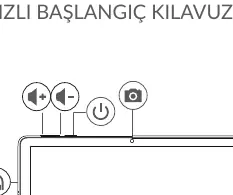
- The device features volume buttons, a power button, and a front-facing camera.
- The status bar provides access to notifications and quick settings.
Model compatibility
- Requires a Wi-Fi connection for internet access.

Manual page author
David Miller
Documentation analyst
Organizes user manual content into clear summaries, with attention to model details, product context, and everyday usability.