Computers / Tablets
User Manual for TCL TAB 10L Gen 4 Tablet
Quick start guide for the TCL TAB 10L Gen 4 tablet. Includes device layout, accessibility features, safety warnings, battery charging guidelines, and regulatory information.
Table of contents
Manual images
Click an image to enlargeQuick Guide from the Manual
This guide provides essential information for setting up and safely using your TCL TAB 10L Gen 4 tablet. Please ensure you charge the device before first use and follow all safety guidelines provided.
Device Layout
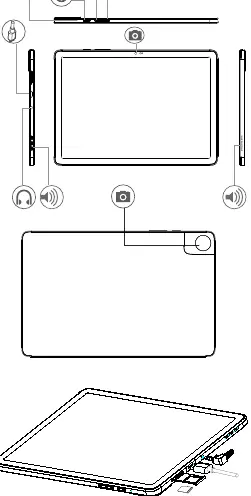
The tablet features a power button, volume keys, microphone, camera, and a headphone jack. The SIM and SD card slots are located on the side of the device. Refer to the device diagram in the manual to identify the exact location of these ports and buttons.
Accessibility Features
To activate accessibility functions, press and hold the Volume Up and Volume Down keys simultaneously for 3 seconds. For hearing assistance, navigate to Settings > Accessibility > Downloaded Apps > TalkBack.

Safety and Usage
Follow these safety precautions to ensure proper operation:
- Medical Devices: Keep the device at least 15 cm away from medical devices like pacemakers, hearing aids, or insulin pumps.
- Environment: Use the device in temperatures between 0°C and 40°C. Avoid exposing the device to extreme humidity, dust, or liquids.
- Driving: Do not use the device while driving.
- Children: Do not leave the device in use by children without adult supervision.
- Radio Waves: To reduce exposure, use a hands-free kit and keep the device away from the abdomen of pregnant women or the lower abdomen of adolescents.
Battery and Charging
The battery is not fully charged upon purchase; please charge it before first use. Use only compatible batteries, chargers, and accessories. Do not attempt to open, disassemble, or puncture the battery. Avoid storing the device in temperatures above 60°C, as this may cause an explosion or leakage of flammable liquids.
Charger Specifications
The included charger operates with an input of 100-240V and 50/60Hz. The output is 5.0V / 2.0A (10W). The power delivered by the charger should be between 2W and 18W for optimal charging speed.
Regulatory and Disposal
Dispose of the device, accessories, and battery in accordance with local environmental laws. Do not dispose of them in household waste. Look for designated collection points or municipal recycling centers.
Support
For further assistance, visit tcl.com to download the full user manual, access FAQs, or find contact information for local support and repair centers.
Official resources from the manual
Manufacturer information
TCL
Practical help
Common problems
Device not charging or charging slowly
Ensure you are using a compatible charger (5V/2A). The power output should be between 2W and 18W.
Accessibility features not activating
Press and hold both Volume Up and Volume Down buttons simultaneously for 3 seconds.
Device overheating
Do not cover the device with blankets or pillows while charging or in use. Ensure it is used within the 0°C to 40°C temperature range.
Before use
- Charge the battery fully before the first use.
- Check the device for any physical damage.
- Ensure the environment temperature is between 0°C and 40°C.
- Keep the device at least 15 cm away from medical devices.
- Verify that you are using compatible accessories.
Specs in practice
- Charger Output
- 5.0V / 2.0A (10W) for standard charging.
- Operating Temperature
- 0°C to 40°C. Exceeding this may affect display readability.
Images and diagrams
- The device layout diagram shows the location of the power button, volume keys, microphone, camera, and headphone jack.
- The diagram illustrates the correct insertion of SIM and SD cards.
Model compatibility
- 5GHz Wi-Fi band (5150-5250 MHz) is restricted to indoor use in the UK and EU.
- Use only chargers and accessories compatible with this specific model.

Manual page author
Emily Carter
User documentation editor
Prepares concise manual descriptions and highlights the most useful setup, operation, and maintenance information for readers.