Electronics / AV Splitters
User Manual for Techly ICA-TB 131B Compact Computer Desk
Quick guide for the Techly ICA-TB 131B Compact Computer Desk. Includes assembly instructions, parts list, safety warnings, and maintenance tips to ensure a stable and safe setup.
Table of contents
Manual images
Click an image to enlargeQuick guide from the manual
This document provides essential instructions for the assembly, safety, and maintenance of the Techly ICA-TB 131B Compact Computer Desk. Please read all instructions carefully before beginning the installation to ensure safe and correct usage.
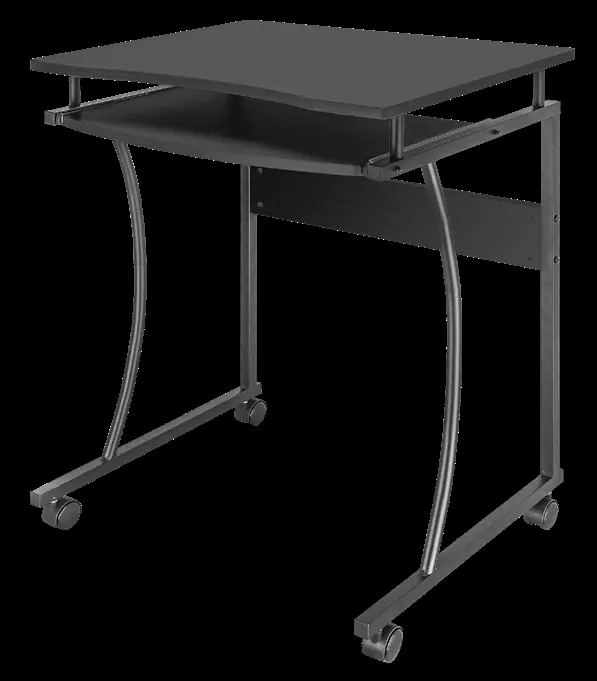
Unpacking and Safety
- Carefully open the carton and lay out the contents on a protective surface to prevent damage.
- Verify all package contents against the parts list provided on page 4. Do not use damaged or defective parts.
- Use proper safety equipment during installation.
- If you do not understand the instructions or have doubts regarding the safety of the installation, contact a qualified professional.
- Do not use the product for any purpose or configuration not explicitly specified in this manual.
- Respect the maximum weight limitation printed on the product packaging.
Assembly Instructions
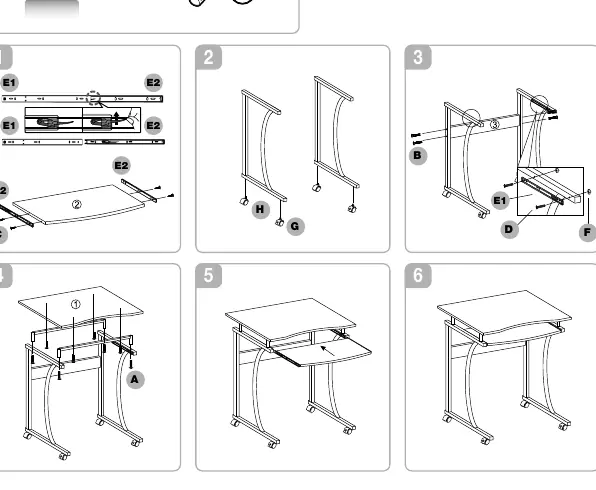
The assembly process consists of 6 steps as illustrated on page 4. Ensure you have the necessary tools (screwdriver) and use the provided hardware:
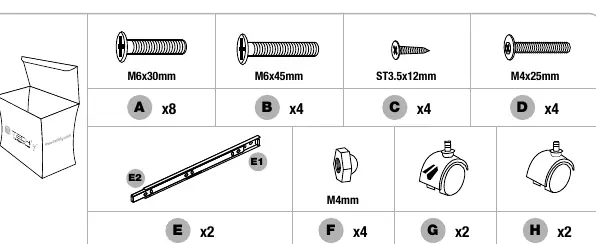
- A (x8): M6x30mm screws
- B (x4): M6x45mm screws
- C (x4): ST3.5x12mm screws
- D (x4): M4x25mm screws
- E (x2): Rails
- F (x4): M4mm nuts
- G (x2) & H (x2): Wheels
Follow the numbered diagrams on page 4 to assemble the frame, attach the rails, and install the wheels. Ensure all connections are tightened securely.
Maintenance
To ensure the desk remains safe and stable, perform the following maintenance:
- Check that the brackets and connections are secure at regular intervals, at least every three months.
- If the desk is not properly installed or becomes unstable, it may fall, causing injury or damage.
Practical help
Common problems
Desk feels unstable or wobbly
Check all screws and connections every three months to ensure they are tight and secure.
Missing or damaged parts
Verify all package contents against the parts list on page 4 before starting assembly. Do not use damaged parts.
Before use
- Check package contents against the parts list on page 4.
- Ensure you have a screwdriver or necessary tools.
- Clear a space on a protective surface to prevent damage during assembly.
- Verify the weight of your equipment does not exceed the limit printed on the box.
Specs in practice
- M6x30mm / M6x45mm
- Screws used for primary frame assembly.
Images and diagrams
- Page 4 displays the parts list with screws (A, B, C, D), rails (E), nuts (F), and wheels (G, H).
- Steps 1-6 illustrate the step-by-step assembly process.
Model compatibility
- Ensure the equipment placed on the desk does not exceed the maximum weight limitation printed on the packaging.

Manual page author
David Miller
Documentation analyst
Organizes user manual content into clear summaries, with attention to model details, product context, and everyday usability.