Furniture / Tables & Desks
User Manual for Techly IDATA HDMI-4K230 1x2 HDMI Splitter
Quick guide for the Techly IDATA HDMI-4K230 1x2 HDMI Splitter. Learn how to connect your devices, troubleshoot common issues, and understand technical specifications.
Quick answers from the manual
Quick answer
- The Techly IDATA HDMI-4K230 is a 1x2 HDMI splitter that distributes one HDMI source to two displays simultaneously, supporting 4Kx2K and 3D signals. p. 2
Key actions
- Connect the HDMI source to the input and displays to the outputs, then connect the 5V power supply. p. 3
First start
- Ensure the splitter is powered off, connect cables, then connect the power supply. p. 3
Problems and fixes
Splitter not functioning
Check LED lights, power supply, cable condition, and ensure cable length is within 10m.
p. 5Maintenance and reset
- Clean only with a dry cloth. Do not use cleaning solvents or abrasives. p. 6
Technical specifications
| Parameter | Value | Meaning | Pages |
|---|---|---|---|
| Power Supply | DC 5V 1A | Required power input. | p. 5 |
| Max Cable Length | 10m | Maximum supported length for input and output cables. | p. 5 |
Where to find it in the PDF
- Connection Diagram p. 3
- Panel Description p. 4
Table of contents
Manual images
Click an image to enlargeQuick guide from the manual
The Techly IDATA HDMI-4K230 is a 1x2 HDMI splitter designed to distribute a single HDMI source (such as a DVD player, STB, or gaming console) to two HDMI displays simultaneously. It supports 4Kx2K and 3D HDMI signals. Ensure you use the provided 5V/1A power adapter and do not exceed the maximum cable length of 10 meters for both input and output.
Safety Notes
- Keep the product away from rain, moisture, and liquids to avoid electric shock or damage.
- Do not open the housing or modify the module.
- Use only the provided 5V/1A power supply.
- Power off the device when not in use for long periods.
- Avoid shaking, collision, or dropping the device.
Box Content
- 1x2 HDMI Splitter
- DC 5V/1A Power adapter
- User's manual
Connection and Operation
Follow these steps to set up your splitter:
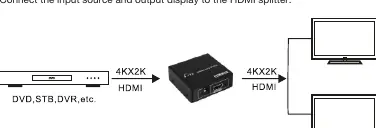
- Ensure the splitter is powered off before connecting or disconnecting any devices.
- Connect your HDMI source (e.g., DVD, STB) to the HDMI Input port.
- Connect your HDMI displays to the HDMI Output 1 and HDMI Output 2 ports.
- Connect the DC 5V power supply to the splitter.
- Power on your devices. The corresponding LEDs on the splitter will light up when connected and active.
Attention: Insert and extract HDMI cables gently to avoid damaging the ports.
Panel Description
Front Panel:
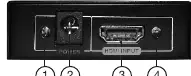
- Power LED: Indicates power status.
- Power supply socket: For the 5V/1A adapter.
- HDMI Input: Port for the video source.
- LED of HDMI Input: Indicates active input signal.
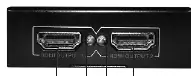
Back Panel:
- HDMI 1 Output / HDMI 2 Output: Ports for connecting displays.
- LED of HDMI 1 Output / LED of HDMI 2 Output: Indicates active output signal.
Technical Specifications
- Input Video Signal: 0.5 - 1.0 volts p-p
- Input DDC Signal: 5 volts p-p (TTL)
- HDMI Resolution: 480p/576p/720p/1080i/1080p, 3D (1080p/24Hz), 4Kx2K
- Bandwidth: Up to 297 MHz
- EDID Duration: 4 seconds
- Max Cable Length: 10m input and 10m output
- Power Supply: DC 5V 1A
Troubleshooting
If the splitter does not appear to be functioning:
- Check if the LED lights are on and the power supply is properly connected.
- Ensure all HDMI cables are in good condition and securely connected.
- Verify that the cable lengths do not exceed the maximum supported length (10m).
- Try connecting the input source directly to the display to verify the source signal is working.
- Note on Resolution: If the two connected displays support different maximum resolutions, the splitter will output the lower resolution supported by both displays.
Maintenance and Disposal
Clean the device only with a dry cloth; do not use solvents or abrasives. In compliance with the WEEE directive, do not dispose of this product with household waste; use designated collection systems for electronic equipment.
Practical help
Common problems
Splitter not functioning
Check LED status, ensure power supply is 5V/1A, verify cable integrity, and ensure cable length is under 10m.
Resolution mismatch between displays
The splitter will automatically output the lower resolution supported by both connected displays.
Before use
- Ensure the power supply is 5V/1A.
- Verify HDMI cables are in good condition.
- Check that cable length does not exceed 10m for input and output.
- Power off the splitter before connecting or disconnecting devices.
Specs in practice
- HDMI Resolution
- Supports up to 4Kx2K and 3D (1080p/24Hz).
- Max Cable Length
- 10m for input and 10m for output; exceeding this may cause signal loss.
- Power Supply
- Requires DC 5V/1A; higher voltage may damage the unit.
Images and diagrams
- Front panel contains the power input and HDMI input port.
- Back panel contains the two HDMI output ports.
Model compatibility
- Supports 1 HDMI source to 2 HDMI displays simultaneously.
- Compatible with STB, DVD, Blu-ray players, and PS3.

Manual page author
Michael Turner
Technical manual editor
Reviews PDF manuals for structure, safety notes, and practical product details so readers can find the right information quickly.