Electronics / Monitors
RC Shark 21E24T08 User Manual
Quick guide for the Terra RC Shark 21E24T08. Learn how to assemble, charge, operate, and replace batteries for your remote-controlled shark.
Quick answers from the manual
Quick answer
- The RC Shark is controlled via a 2.4 GHz remote. To charge, switch the shark to OFF, remove the silicon plug, and connect the USB cable until the light turns green. It is designed for fresh water only. p. 1, 2
Key actions
- Assemble the tail by inserting the pegs into the holes. p. 1
- Charge the shark using the USB cable until the light turns green. p. 2
First start
- Assemble the tail, charge the shark, and install 2 AAA batteries in the remote. p. 1, 2
Show 4 more answers Show less
Problems and fixes
Shark stops swimming
The shark stops when out of water or if the power switch is OFF. Ensure it is in water and switched to ON or AUTO.
p. 1Maintenance and reset
- Always dry the shark completely before charging and store with the power switch OFF. p. 2
Technical specifications
| Parameter | Value | Meaning | Pages |
|---|---|---|---|
| Charging Time | 100 mins | Time to full charge | p. 2 |
| Battery Life | 35 mins | Play time per charge | p. 2 |
| Remote Batteries | 2 x AAA | Required batteries for remote | p. 2 |
Where to find it in the PDF
- Controls and Assembly p. 1
- Charging and Battery Info p. 2
Table of contents
Manual images
Click an image to enlargeQuick guide from the manual
This document provides instructions for the Terra RC Shark (Model 21E24T08). The shark is designed for use in fresh water only and is not intended for saltwater. The remote control is not waterproof. Always ensure the shark is dry before charging and that the power switch is set to OFF.
Assembly
Before first use, assemble the tail section:
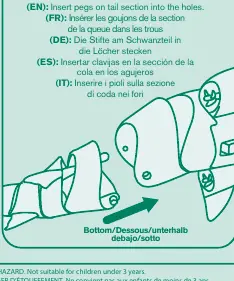
- Locate the tail section and the main body.
- Insert the pegs on the tail section into the corresponding holes on the shark's body.
Charging
The shark features a built-in rechargeable Li-battery (650 mAh). Follow these steps to charge:
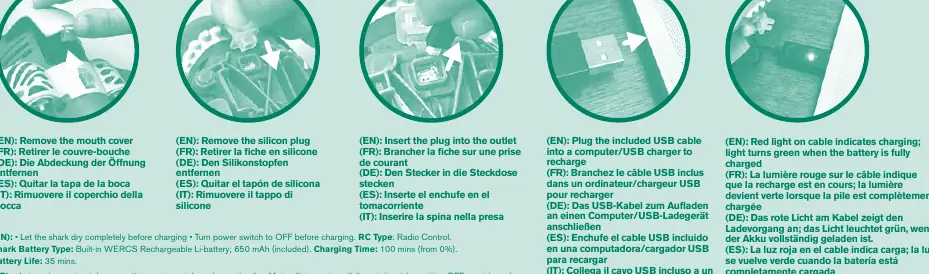
- Ensure the power switch is set to OFF.
- Remove the silicon plug covering the charging port.
- Connect the included USB cable to the shark and a computer or USB charger.
- Indicator Lights: A red light on the cable indicates charging is in progress. The light turns green when the battery is fully charged.
- Charging time is approximately 100 minutes from 0%.
Operation
Use the remote control to navigate the shark:
- Forward: Push the L stick up.
- Backward: Push the L stick down.
- Turn Left: Push the L stick up and the R stick left.
- Turn Right: Push the L stick up and the R stick right.
- Swim Counterclockwise: Push the R stick left.
- Swim Clockwise: Push the R stick right.
- Speed Boost: Hold down the lightning button. Release to return to normal speed.
- Auto Mode: Set the switch to AUTO to see the shark swim in random circles. Controller input will override AUTO mode.
Remote Control Battery Replacement
The remote requires 2 x AAA (1.5V) batteries.
- Open the battery compartment on the remote.
- Insert new batteries, ensuring correct polarity (+/-).
- Close the compartment securely.
- Do not mix old and new batteries or different types of batteries.
Safety and Maintenance
- Water Usage: Designed for play in still, fresh water. Do not use in saltwater.
- Storage: Always set the power switch to OFF after playing.
- Waterproofing: The shark's motors stop running when out of water, even if the switch is ON or AUTO. The remote control is not waterproof.
Practical help
Common problems
Shark does not move
Ensure the power switch is set to ON or AUTO. Check if the shark is in the water, as motors stop when out of water.
Remote control not responding
Check if the remote batteries are installed correctly or need replacement (2 x AAA).
Shark is slow
The battery may be low. Recharge the shark using the provided USB cable.
Before use
- Ensure the shark is completely dry before charging.
- Set the power switch to OFF before charging.
- Check that the tail section is properly assembled.
- Install 2 x AAA batteries in the remote control.
- Ensure the water is fresh (not saltwater).
Show more Show less
Specs in practice
- 65-foot range
- The maximum distance the remote can control the shark (approx. 20 meters).
Images and diagrams
- The controller diagram shows L and R stick movements for forward, backward, turning, and spinning.
- The charging diagram illustrates removing the silicon plug and connecting the USB cable.
- The battery replacement diagram shows the compartment location on the remote.
Model compatibility
- Not intended for use in saltwater.
- Remote control is not waterproof.
- Designed for play in still water.

Manual page author
David Miller
Documentation analyst