Electronics / Monitors
User Manual for Thrustmaster T248P Racing Wheel and Magnetic Pedals
Quick guide for the Thrustmaster T248P racing wheel and magnetic pedals. Includes setup, installation, calibration, button mapping, and pedal adjustments.
Table of contents
Quick guide from the manual
The Thrustmaster T248P is a high-performance racing wheel designed for Xbox and PC. Before using the device, ensure it is placed on a flat, stable surface. Always connect the pedal set to the wheel base before connecting the wheel to your console or PC. During the automatic calibration phase, do not touch the wheel or press the pedals, as this can cause calibration errors. If the device behaves abnormally, disconnect all cables, power off the console/PC, and reconnect everything to restart the calibration process.
Technical features
The T248 racing wheel features a T-RDD (Thrustmaster Race Dash Display) screen, magnetic paddle shifters, and various encoder switches for in-game adjustments. The pedal set includes adjustable springs and spacers to customize brake pressure.
Installation
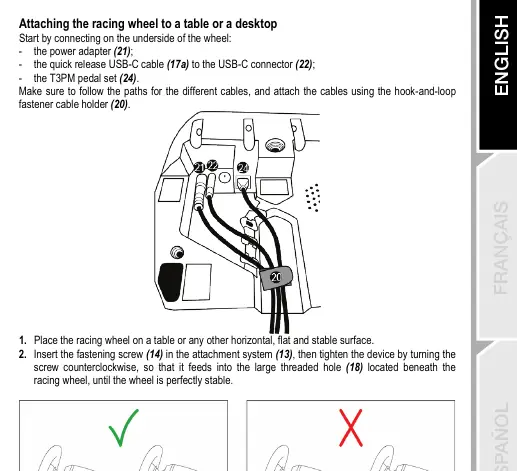
The wheel can be attached to a table or desk using the included attachment system and metal fastening screw. For racing cockpits, use the threaded holes on the underside of the base. Ensure that M6 screws used for cockpit mounting do not exceed the shelf thickness by more than 12 mm to avoid damaging internal components.
Installation on Xbox and PC
For Xbox consoles, connect the pedal set to the RJ12 connector, plug in the power adapter, and connect the USB-C cable to the console. For PC, visit the official support website to download the necessary drivers and Force Feedback software before connecting the device. The wheel is recognized as 'Thrustmaster Advanced Racer' on PC.
Configuration and Mapping
Use the MODE button to access the menu for system selection (Xbox/PC), Force Feedback profiles (FFB 1, 2, 3), rotation angle, and pedal configuration. The DISPLAY button allows configuration of telemetry settings on the T-RDD screen (PC only). Directional buttons are used to navigate these menus.
Pedal Set Adjustments
The T3PM pedal set allows for customization of height, spacing, and inclination. Use the included 2.5 mm Allen key to adjust these settings. Additionally, the brake pressure can be modified by changing the internal springs and elastomer cushioning ring. Always disconnect the USB cable before making any physical adjustments to the pedals.
Safety and Warnings
Keep the device in a dry location, away from dust and sunlight. Do not use the pedal set with bare feet or socks to avoid injury. Ensure air vents on the wheel base are not blocked. The product is intended for users aged 14 and older.
Practical help
Common problems
Wheel or pedals not functioning correctly
Power off the console/PC, disconnect all cables, reconnect them, and restart the system.
Improper calibration
Never touch the wheel or press the pedals during the self-calibration phase. Always connect the pedal set before connecting the wheel to the system.
Pinch hazard
Keep fingers away from the sides, front, and rear base of the pedals during gameplay.
Before use
- Place the wheel on a flat, stable surface.
- Connect the power adapter to the wheel base.
- Connect the pedal set to the RJ12 port.
- Connect the USB-C cable to the wheel base and the console/PC.
- Ensure air vents are not blocked.
- Install game updates if required.
Images and diagrams
- 6: Magnetic paddle shifters
- 13: Attachment system
- 24: RJ12 connector for pedal set
Model compatibility
- T-RDD screen is compatible with PC only.
- Compatible with Xbox One, Xbox Series X|S, and PC.
- LSB and RSB buttons on Xbox are only functional in some games.

Manual page author
Michael Turner
Technical manual editor
Reviews PDF manuals for structure, safety notes, and practical product details so readers can find the right information quickly.