Garden / Lawn Mowers
Operator's Manual for Toro Flex-Force 60V Power System Tools
Comprehensive operator's manual for Toro Flex-Force 60V power tools, including the 16-inch chainsaw, axial blower, and 14/16-inch string trimmer. Includes setup, operation, maintenance, and troubleshooting guides.
Quick answers from the manual
Quick answer
- This manual provides instructions for the Toro Flex-Force 60V Chainsaw, Axial Blower, and String Trimmer. It covers setup, safe operation, maintenance, and troubleshooting for all three tools. p. 1, 29, 45
Key actions
- Charge the battery pack p. 18, 39, 57
- Adjust chainsaw chain tension p. 21
- Replace trimmer string p. 60
First start
- Ensure the battery is fully charged before first use. p. 9, 35, 51
Problems and fixes
Tool does not start
Check if the battery is fully installed, charged, or damaged.
p. 25, 41, 62Technical specifications
| Parameter | Value | Meaning | Pages |
|---|---|---|---|
| Rated Voltage | 60V DC | 60V DC maximum, 54 VDC nominal usage | p. 10, 36, 55 |
Where to find it in the PDF
- Chainsaw Manual p. 1, 28
- Axial Blower Manual p. 29, 44
- String Trimmer Manual p. 45, 64
Table of contents
Manual images
Click an image to enlargeQuick Guide from the Manual
This manual covers the operation and maintenance of the Toro Flex-Force 60V Power System, including the 16-inch Chainsaw (Models 51850/51850T), Axial Blower (Models 51820/51820T), and 14/16-inch String Trimmer (Models 51830/51830T). Always ensure the battery is charged and the tool is inspected for damage before use. Keep bystanders away and wear appropriate personal protective equipment.
Toro Flex-Force 60V Chainsaw
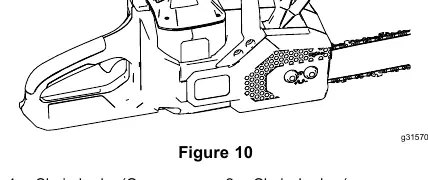
Operation
Ensure vents are clear. Align the battery pack with the cavity and push until it locks. Remove the protective cover from the chain. Ensure the chain brake is in the OPERATING position. Grip the front handle with your left hand and the rear handle with your right hand, then press the trigger lock and squeeze the trigger.
Maintenance
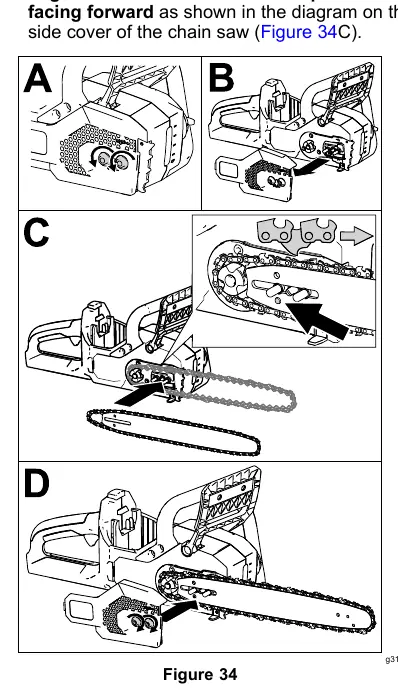
Check chain tension before each use. If the chain is loose, loosen the captive nuts on the side cover, hold up the tip of the guide bar, and turn the chain tensioning screw. Ensure the chain is lubricated; check the oil level in the window and add bar and chain oil if necessary.
Toro Flex-Force 60V Axial Blower
Setup and Operation
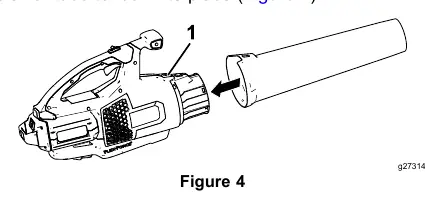
Slide the blower tube onto the housing until the latch clicks. To start, squeeze the variable-speed trigger. Use the turbo boost button for maximum air speed. Engage the speed lock to maintain speed without holding the trigger.
Toro Flex-Force 60V String Trimmer
Setup and Operation
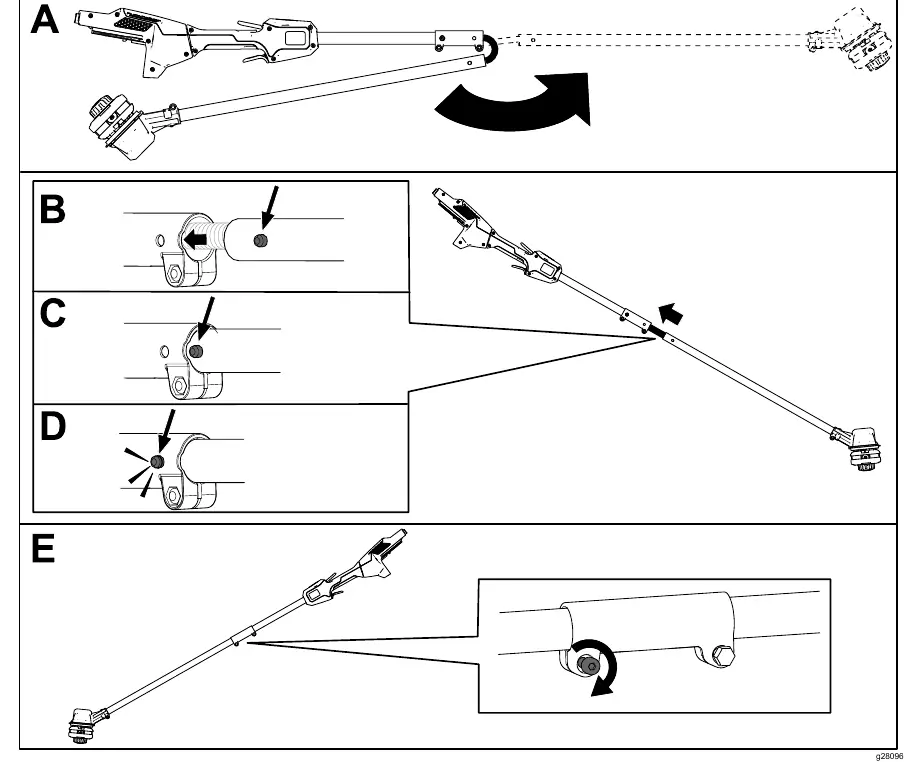
Unfold the handle and secure it with the provided Allen wrench. Install the auxiliary handle and the guard. To start, squeeze the lockout trigger, then the run trigger. Use the bump feed to advance the line while the tool is running at full throttle.
Replacing the String
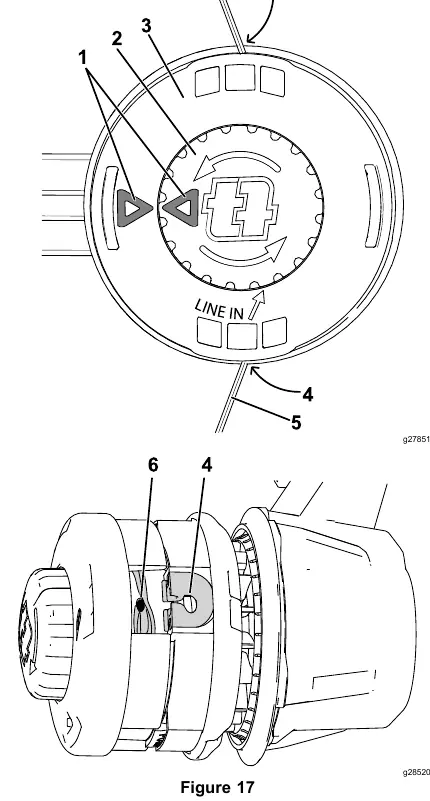
Remove the battery. Press the bump button while pulling the line out to remove old string. Cut new string to the specified length (4.9m for 2mm string or 3m for 2.4mm twisted string). Align the arrows on the knob and string head, insert the line through the eyelet, and wind the knob counterclockwise.
Battery and Charger Maintenance
Charge the battery in a well-ventilated area. The LED indicator on the charger shows the status: Green blinking means charging, solid green means charged, and red indicates a temperature or charging fault. Store the battery in a clean, dry, enclosed area. Do not store fully charged or fully depleted batteries for long periods.
Troubleshooting
If the tool does not start, ensure the battery is fully seated and charged. If the tool loses power, check for blocked air vents. For charging faults, unplug the charger, wait 10 seconds, and retry. If the issue persists, contact an Authorized Service Dealer.
Practical help
Common problems
Tool does not start
Ensure the battery is fully seated and charged. Check for moisture on battery leads.
Chain saw does not cut properly
Check chain tension, ensure the chain is not dull or damaged, and verify the chain is installed in the correct direction.
Battery charger LED is blinking red
Indicates a communication error or weak battery. Unplug, wait 10 seconds, and retry. If it fails twice, dispose of the battery at a recycling facility.
Trimmer line not advancing
Ensure the line is not worn too short. If it is, advance the line manually by pushing the bump button while pulling the line.
Before use
- Check battery charge level.
- Inspect tool for damage or loose fasteners.
- Ensure all vents are free from dust and debris.
- For chainsaw: Check chain tension and oil level.
- For trimmer: Ensure guard is installed and string is properly wound.
Specs in practice
- Rated Voltage
- 60V DC maximum, 54V DC nominal usage.
- Appropriate Temperature Ranges
- Charge/store battery between 5°C (41°F) and 40°C (104°F). Use tool between 0°C (32°F) and 49°C (120°F).
Images and diagrams
- Figure 1 (Chainsaw/Blower/Trimmer): Location of model and serial numbers.
- Figure 11 (Chainsaw): Starting the chainsaw using the trigger lock and trigger.
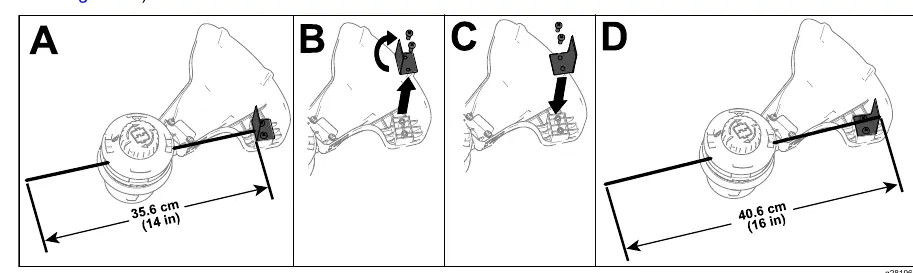
- Figure 15 (Trimmer): Adjusting the cutting swath from 14 inches to 16 inches.
- Figure 17 (Trimmer): Replacing the trimmer string.
Model compatibility
- Designed to use Toro Flex-Force lithium-ion battery packs (Models 88625, 88620, 88640, 88650, 88660, or 88675).
- Battery packs must be charged using Toro battery charger Models 88602, 88605, or 88610.

Manual page author
David Miller
Documentation analyst
Organizes user manual content into clear summaries, with attention to model details, product context, and everyday usability.