HVAC / Towel Warmers
User Manual for Towelrads 126007TR Smart Thermostatic Towel Rail Heating Element
Quick guide for the Towelrads 126007TR Smart Thermostatic heating element. Learn how to install, operate modes (Comfort, Boost, P1, P2), and use safety features.
Table of contents
Manual images
Click an image to enlargeQuick guide from the manual
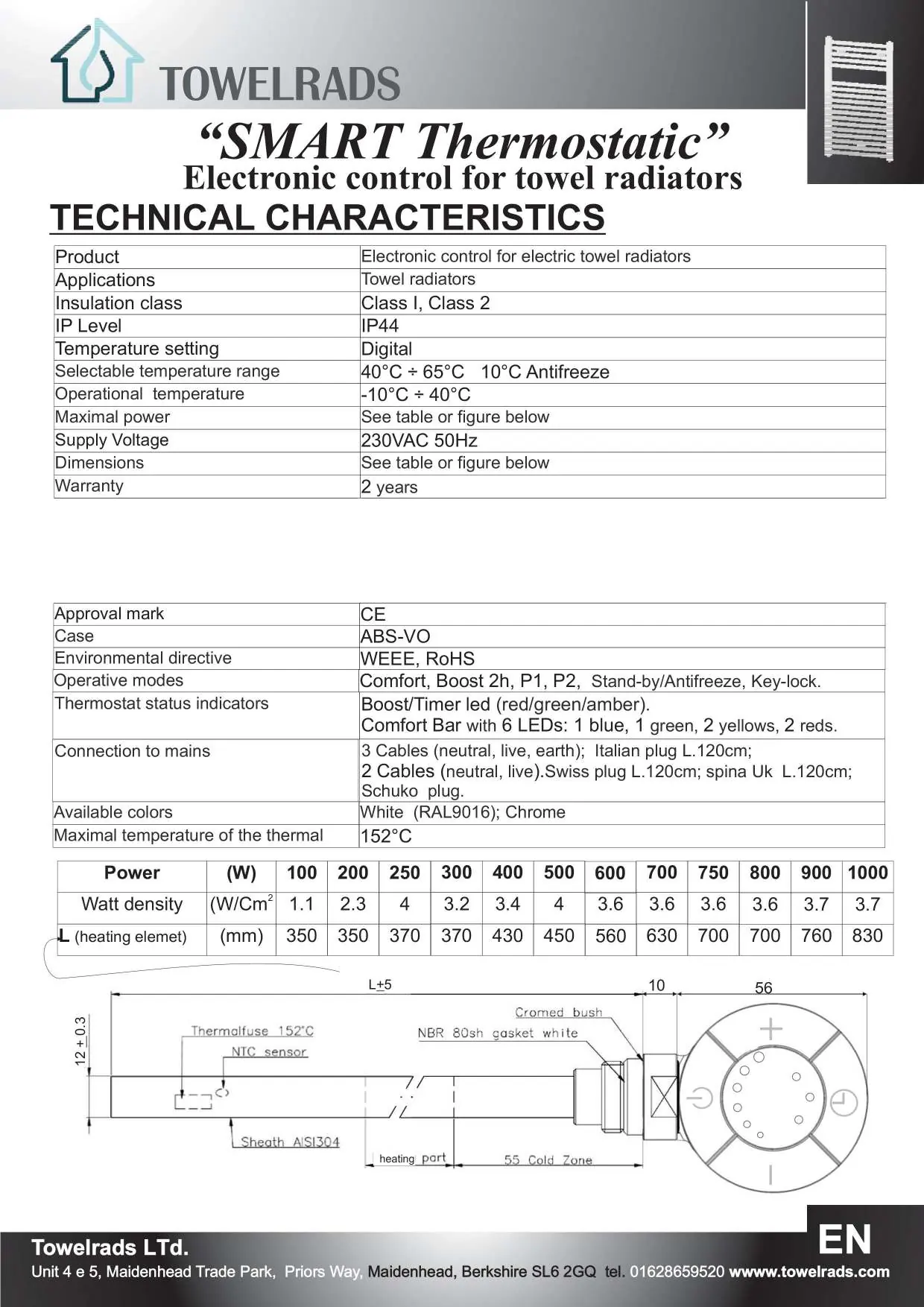
The Towelrads SMART Thermostatic is an electronic thermostat designed for the automatic control of electric towel radiators. It features multiple operating modes including Comfort, Stand-by/Antifreeze, Boost 2h, and programmable cycles P1 and P2. The device is designed for exclusive use on towel radiators and must be installed by a qualified electrician.
Installation
Installation must be performed by a qualified electrician. Before proceeding, disconnect the power supply. It is recommended to protect the device with a 30mA RCD circuit breaker and an isolating switch.

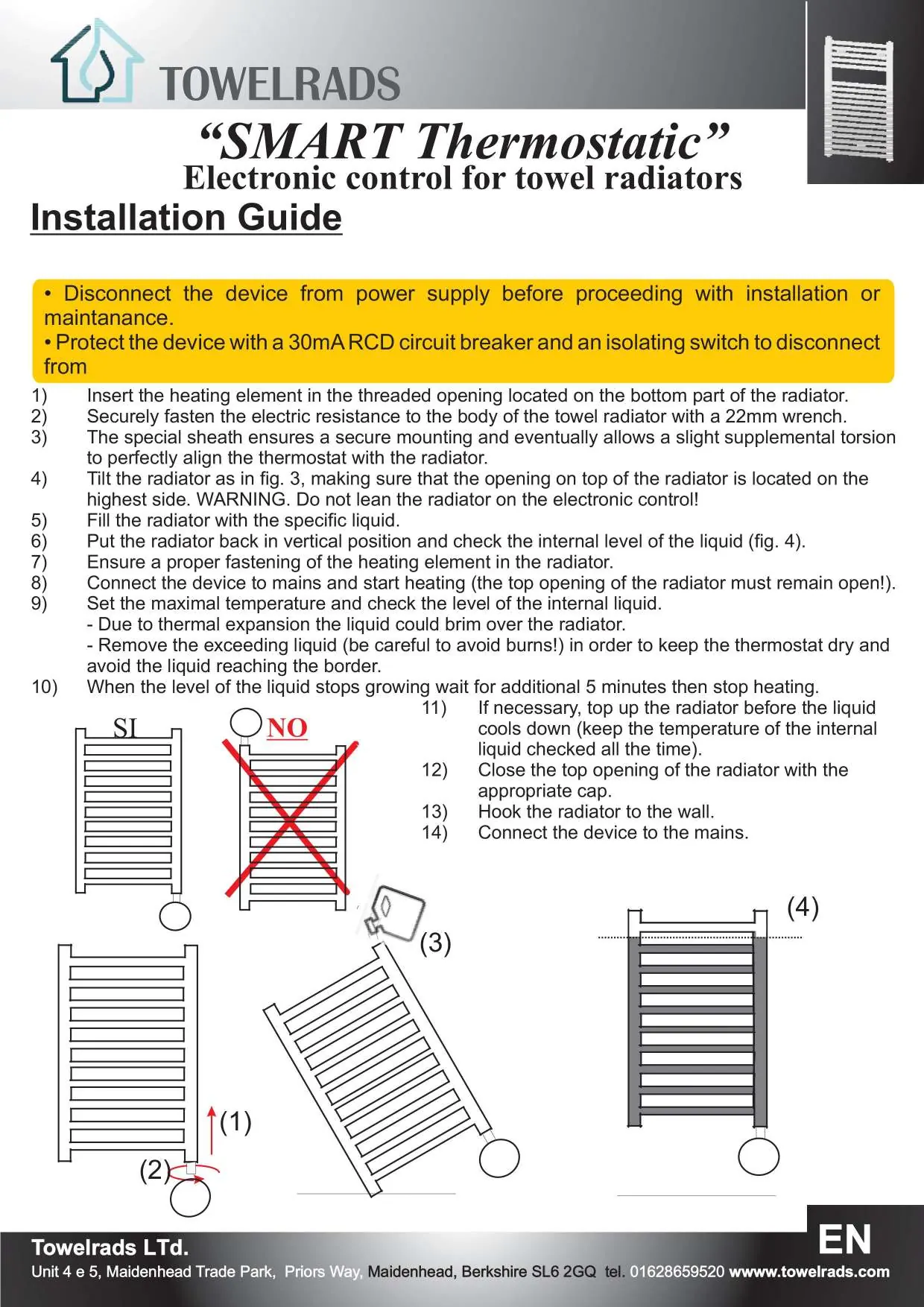
- Insert the heating element into the threaded opening at the bottom of the radiator.
- Fasten the electric resistance to the radiator body using a 22mm wrench.
- Tilt the radiator to ensure the top opening is at the highest point.
- Fill the radiator with the specific liquid.
- Return the radiator to a vertical position and check the internal liquid level.
- Connect the device to the mains and start heating, keeping the top opening open to allow for thermal expansion.
- Once the liquid level stabilizes, wait 5 minutes, then stop heating.
- Close the top opening with the appropriate cap, hook the radiator to the wall, and connect to the mains.
Operation
The device is controlled via the On/Standby button and the + and - buttons. The Comfort Bar indicates the selected temperature and status.
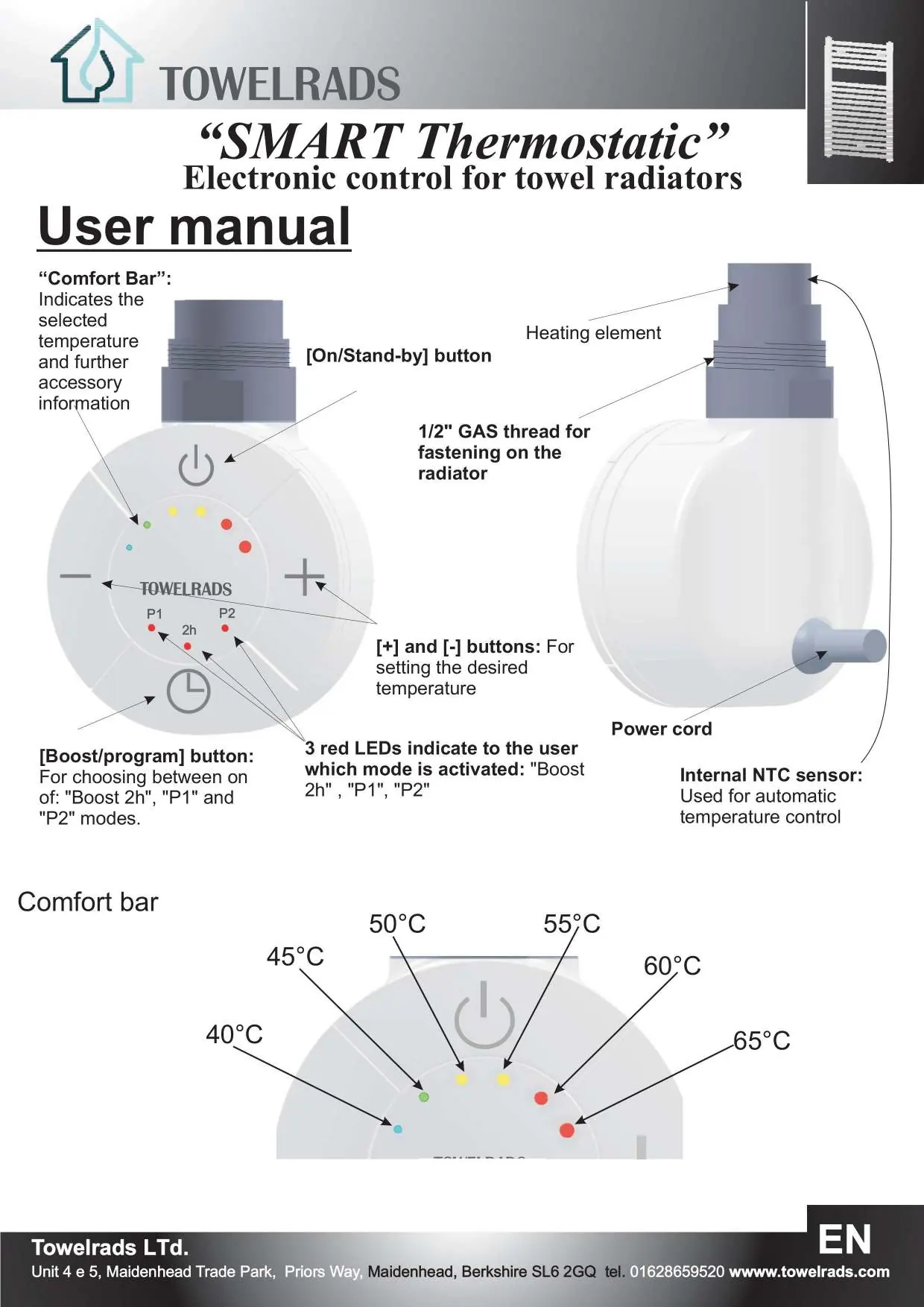
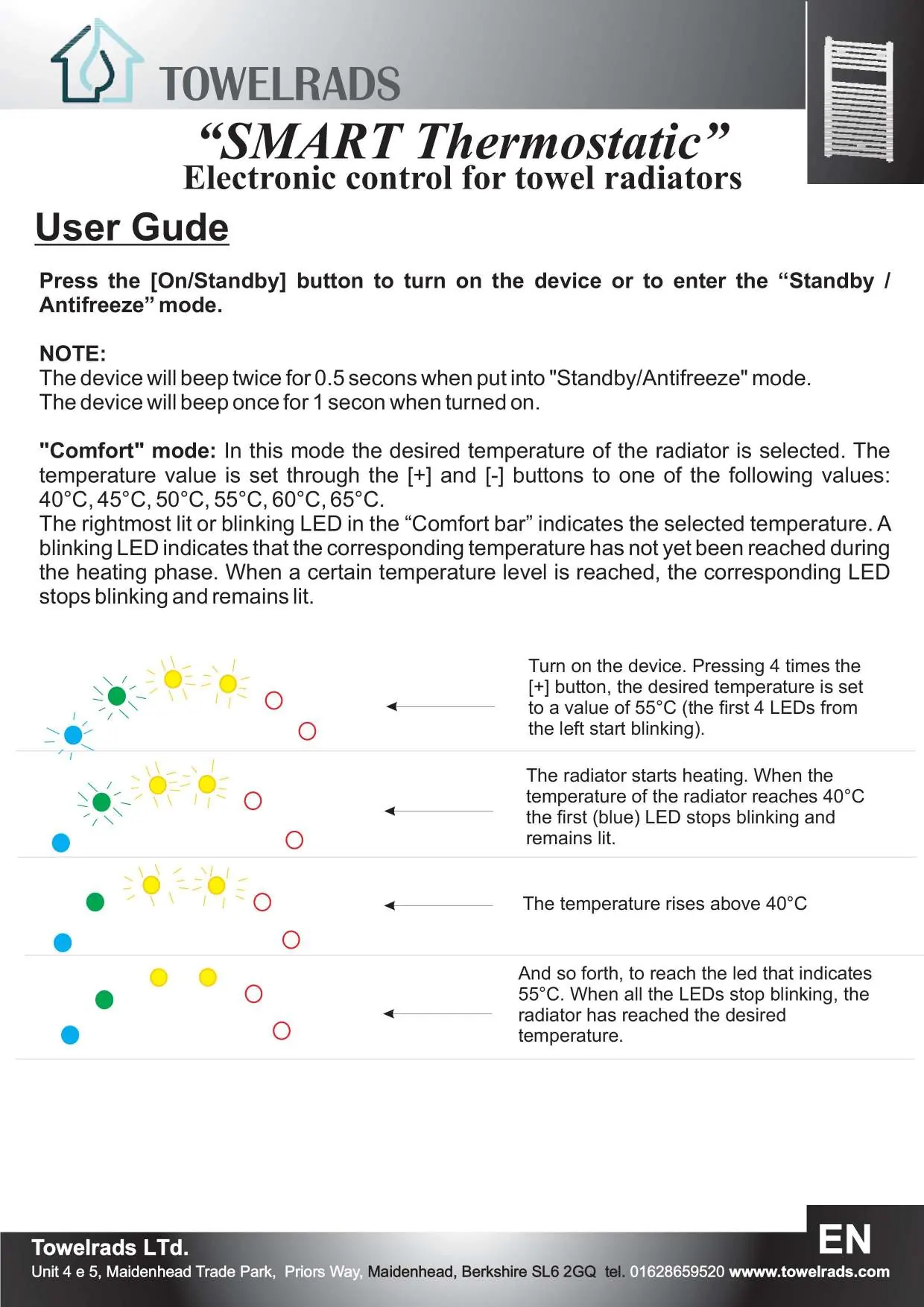
- On/Standby: Press the button to turn the device on or enter Stand-by/Antifreeze mode. The device beeps twice for Stand-by and once when turned on.
- Comfort Mode: Allows setting the desired temperature between 40°C and 65°C using the + and - buttons. The rightmost LED indicates the selected temperature.
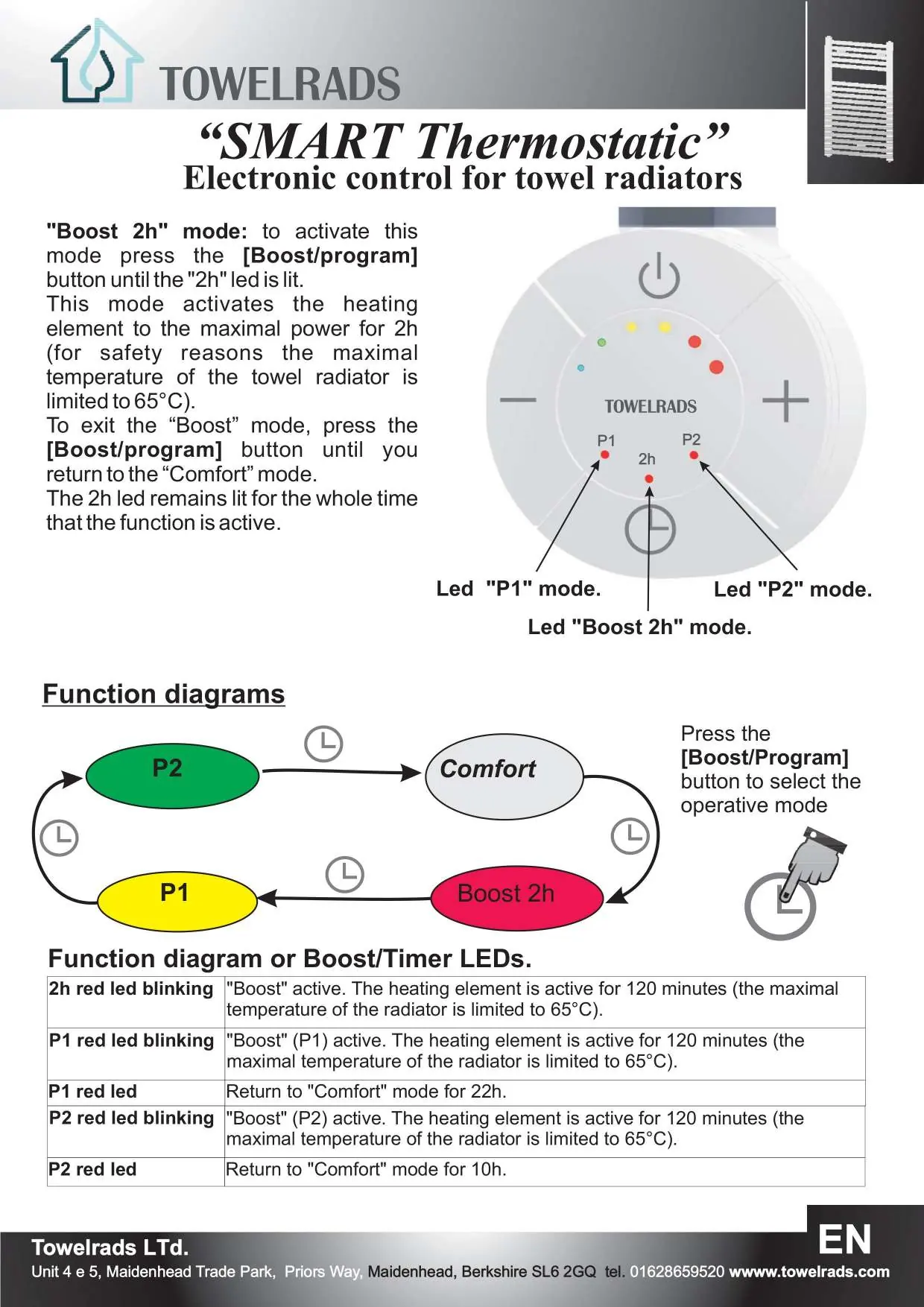
- Boost 2h Mode: Activates the heating element at maximal power for 2 hours (limited to 65°C for safety). Press the Boost/program button until the 2h LED is lit.
- P1 and P2 Modes: These are cyclic programs. P1 runs 2 hours of Boost followed by 22 hours of Comfort. P2 runs 2 hours of Boost followed by 10 hours of Comfort. Press the Boost/program button until the corresponding P1 or P2 LED is lit.
Key-lock Function
To activate the key-lock, press the + and - buttons simultaneously for 3 seconds. The device will beep twice. To deactivate, repeat the procedure; the device will beep four times.
Safety and Maintenance
Disconnect the power supply before cleaning or performing maintenance. If the supply cable is damaged, do not touch it and contact an authorized service center. The device must not be treated as ordinary household waste and should be disposed of at proper waste collection sites.
Practical help
Common problems
Device beeps twice
The key-lock function is active.
External (blue and red) LEDs blink
Failure on the temperature sensor; the heating element is deactivated. Contact customer support.
Two central (yellow) LEDs blink when a button is pressed
Key-lock is active.
Before use
- Ensure installation is performed by a qualified electrician.
- Verify that the line voltage matches the technical specifications.
- Ensure the heating element is compatible with the towel radiator.
- Protect the device with a 30mA RCD circuit breaker.
- Ensure the radiator is filled with the correct specific liquid.
Specs in practice
- Comfort mode
- Maintains a user-set temperature between 40°C and 65°C.
Images and diagrams
- The Comfort Bar LEDs indicate the current temperature setting and heating status.
- Function diagrams illustrate the cyclic nature of P1 and P2 programs.
Model compatibility
- Designed for exclusive use on a towel radiator.
- Requires specific liquid for filling.

Manual page author
David Miller
Documentation analyst
Organizes user manual content into clear summaries, with attention to model details, product context, and everyday usability.