Toys / RC Components
Traxxas TQ 2.4GHz Radio System User Guide
Comprehensive user guide for the Traxxas TQ 2.4GHz radio system (Models #2208, #2209). Learn how to install batteries, bind the transmitter and receiver, adjust steering and throttle settings, use the Multi-Function knob, and troubleshoot...
Quick answers from the manual
Quick answer
- The TQ 2.4GHz radio system is pre-adjusted at the factory. To start, install 4 AA batteries, turn on the transmitter (solid green LED), elevate your model, connect the battery to the speed control, and turn on the receiver. p. 1
Key actions
- Binding the transmitter and receiver p. 2
- Resetting to factory defaults p. 2
First start
- Install 4 AA batteries in the transmitter base. p. 1
- Elevate the model on a stand before powering on. p. 1
Problems and fixes
Transmitter LED flashes medium red
Low battery alarm; replace with new or freshly charged batteries.
p. 3
Transmitter LED flashes fast red
Link Failure; turn system off and back on.
p. 3Maintenance and reset
- Resetting transmitter to default settings p. 2
Where to find it in the PDF
- Transmitter Controls and Basic Setup p. 1
- Advanced Tuning and Binding p. 2
- Programming and LED Codes p. 3
- Menu Tree p. 4
Table of contents
Manual images
Click an image to enlargeQuick Guide from the Manual
The Traxxas TQ 2.4GHz radio system is pre-adjusted at the factory. Before operating, ensure the transmitter antenna is in a vertical position. To start, install 4 AA batteries in the transmitter, elevate your model on a stand, connect the battery to the speed control, and turn on the receiver. The transmitter status LED should be solid green.
Transmitter Overview
The transmitter features a steering wheel, throttle trigger, and a programmable Multi-Function knob. Key controls include:
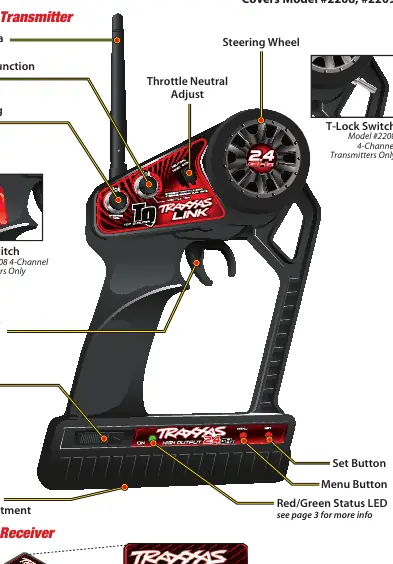
- Steering Trim: Adjusts the neutral point of the steering channel.
- Multi-Function Knob: Programmable for steering sensitivity (exponential), dual rate, braking percentage, or throttle trim.
- Throttle Neutral Adjust: Switches between 50/50 (equal travel) and 70/30 (70% throttle, 30% reverse) settings.
- Set and Menu Buttons: Used for programming advanced features and binding.
Battery Installation
The transmitter requires 4 AA batteries located in the base.
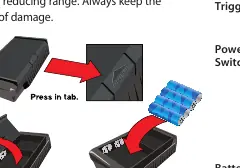
- Press the tab and lift the battery compartment door.
- Install batteries in the correct orientation.
- Reinstall the door and snap it closed.
- Turn on the transmitter and verify the status LED is solid green.
Binding Instructions
The system is bound at the factory. If re-binding is required:
- Press and hold the transmitter's SET button while turning it on (LED flashes red).
- Press and hold the receiver's LINK button while turning on the model.
- When both LEDs turn solid green, the system is bound.
Advanced Tuning
The Multi-Function knob can be customized using the programming menu. Access the menu by holding the MENU button for 3 seconds. Use the MENU button to navigate and the SET button to select options. You can adjust steering sensitivity, throttle sensitivity, steering dual rate, braking percentage, and throttle trim.
Troubleshooting and LED Codes
The transmitter and receiver use LED patterns to indicate status:
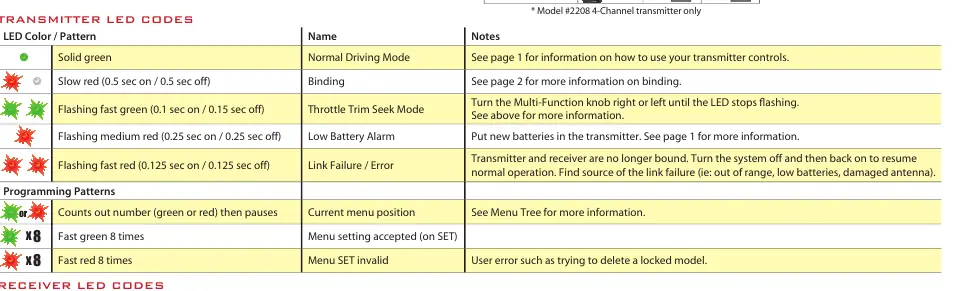
- Solid Green: Normal driving mode.
- Slow Red Flash: Binding mode.
- Flashing Medium Red: Low battery alarm; replace transmitter batteries.
- Flashing Fast Red: Link failure or error; turn system off and back on.
Safety and Maintenance
Always keep the transmitter antenna vertical for maximum range. Do not kink or cut the receiver antenna wire. If the model is electric, always elevate it on a stand before connecting the battery to prevent accidental movement. Refer to the warranty section for details on electronic component coverage.
Practical help
Common problems
Transmitter LED flashes red
Batteries are weak, discharged, or installed incorrectly. Replace with fresh batteries.
Link Failure / Error
Transmitter and receiver are no longer bound. Turn the system off and back on to resume normal operation.
Steering or throttle not responding
Check if the system is bound, ensure batteries are charged, and verify the receiver is powered.
Before use
- Install 4 AA batteries in the transmitter
- Ensure transmitter antenna is vertical
- Elevate the model on a stand
- Connect battery pack to the speed control
- Verify solid green LED on transmitter
- Check steering and throttle operation
Specs in practice
- 50/50 Setting
- Allows equal travel for both acceleration and reverse.
- 70/30 Setting
- Allows 70% throttle travel and 30% reverse travel.
- Exponential (Expo)
- Adjusts steering sensitivity near the neutral point.
Images and diagrams
- Transmitter controls layout showing antenna, steering wheel, and buttons
- Battery compartment access instructions
- Menu tree navigation for advanced settings
- Servo reversing settings for non-Traxxas models
Model compatibility
- Compatible with Traxxas Link enabled receivers
- Can be used with all popular servos in hobby-grade R/C vehicles
- 50/50 throttle setting is required for Traxxas nitro models

Manual page author
Michael Turner
Technical manual editor
Reviews PDF manuals for structure, safety notes, and practical product details so readers can find the right information quickly.