Electronics / Audio
User Guide for Trevi DAB 7F80 R Radio
Comprehensive user guide for the Trevi DAB 7F80 R radio. Includes instructions for DAB/FM tuning, Bluetooth pairing, alarm configuration, power management, and technical specifications.
Table of contents
Quick Guide
The Trevi DAB 7F80 R is a portable radio supporting DAB/DAB+, FM, and Bluetooth connectivity. To get started, insert 4x AA batteries or connect a 5V 1A USB power supply. Extend the telescopic antenna fully for optimal reception. Use the Mode button to switch between sources and the Volume knob to adjust sound levels.
Device Overview
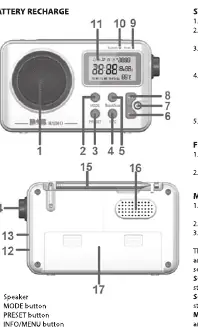
The device features a telescopic antenna, a volume knob, a display, and several control buttons including Mode, Preset, Info/Menu, and Select/Scan. The battery compartment is located on the back, and the headphone jack is on the side.
Power Supply
The radio can be powered in two ways:
- USB Power: Connect a 5V 1A USB power supply (not included) to the input port (13).
- Batteries: Open the battery compartment (17) and insert 4x AA batteries, ensuring correct polarity.
Note: If the unit is running on batteries, standby mode will consume power. Turn the unit off completely using the power button (7) to conserve battery life.
Basic Operation
- Switching On/Off: Press and hold the Power button (7) for 2 seconds to turn the device on or off.
- Standby: Press the Power button (7) briefly to enter or exit standby mode.
- Volume: Turn the Volume knob (14) to adjust the sound level.
- Mode Selection: Press the Mode button (2) to cycle between DAB/DAB+, FM, and Bluetooth.
Menu Settings
Press and hold the Info/Menu button (4) to access the settings menu. Use the Up/Down buttons (8/6) to navigate and Select/Scan (5) to confirm.
- Scan (DAB): Automatically scans and stores available stations.
- Scan Setting (FM): Searches for FM stations with strong signals.
- Manual Tune (DAB): Allows manual selection of frequencies.
- System: Accesses Time/Date, Backlight, Alarms, Sleep timer, Language, and Factory Reset.
- Time/Date: Set current time, date, and format.
- Backlight: Adjust display timeout and brightness level.
DAB/DAB+ Operation
- Select DAB mode using the Mode button.
- The radio will automatically scan for stations upon first use.
- Use the Up/Down buttons to scroll through the list of received stations.
- Press Select/Scan to tune into the desired station.
- To store a station, press and hold the Preset button (3), select a memory slot, and confirm.
FM Radio Operation
- Select FM mode using the Mode button.
- Press and hold the Select/Scan button to start an automatic scan and storage.
- For manual tuning, press the Up/Down buttons to shift frequency by 0.05 MHz.
- To save a station, press and hold the Preset button (3), select a slot, and confirm.
Bluetooth Function
- Select BT mode using the Mode button.
- On your external device, search for 'RA 7F80R' and pair. Enter PIN '0000' if prompted.
- Once paired, you can stream audio from your device.
Technical Specifications
- Power Supply: 5V 1A (USB) or 4x AA batteries (LR6)
- DAB Frequency: 174.928 - 239.200 MHz
- FM Frequency: 87.5 - 108 MHz
- Bluetooth Frequency: 2402-2480 MHz
- Audio Power: 3W
- Dimensions: 140 x 85 x 35 mm
- Weight: 182 g
Manufacturer information
TREVI S.p.A.
Practical help
Common problems
Radio does not turn on
Check if batteries are inserted correctly or if the USB power cable is securely connected.
Poor radio reception
Ensure the telescopic antenna is fully extended and positioned for the best signal.
Bluetooth pairing fails
Ensure the radio is in BT mode and your external device is searching for 'RA 7F80R'. Enter '0000' if a PIN is requested.
Batteries drain quickly in standby
Standby mode consumes power. Turn the device off completely using the power button for long-term storage.
Before use
- Insert 4x AA batteries or connect a 5V 1A USB power source.
- Extend the telescopic antenna fully.
- Ensure the device is in the correct mode (DAB, FM, or BT) using the Mode button.
- Check that the volume is set to a low level before turning on.
Specs in practice
- DAB Frequency
- 174.928 - 239.200 MHz (Range for digital radio stations)
- FM Frequency
- 87.5 - 108 MHz (Range for analog radio stations)
Images and diagrams
- 11: Display screen
- 14: Volume control knob
- 15: Telescopic antenna
- 17: Battery compartment
Model compatibility
- Bluetooth: Compatible with external devices supporting standard pairing protocols.

Manual page author
Michael Turner
Technical manual editor
Reviews PDF manuals for structure, safety notes, and practical product details so readers can find the right information quickly.