Electronics / Headphones Earbuds
User Manual for Trevi SLD 3P60 Digital Alarm Clock
Quick guide for the Trevi SLD 3P60 digital alarm clock. Learn how to set the time, date, alarm, and temperature display, plus battery installation and troubleshooting tips.
Table of contents
Quick guide from the manual
This document provides instructions for the Trevi SLD 3P60 digital alarm clock. It covers the initial setup, including battery installation, time and date configuration, alarm settings, and basic operation of the temperature display.
Command Description
The device features the following controls:
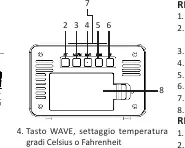
- 1. Display: Shows time, date, and temperature.
- 2. SET button: Used for setting date and time.
- 3. ALARM button: Used for arming, disarming, and setting the alarm.
- 4. WAVE button: Switches temperature display between Celsius and Fahrenheit.
- 5. DOWN button: Adjusts settings downwards.
- 6. UP button: Adjusts settings upwards.
- 7. SNOOZE/LIGHT button: Temporarily interrupts the alarm or illuminates the display.
- 8. Battery compartment: Located on the back of the unit.
Battery Installation
- Remove the battery compartment cover (8).
- Insert two 1.5V AA batteries, ensuring you observe the correct polarity as indicated inside the compartment.
- Close the battery compartment cover.
Clock and Date Adjustment
- Press and hold the SET button (2).
- Use the DOWN (5) or UP (6) buttons to select the 12h/24h time format, then press SET (2).
- Continue using the DOWN or UP buttons to adjust the hour, minutes, year, month, day, and language, pressing SET after each selection to confirm.
Alarm Adjustment
- Press and hold the ALARM button (3).
- Use the DOWN (5) or UP (6) buttons to adjust the hour, then press ALARM (3).
- Use the DOWN or UP buttons to adjust the minutes, then press ALARM (3).
Using Alarm/Snooze
- Activate Alarm: Press the ALARM button (3). The active alarm icon (B) will appear on the display.
- Snooze: When the alarm sounds, press the SNOOZE/LIGHT button (7) to temporarily deactivate it. The alarm will sound again after 5 minutes.
- Deactivate Alarm: Press the ALARM button (3) to permanently turn off the alarm. The active alarm icon (B) will disappear.
Temperature Indication
Press the WAVE button (4) to toggle the temperature display between degrees Celsius (°C) and Fahrenheit (°F).
Technical Features
- Power supply: 2 x 1.5V AA batteries.
- Dimensions: 103 x 67 x 42 mm.
Warranty and Disposal
The unit is guaranteed for 24 months from the date of purchase. The warranty applies only to units that have not been tampered with and are repaired by authorized Trevi assistance centers. For disposal, please follow local regulations for separate waste collection of electronic equipment.
Manufacturer information
TREVI S.p.A.
Practical help
Common problems
Alarm does not sound at the set time.
Ensure the alarm is activated. The active alarm icon (B) must be visible on the display.
Display is blank or dim.
Check that the batteries are installed correctly with the right polarity and that they are not depleted.
Before use
- Remove the battery compartment cover (8).
- Insert two 1.5V AA batteries.
- Verify correct polarity inside the battery compartment.
- Close the battery compartment cover.
Specs in practice
- Power supply
- Requires 2 x 1.5V AA batteries.
Images and diagrams
- Buttons 1-8 control all functions including setting time, alarm, and display lighting.
- Icons A-G on the display indicate alarm status, AM/PM, time, date, day, and temperature.

Manual page author
Emily Carter
User documentation editor
Prepares concise manual descriptions and highlights the most useful setup, operation, and maintenance information for readers.