Electronics / Audio
User Manual for Trevi HCX 10F6 Mini Hi-Fi System
Quick guide for the Trevi HCX 10F6 Mini Hi-Fi System. Learn how to operate the CD/MP3 player, connect via Bluetooth, use the FM radio, and troubleshoot common issues.
Table of contents
Manual images
Click an image to enlargeQuick Guide
The Trevi HCX 10F6 is a versatile mini Hi-Fi system. To get started, connect the power cord to a 100-240V outlet. Use the STANDBY/MODE button to turn the unit on and switch between sources (CD, USB, AUX, BT, TUNER). Adjust volume using the main knob or the remote control. Ensure the unit is placed on a flat surface with at least 10cm of ventilation space.
Safety Information
- Electric Shock: Do not open the unit. There are no user-serviceable parts inside.
- Laser Safety: The unit contains a laser system. Do not attempt to disassemble or look directly at the laser lens.
- Environment: Keep away from heat sources, magnetic fields, dust, and moisture. Do not place objects filled with liquids (like vases) on the unit.
- Hearing Protection: Avoid listening at high volumes for extended periods to prevent hearing damage.
Device Overview
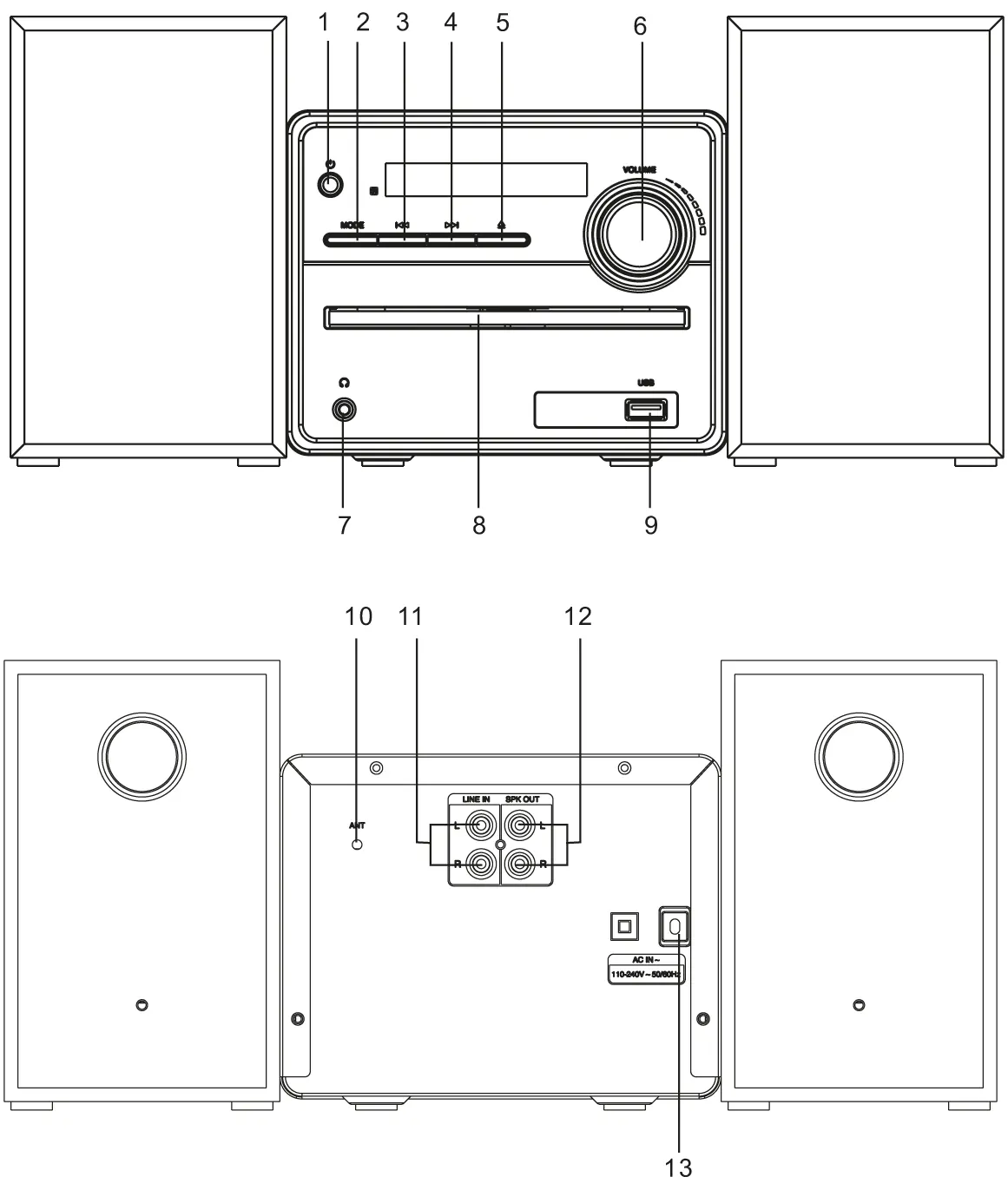
The front panel features the CD tray, volume control, USB input, and headphone jack. The rear panel contains the antenna connection, Line In (AUX), and speaker outputs.
Remote Control
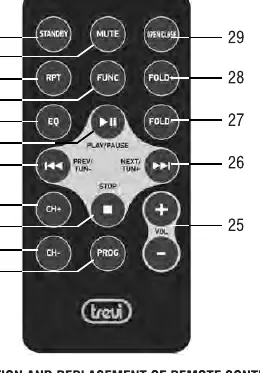
The remote control allows full operation of the system, including source selection, track navigation, folder selection (for MP3), and radio tuning. To activate, remove the transparent battery tab. The remote uses a CR2025 battery.
Operation
CD/MP3 Player
- Press the FUNC button until 'DISC' appears on the display.
- Press OPEN/CLOSE to open the tray, insert the disc (label side up), and close.
- Playback starts automatically. Use the play/pause and track skip buttons to control playback.
USB Input
- Insert a USB memory device into the USB port.
- Select the USB mode using the FUNC button.
- Note: Some USB devices may not be compatible due to processor differences.
Bluetooth
- Select the BT mode using the FUNC button.
- The 'BT' indicator will flash. Enable Bluetooth on your external device and search for 'HCX10F6'.
- Once paired, the 'BT' indicator will remain solid.
FM Radio
- Select TUNER mode using the FUNC button.
- Use the skip buttons to tune frequencies.
- Long-press the play/pause button to start automatic scanning and storage of stations.
Maintenance
Clean the unit with a soft, slightly damp cloth. Do not use solvents or abrasive materials.
Manufacturer information
TREVI S.p.A.
Practical help
Common problems
No sound
Check that the volume is turned up, the correct source is selected, and all cables are securely connected.
CD not playing
Ensure the disc is inserted with the label side facing up. Check if the disc format is supported (CD/CD-R-RW/MP3).
Bluetooth connection fails
Ensure the device is in pairing mode and within range. Try unpairing and pairing again.
Poor radio reception
Adjust the length and orientation of the antenna. Reception quality depends heavily on the location of the device.
Before use
- Remove the transparent battery tab from the remote control.
- Place the unit on a firm, level surface.
- Ensure at least 10cm of free space around the unit for ventilation.
- Connect the power cord to a 100-240V 50/60Hz outlet.
- Check that all speaker wires are connected to the rear terminals.
Specs in practice
- Power Consumption
- 22W total power usage.
- FM Frequency Range
- 87.5 - 108 MHz.
- Bluetooth Frequency
- 2.4GHz transmission frequency.
- Standby Consumption
- Less than 0.5W.
Images and diagrams
- Front panel: Includes power switch, mode button, track skip buttons, CD tray, headphone jack, and volume knob.
- Rear panel: Includes antenna input, Line In (AUX), speaker outputs (R/L), and AC power input.
Model compatibility
- Supports CD, CD-R-RW, and MP3 formats.
- USB input may not support all USB devices due to processor incompatibility.
- The unit is designed for use in moderate climates.

Manual page author
David Miller
Documentation analyst
Organizes user manual content into clear summaries, with attention to model details, product context, and everyday usability.