Electronics / Audio
User Manual for Trevi RA 7F50 BT Multiband Radio
Quick guide for the Trevi RA 7F50 BT multiband radio. Learn how to charge the battery, operate the radio, use the MP3 player, connect via Bluetooth, and maintain your device.
Table of contents
Manual images
Click an image to enlargeQuick guide from the manual
The Trevi RA 7F50 BT is a portable multiband radio with wireless audio, MP3 playback, and an AUX input. Before first use, it is recommended to fully charge the internal battery. Ensure the telescopic antenna is fully extended for optimal radio reception. If you experience issues with wireless pairing, ensure no USB or MicroSD media is inserted, as the wireless function activates only in the 'Music' mode without external storage connected.
Device Description
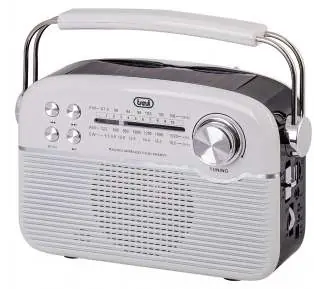
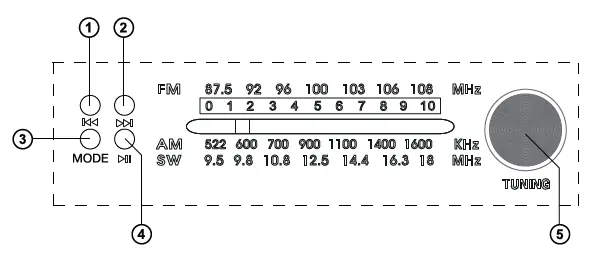
The device features a tuning knob, volume/power control, and a mode selector. Playback controls (Play/Pause, Prev, Next) are located on the top panel. Inputs for USB, MicroSD, and AUX are on the side, along with the USB Type-C charging port and status indicators.
Power and Charging
The device operates on an internal 3.7V 1500mAh lithium battery. To charge:
- Ensure the device is switched off.
- Connect the provided USB Type-C cable to the device's charging port (13).
- Connect the other end to a 5V 1A power supply (not included).
- The 'Charge' LED (12) will light up red during charging and turn off when complete.
- The device can also be charged via the integrated solar panel (80mA max).
Radio Operation
- Set the function selector (6) to the desired wave range (FM, AM, or SW).
- Pull out and fully extend the telescopic antenna.
- Switch on the device using the volume control (7).
- Rotate the tuning knob (5) to find your desired station.
Note: For best FM reception, adjust the length and orientation of the antenna. Reception quality depends significantly on the device's location.
MP3 Player (USB/MicroSD)
- Insert a USB drive or MicroSD card into the respective slots (8 or 9).
- Set the function selector (6) to the 'MUSIC' position.
- Playback will start automatically after a few seconds.
- Use the Play/Pause (4), Prev (1), and Next (2) buttons to control playback.
Note: If both USB and MicroSD are inserted, remove the one you do not wish to play.
Wireless Function
- Set the function selector (6) to 'MUSIC' without any USB or MicroSD media inserted.
- Enable Bluetooth on your external device and search for 'RA 7F50 BT'.
- Pair the device; enter PIN '0000' if prompted.
- Once paired, the device will emit a confirmation tone.
AUX Input
- Connect an external audio device to the AUX input (10) using a 3.5mm jack cable.
- Start playback on the external device.
- Press the MODE button (13) repeatedly until the AUX input is selected.
Technical Features
- Power Supply: 3.7V 1500mAh lithium battery, rechargeable via USB Type-C (5V 1A) or solar panel (80mA max).
- Reception Range: FM 87.5-108 MHz, AM 530-1710 KHz, SW 3-23 MHz.
- Wireless: 2.4GHz frequency, 2.5mW transmission power.
- Dimensions: 230 x 192 x 86 mm.
- Weight: 920 g.
Safety and Maintenance
Clean the device with a soft, slightly damp cloth. Do not use solvents or abrasive substances. Keep the device away from magnetic fields, heat sources, and high humidity. Battery removal and disposal must be performed only by specialized technical personnel.
Manufacturer information
TREVI S.p.A.
Practical help
Common problems
Device does not turn on
Ensure the battery is fully charged using the USB Type-C cable.
Poor FM radio reception
Fully extend and orient the telescopic antenna; try moving the device to a different location.
Wireless pairing fails
Ensure no USB or MicroSD media is inserted, as this prevents Wireless mode activation. Use PIN '0000' if requested.
Before use
- Charge the battery fully before first use.
- Ensure the telescopic antenna is fully extended for radio operation.
- Check that the volume is set to minimum before turning the device on.
- Verify the mode selector is set to the correct position (Music, FM, AM, or SW).
Images and diagrams
- Controls 1-4: Playback navigation (Prev, Next, Mode, Play/Pause).
- Control 5: Tuning knob for radio stations.
- Control 6: Mode selector (Music/FM/AM/SW).
- Control 7: Power switch and volume control.
- Inputs 8-10: USB, MicroSD, and AUX ports.
Model compatibility
- Wireless mode requires no USB or MicroSD media to be inserted.
- AUX input requires a 3.5mm jack cable.
- Charging requires a 5V 1A power supply (not included).

Manual page author
Emily Carter
User documentation editor
Prepares concise manual descriptions and highlights the most useful setup, operation, and maintenance information for readers.