Electronics / Speakers & Soundbars
User Manual for Trevi XF 3600 PRO Party Speaker
Quick guide for the Trevi XF 3600 PRO party speaker. Learn how to set up wireless connections, use TWS mode, record voice, adjust audio settings, and troubleshoot common issues.
Table of contents
Manual images
Click an image to enlargeQuick guide from the manual
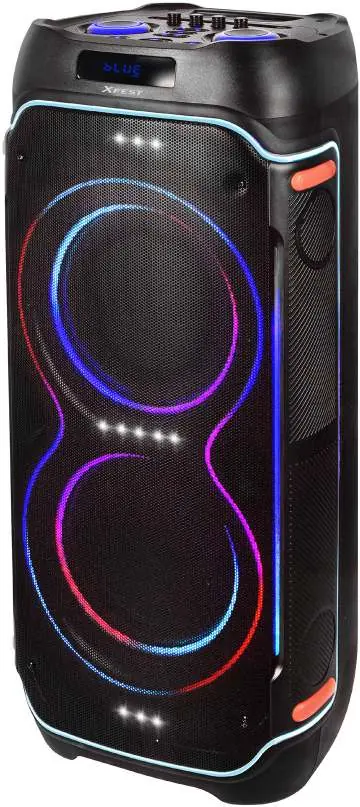
The Trevi XF 3600 PRO is a high-power portable speaker designed for home use. It features wireless connectivity, USB/Micro SD playback, FM radio, and inputs for microphones and a guitar. It also supports TWS (True Wireless Stereo) for pairing two speakers and voice recording functionality.
Safety Warnings
- Do not open the device; there are no user-serviceable parts inside.
- Do not expose the unit to rain, humidity, or splashing water.
- Keep the device away from strong heat sources and dust.
- Ensure the power cable is connected to an easily accessible socket.
- If liquid enters the unit, unplug it immediately and contact an authorized service center.
Controls Description
The top panel features knobs for Microphone Echo, Guitar Volume, Microphone Volume, Treble, Bass, and Master Volume. It also includes buttons for Play/Pause/TWS, Mode selection, Wireless function, LED light, and track navigation. Input ports include USB, Micro SD, AUX, two microphone jacks, and a guitar input.
Basic Functions
- Power On/Off: Use the POWER switch (15) to turn the unit on or off.
- Battery Charging: Turn the power switch to OFF and connect the power cable to the socket (22). The battery icon segments on the display will flash. Wait until all three segments are solid before disconnecting. Charging takes approximately 6-8 hours.
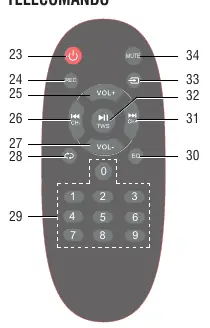
- Stand-by: Use the power button (23) on the remote control to enter/exit standby mode.
Audio Settings
- Volume: Adjust the master volume using the knob (10) or remote buttons. Adjust microphone volume using the MIC VOL knob (4).
- Tone & Echo: Use the BASS (14) and TREBLE (13) knobs to adjust sound frequencies. Use the ECHO (1) knob to adjust the microphone echo effect.
- Equalizer: Press the EQ button (30) on the remote to cycle through 6 preset audio modes.
Playback Modes
- Wireless: Press the Wireless button (9) or Mode button (33) to select Wireless mode. Search for "XF 3600 PRO" on your device and pair using password "0000" if prompted.
- TWS (True Wireless Stereo): Turn on two identical speakers and select Wireless mode on both. Press and hold the Play/Pause button (11) on one unit until "Slau" flashes. Once paired, the message will remain steady.
- USB/SD: Insert a USB drive or Micro SD card into the respective slots. Playback starts automatically.
- AUX-IN: Connect an external audio device using a 3.5mm jack cable to the AUX input (18).
- FM Radio: Select Radio mode and press the Play/Pause button to start automatic station scanning and storage.
Microphone & Recording
- Wireless Microphone: Insert 2 AA batteries, turn on the switch, and adjust volume via the MIC VOL knob. Keep the microphone within 15 meters of the speaker.
- Voice Recording: Insert a USB or SD card. Select USB/SD mode. Press the REC button (24) or the Record button (3) on the unit to start recording. Press again to stop. The unit creates a "Record" folder on the storage media.
Troubleshooting
- No sound: Check if the source is connected, volume is up, and the correct mode is selected.
- Distorted sound: Lower the volume or check the audio file.
- No microphone sound: Ensure the mic is turned on, connected properly, and volume is adjusted.
- Charging issues: Ensure the power cable is connected correctly and allow sufficient charging time.
- Loud noise: Keep the microphone at least 2 meters away from the speaker and away from other wireless equipment.
Technical Specifications
- Power Supply: 100-240V 50/60Hz, internal 12.8V 8A lithium battery.
- Audio Power: 200W Max.
- Dimensions: 380 x 350 x 860 mm.
- Weight: 18.5 kg.
Manufacturer information
TREVI S.p.A.
Practical help
Common problems
No sound when powered on
Check that an input source is connected, the volume is not at 0, the voice switch is on, and a USB/SD card is inserted if using that mode.
Distorted sound
Lower the master volume or check if the audio file is corrupted.
No sound from microphone
Ensure the microphone is plugged in correctly, the power switch on the mic is ON, and the microphone volume knob is turned up.
Unable to charge or short battery life
Verify the power cord is connected properly. A full charge typically takes 6-8 hours. If the battery is old, it may need replacement.
Loud noises/feedback
Keep the microphone at least 2 meters away from the speaker and turn off the microphone when not in use.
Before use
- Charge the battery fully (approx. 6-8 hours).
- Ensure the power switch is in the correct position.
- Check that all cables (AUX, Mic, Guitar) are securely connected.
- Ensure the microphone has fresh batteries.
- Keep the speaker away from strong heat sources and moisture.
Specs in practice
- Output Audio power
- 200W maximum audio output.
- Operating temperature
- 0°C to 40°C.
- Wireless microphone frequency
- 668.5MHz.
Images and diagrams
- Control Panel: Shows volume, echo, bass, treble knobs, and input ports (USB, SD, AUX, Mic, Guitar).
- Remote Control: Shows buttons for playback, volume, EQ, and mode selection.
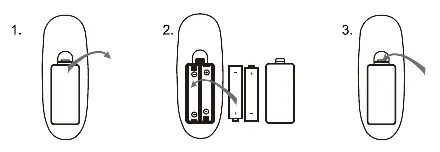
- Battery Installation: Shows how to open the remote control battery compartment.
Model compatibility
- TWS function only works between speakers of the same model.
- USB/SD memory must be formatted in FAT16 or FAT32.
- Wireless microphone range is approximately 15 meters.

Manual page author
Michael Turner
Technical manual editor
Reviews PDF manuals for structure, safety notes, and practical product details so readers can find the right information quickly.