Electronics / Speakers & Soundbars
User Guide for Trevi XF 1750KB Portable Speaker
Quick guide for the Trevi XF 1750KB portable speaker. Learn how to operate the Bluetooth, USB/SD playback, wireless microphone, recording functions, and battery charging.
Table of contents
Manual images
Click an image to enlargeQuick guide from the manual
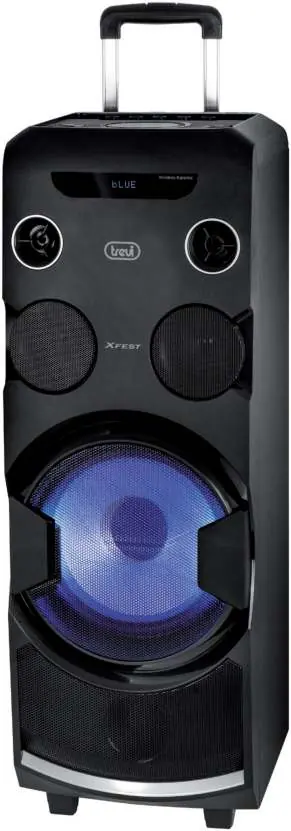
The Trevi XF 1750KB is a high-power portable speaker with a trolley design, featuring Bluetooth connectivity, USB/SD playback, and a wireless microphone. Before first use, ensure the battery is fully charged. The device can be powered via an AC outlet or its internal 12V 9Ah rechargeable battery.
Safety Warnings
- Do not open the device; there are no user-serviceable parts inside.
- Do not expose the unit to rain or humidity.
- Avoid placing the unit near heat sources, in dusty environments, or in areas with strong vibrations.
- Ensure at least 5 cm of space around the unit for proper air circulation.
- Do not place objects filled with liquid (e.g., vases) on the unit.
Controls and Connections
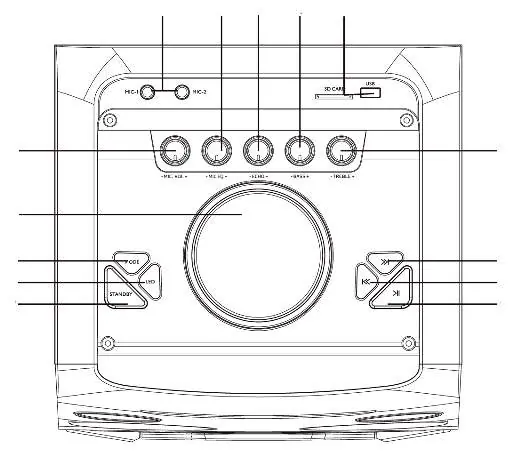
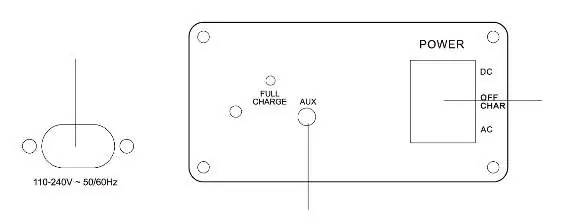
The main control panel includes volume knobs for the main output and microphones, input ports for USB and SD cards, and playback control buttons. The rear panel features the power switch (AC/OFF/DC), charging input, and AUX input.
Power and Charging
The unit operates on 110-240V AC or its internal 12V 9Ah lead-acid battery. To charge, connect the power cord to the charging input (15) and plug it into a wall socket. The LED indicator (18) shows charging status: red indicates charging, and green indicates the battery is fully charged.
Basic Operation
- Power On/Off: Use the switch (17) to select DC (battery), AC (mains), or OFF.
- Stand-by: Use button (5) on the unit or (19) on the remote to enter standby. Note that the battery does not charge in standby mode.
- Volume: Adjust the main volume knob (2) and remote keys (23/29). Both settings are additive.
- Equalizer: Press the SOUND button (27) on the remote to cycle through 5 preset audio modes (active only in Bluetooth, USB, and SD modes).
- Tone Control: Use the TREBLE (9) and BASS (11) knobs to adjust sound output.
Bluetooth and Playback
- Bluetooth: Select Bluetooth mode using the MODE button. The display will show "BLUE". Search for "XF 1750KB" on your external device and pair (password "0000" if required).
- USB/SD Playback: Insert a USB or SD card into the corresponding slots. Playback starts automatically. Use the playback buttons to pause, skip tracks, or repeat songs.
- AUX-IN: Connect an external audio device using a 3.5mm jack cable to the AUX IN port (16) and select "LINE IN" mode.
Wireless Microphone
Insert 2x AA batteries into the microphone, observing correct polarity. Switch the microphone on using the center switch. Adjust the volume using the MIC VOL knob (1). The effective range is approximately 15 meters.
Recording Function
The device can record audio from the microphone or AUX input to a USB/SD device. Press the RECORD button (26) on the remote to start recording. The system will automatically create a "RECORDM" folder on the storage media.
Technical Specifications
- Power Supply: 110-240V AC or 12V 9Ah internal battery
- Max Audio Power: 120W
- Frequency Response: 80Hz - 20KHz
- Wireless Mic Frequency: 174MHz - 216MHz (VHF)
- Dimensions: 360 x 350 x 950 mm
- Weight: 15 kg
Manufacturer information
TREVI S.p.A.
Practical help
Common problems
Device does not turn on
Check if the battery is charged or if the power cable is properly connected to an AC outlet.
Microphone not working
Check battery polarity, ensure the microphone is switched on, and ensure no other wireless devices are causing interference.
Recording not starting
Ensure a USB or SD card is inserted and formatted in FAT16 or FAT32.
Before use
- Charge the battery fully before first use.
- Install 2x AAA batteries in the remote control.
- Install 2x AA batteries in the wireless microphone.
- Ensure the device is placed on a stable surface with at least 5cm of ventilation space.
Specs in practice
- Power Supply
- Supports 110-240V AC mains or internal 12V 9Ah lead-acid battery.
- Max Audio Power
- 120W peak output power.
- Wireless Mic Frequency
- Operates in the 174MHz - 216MHz VHF band.
Images and diagrams
- Control Panel: Shows volume knobs, input ports (USB/SD/AUX/MIC), and playback buttons.
- Remote Control: Shows power, mode selection, playback controls, and numeric keypad.
- Battery Installation: Shows how to open the compartment and insert batteries with correct polarity.
Model compatibility
- USB/SD cards must be formatted in FAT16 or FAT32.
- Wireless microphone range is approximately 15 meters.

Manual page author
David Miller
Documentation analyst
Organizes user manual content into clear summaries, with attention to model details, product context, and everyday usability.