Electronics / Audio
Trevi HCX 10F6 Home Audio Mini System User Guide
Comprehensive user guide for the Trevi HCX 10F6 Mini Hi-Fi System, covering setup, CD/MP3 playback, USB, Bluetooth, FM radio, and maintenance instructions.
Table of contents
Product Overview
The Trevi HCX 10F6 is a versatile mini Hi-Fi stereo system designed for home use. It features a built-in CD/MP3 player, USB input, Bluetooth connectivity, and an FM PLL radio tuner. The system is designed to provide high-quality audio in a compact form factor, suitable for various media playback needs.
Safety Information
For your safety, please observe the following precautions. Do not open the unit, as there are no user-serviceable parts inside and it poses a risk of electric shock. The device contains a laser system; do not attempt to disassemble or tamper with the laser unit. Keep the unit away from moisture, rain, and extreme temperatures. Ensure the device is placed in a well-ventilated area with at least 10cm of free space around it to prevent overheating.
Getting Started
Connect the power cord to a 100-240V 50/60Hz power outlet. To turn the unit on, press the main power switch. Use the STANDBY/MODE button to toggle between standby and active modes. The system will automatically enter standby mode if no operation is performed for 10 minutes while in CD, USB, or AUX source.
Operation
The system supports various playback modes. Use the FUNC button to select your desired source: CD, USB, AUX, Bluetooth, or Tuner. For CD and USB playback, you can use the track skip buttons to navigate, or hold them down for fast search. The system also supports repeat and programmed playback functions. For Bluetooth, ensure your external device is visible, search for 'HCX10F6', and pair. The FM radio allows for automatic scanning and storage of up to 30 stations.
Maintenance and Care
Clean the unit using a soft, slightly damp cloth. Avoid using solvents or abrasive materials. If the system is not working correctly, check all connections before consulting an authorized service center. Always protect your hearing by limiting the time spent listening at high volume levels.
Disposal
This product must be disposed of according to local regulations for electronic waste. Do not dispose of it with household waste. Take it to a designated collection center to ensure proper recycling and environmental protection.
Manufacturer information
TREVI S.p.A.
Practical help
Common problems
Unit does not turn on
Check if the power cord is securely connected to the wall outlet.
No sound from USB or CD
Ensure the correct source is selected via the FUNC button and the device is not in standby.
Bluetooth pairing fails
Ensure the external device is in pairing mode and visible; search for 'HCX10F6'.
Poor FM radio reception
Adjust the length and orientation of the antenna for better signal quality.
Before use
- Remove the transparent battery tab from the remote control.
- Ensure the unit is placed on a firm, level surface.
- Check that the power supply matches the 100-240V specification.
- Verify that all speaker cables are connected to the correct R/L terminals.
- Ensure at least 10cm of ventilation space around the unit.
Specs in practice
- Power Output
- 20W total audio power.
- Bluetooth Frequency
- 2.4GHz transmission band.
- Standby Consumption
- Less than 0.5W for energy efficiency.
Images and diagrams
- Front panel includes CD tray, volume knob, and USB port.
- Rear panel features antenna, line-in, and speaker output terminals.
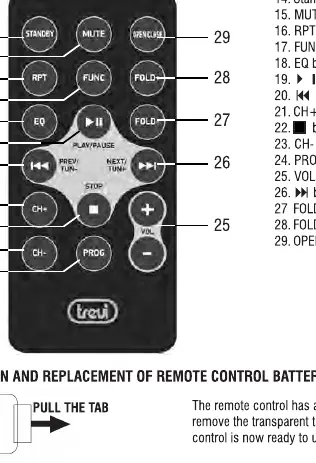
- Remote control provides direct access to playback, folder navigation, and EQ presets.
- Battery compartment on the remote uses a CR2025 lithium cell.
Model compatibility
- USB port may not support all memory devices due to processor incompatibility.
- MP3 folder function is only valid for discs or USB drives containing folders.
- The system is designed for use in moderate climates.

Manual page author
David Miller
Documentation analyst
Organizes user manual content into clear summaries, with attention to model details, product context, and everyday usability.