Tools / Drills
Operating Manual for Trotec PWLS 10-50S LED Construction Site Spotlight
Quick guide for the Trotec PWLS 10-50S LED construction site spotlight. Learn how to operate, connect external devices, adjust the handle, and maintain your work light safely.
Table of contents
Manual images
Click an image to enlargeQuick guide from the manual
The Trotec PWLS 10-50S is a high-performance LED construction site spotlight designed for temporary illumination of indoor and roofed outdoor areas. Key features include an adjustable handle (180° swivel), overheating protection, and two integrated safety sockets for daisy-chaining additional devices. Always inspect the device for damage before use and ensure it is operated in a dry environment.
Device description
The spotlight consists of the following main components:
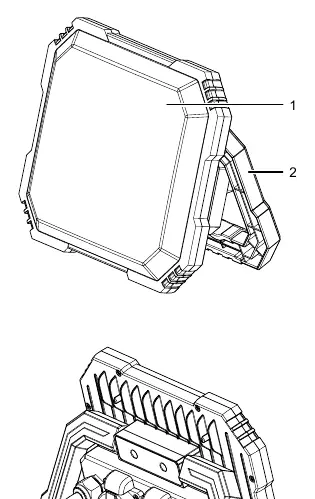
- Surface LED: The main light source.
- Transport handle: Swivels up to 180° and locks in five positions.
- On/off switch: Controls the two brightness levels.
- Edge protection: Protective frame for the LED surface.
- Safety sockets: Two sockets on the back for connecting external devices.
Start-up and installation
Before using the device, unpack it and check for completeness. To prepare the device for operation:
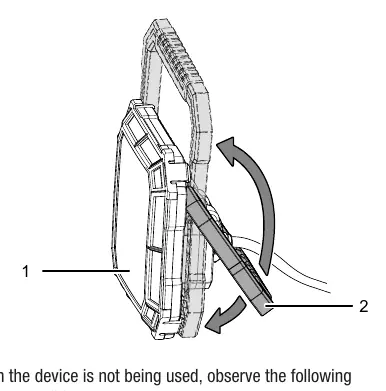
- Unfold the transport handle. It can be locked in one of five positions.
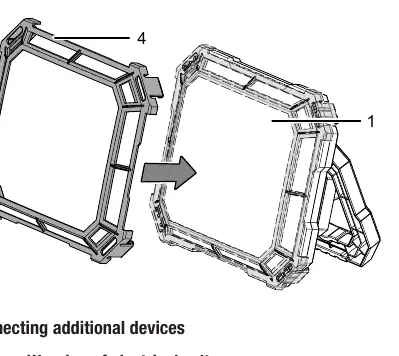
- Place the edge protection onto the surface LED if required.
- Ensure the device is placed on a stable surface.
Operation
To operate the spotlight:
- Insert the mains plug into a properly fused socket.
- Set the on/off switch to position I to activate Level 1 brightness.
- Set the switch to position 0 to turn the device off.
- Set the switch back to position I to activate Level 2 brightness.
Connecting additional devices
The spotlight features two safety sockets for connecting other electrical devices:
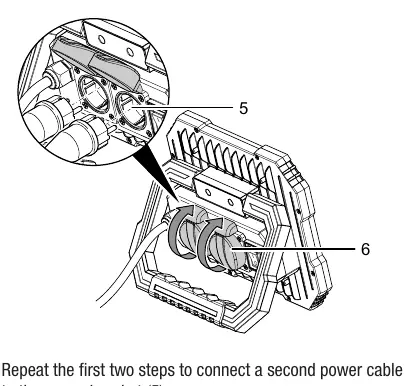
- Ensure the mains voltage of the external device matches the spotlight's specifications.
- Open the cover of the socket on the spotlight.
- Plug the external device's power cable into the socket.
- Ensure cables are laid to avoid tripping hazards.
Maintenance and cleaning
The device is largely maintenance-free. To clean:
- Switch off and unplug the device before cleaning.
- Use a soft, damp, lint-free cloth.
- Do not use aggressive cleaning agents, solvents, or abrasive cleaners.
- Ensure no moisture enters the housing.
- Dry the device thoroughly with a lint-free cloth after cleaning.
Safety
- Do not look directly into the LEDs.
- Do not use the device in explosive atmospheres or near water/damp areas.
- If the power cable is damaged, it must be replaced by a qualified professional.
- Allow the device to cool down before transport or maintenance.
- Keep away from children and animals.
Technical data
- Nominal voltage: 220–240 V ~ 50/60 Hz
- Power input: 50 W
- Luminous flux: Level 1: 2750 lm / Level 2: 5500 lm
- Colour temperature: 6500 K
- Protection class: IP54
- Weight: 1.3 kg
Practical help
Common problems
Device is not lit
Check if the power cable is connected correctly and inspect for damage. If LEDs are defective, they cannot be replaced; contact Trotec customer service.
Overheating protection has tripped
Unplug the device and allow it to cool down. Wait at least 3 minutes before switching it back on.
Before use
- Check the device for damage before each use.
- Ensure the mains voltage matches the device specifications.
- Verify that hands are dry before touching the power cable.
- Ensure the power cable is not damaged.
- Check that the device is not being used in an explosive atmosphere.
Specs in practice
- Luminous flux
- Level 1 provides 2750 lm, Level 2 provides 5500 lm.
- Safety sockets
- Allows connection of additional devices (max 16A fuse).
Images and diagrams
- The transport handle swivels 180° and locks in 5 positions.
- The edge protection is a removable frame that fits over the surface LED.
Model compatibility
- Only use accessories and additional equipment specified in the manual.
- External devices connected to the sockets must match the mains voltage of the spotlight.

Manual page author
Emily Carter
User documentation editor
Prepares concise manual descriptions and highlights the most useful setup, operation, and maintenance information for readers.