General / Other Manuals
User Manual for Volteck Wallplate with 1-Outlet and 2-USB Ports
Quick guide for the Volteck wallplate with 1-outlet and 2-USB ports. Includes installation steps, wiring instructions, charging status indicators, and safety warnings.
Table of contents
Manual images
Click an image to enlargeQuick Guide
This document provides instructions for the installation and operation of the Volteck wallplate with 1-outlet and 2-USB ports. Ensure the power is turned off before beginning any installation work. The device features an LED indicator to show charging status and allows simultaneous use of the outlet and USB ports.
Installation
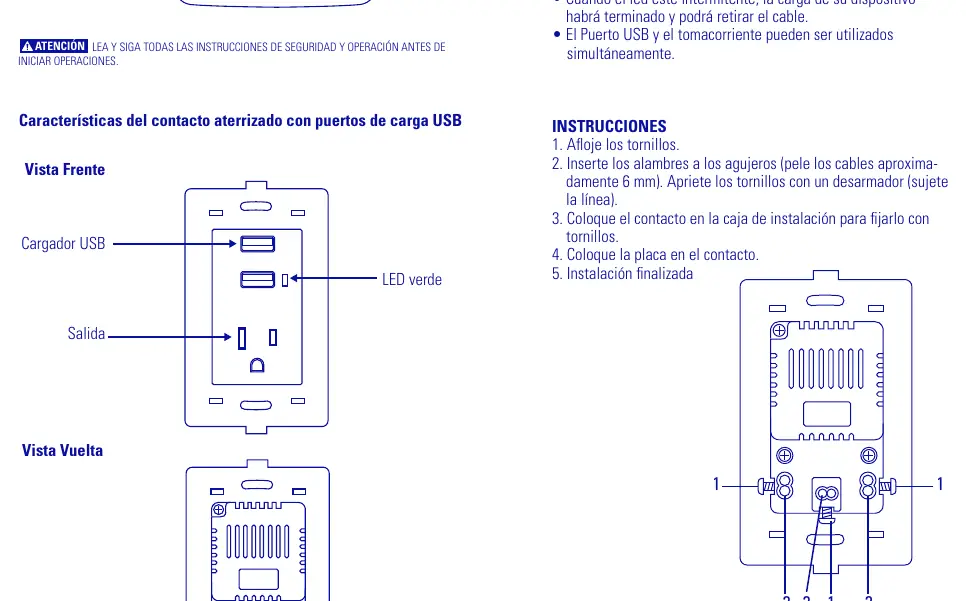

- Turn off the main power supply to the area where the wallplate will be installed.
- Strip approximately 6 mm of insulation from the electrical wires.
- Loosen the terminal screws on the wallplate.
- Insert the wires into the appropriate holes and tighten the screws securely with a screwdriver. Ensure the line wire is connected correctly.
- Place the wallplate into the installation box and secure it with screws.
- Attach the faceplate to the wallplate.
- Installation is complete.
Usage
The USB ports are designed for charging devices such as MP3 players, MP4 players, smartphones, and tablets.
- Connect your USB cable to the USB port when the device requires charging. The LED will turn on.
- When the LED starts blinking, the charging process is finished, and you may remove the cable.
- The USB port and the electrical outlet can be used simultaneously.
Safety Warnings
- Do not modify, disassemble, crush, or puncture the product.
- Keep the product away from rain, water, fire, and direct sunlight to prevent overheating.
- Keep away from high-voltage equipment.
- This product is not a toy; keep out of reach of children.
- Failure to follow safety instructions may result in fire, explosion, electrical shock, or serious injury.
Specifications
- Input: 127 V~ / 60 Hz / 16 A
- USB Output: 5 V DC / 2.1 A
Manufacturer information
TRUPER, S.A. DE C.V.
Practical help
Common problems
Device not charging
Ensure the USB cable is securely connected to the port and the wallplate is properly wired to the power source.
LED not indicating status
Verify that the wallplate is receiving power and that the wiring connections are secure.
Before use
- Turn off the main power supply before starting installation.
- Strip approximately 6 mm of insulation from the wires.
- Ensure you have a screwdriver for terminal screws.
- Verify the wall box is compatible with the wallplate dimensions.
Specs in practice
- 127 V~ / 60 Hz / 16 A
- Standard electrical rating for the outlet.
- 5 V DC / 2.1 A
- Output rating for the USB charging ports.
Images and diagrams
- The wiring diagram illustrates the connection points for Line and Neutral wires.
- The front view identifies the location of the USB ports and the status LED.
Model compatibility
- Suitable for charging MP3, MP4, smartphones, and tablets.

Manual page author
David Miller
Documentation analyst
Organizes user manual content into clear summaries, with attention to model details, product context, and everyday usability.