Power / Power Banks
Videx 323 20000mAh Power Bank User Manual
Quick guide for the Videx 323 20000mAh Power Bank. Learn how to charge devices, recharge the power bank, interpret the LCD display, and understand safety precautions.
Quick answers from the manual
Quick answer
- The Videx 323 is a 20000mAh power bank with an LCD display. To charge devices, connect them via USB-C or USB-A. To recharge the power bank, use a 100W USB-C charger for the fastest charging (approx. 1.5 hours). p. 4, 5
Key actions
- Charging devices: Connect the device to the power bank using a USB-C or USB-A cable. p. 4
- Recharging the power bank: Connect a 100W USB-C charger to the power bank's USB-C port. p. 5
First start
- The device starts charging automatically when connected. p. 4
Problems and fixes
Temperature warning
If the temperature is too high or too low, input/output will be suspended. Allow the device to reach a safe temperature.
p. 10Technical specifications
| Parameter | Value | Meaning | Pages |
|---|---|---|---|
| Battery | Li-ion 3.7V 20000mAh 74Wh | Capacity and type | p. 2 |
Where to find it in the PDF
- Specifications p. 2
- Product Scheme p. 3
- LCD Display p. 6, 7, 8, 9
Table of contents
Manual images
Click an image to enlargeQuick guide from the manual
This manual provides instructions for the Videx 323 20000mAh Power Bank. It covers device operation, charging procedures, and understanding the LCD display interface. Always ensure you use compatible cables and chargers to maintain optimal performance and safety.
Product Overview
The power bank features a high-capacity 20000mAh battery with an LCD display for real-time monitoring. It includes multiple ports for charging various devices simultaneously.
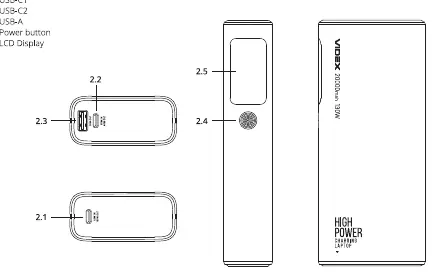
- USB-C1: Input and Output
- USB-C2: Input and Output
- USB-A: Output
- Power Button: Used to control the display and settings.
Charging Outer Devices
To charge your external devices:
- Connect one end of the USB-C charging cable to the corresponding port on the Power Bank.
- Connect the other end to the input port on the device to be charged.
- The charging process will start automatically.
Note: If your device's input port type is different from the cable port, you need to purchase an additional cable.
Recharging the Power Bank
To recharge the power bank:
- Connect one end of the USB-C charging cable to a wall charger.
- Connect the other end to the corresponding port on the Power Bank.
Note: To achieve maximum charging speed (approx. 1.5 hours to full charge), use a 100W USB-C charger.
LCD Display and Interface
The LCD display provides detailed information about the power bank's status:
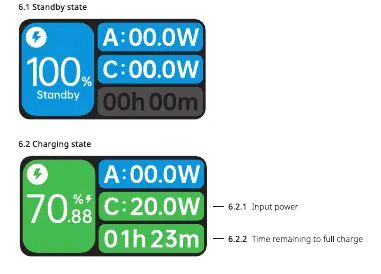
- Standby/Charging/Discharging states: Shows input/output power and time remaining.
- Time Interface: Allows setting an alarm clock.
- Parameter Interface: Displays run time, last charge percentage, max capacity (battery health), battery cycles, internal temperature, and total output.
- Screen Time: You can choose whether the screen is always on or turns off after 30 seconds of inactivity.
Temperature Warnings
The power bank monitors internal temperature and will suspend operations if conditions are unsafe:
- Input suspended: Temperature exceeds 45°C or is below 0°C.
- Input & Output suspended: Temperature exceeds 60°C or is below -20°C.
If a temperature warning appears, let the power bank cool down or warm up to a safe operating temperature.
Safety Precautions
- Do not throw, disassemble, or attempt to repair the product yourself.
- Do not leave in a damp place or in direct sunlight.
- Keep away from open flames and heating devices.
- Keep out of reach of children.
- Improper use may void the warranty.
Practical help
Common problems
Input suspended
The temperature is too high (above 45°C) or too low (below 0°C). Allow the power bank to reach a safe operating temperature.
Input & Output suspended
The temperature is too high (above 60°C) or too low (below -20°C). Allow the power bank to reach a safe operating temperature.
Before use
- Check if the device input port matches the cable port.
- Ensure the power bank is charged.
- Use a 100W USB-C charger for maximum charging speed (approx. 1.5 hours).
Specs in practice
- USB-C1 Output
- Up to 100W
- USB-A Output
- Up to 30W
Images and diagrams
- USB-C1/C2 and USB-A ports are located on the top.
- Power button is on the side.
- LCD display shows charging status, time, and parameters.
Model compatibility
- If your device's input port type is different from the cable port, you need to purchase an additional cable.

Manual page author
Emily Carter
User documentation editor
Prepares concise manual descriptions and highlights the most useful setup, operation, and maintenance information for readers.