Power / Car Chargers
User Manual for UGREEN 150W 4-Port GaN Fast Car Charger
Quick guide for the UGREEN 150W 4-Port GaN Fast Car Charger (Model: EC706). Learn about power distribution, technical specifications, and safe usage instructions.
Table of contents
Manual images
Click an image to enlargeQuick Guide
The UGREEN 150W 4-Port GaN Fast Car Charger is designed to charge multiple devices simultaneously in a vehicle. To ensure fast and safe charging, always use a charging cable that matches the rated charging power of your device. The charger features built-in over-temperature protection, which will automatically reduce output power if the internal temperature exceeds the preset safety limit.
Product Overview
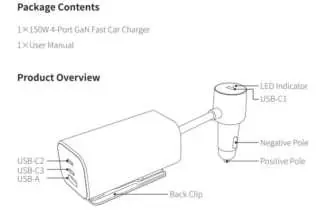
The charger consists of a main unit with a back clip and a connector plug. The main unit features three USB-C ports (USB-C1, USB-C2, USB-C3) and one USB-A port. The connector plug includes an LED indicator, a negative pole, and a positive pole for connection to the vehicle's power socket.
How It Works
To use the charger, insert the connector plug into the vehicle's power outlet. Connect your devices (tablets, phones, or laptops) to the appropriate USB ports using compatible charging cables. The charger supports simultaneous charging for multiple devices, with power distribution varying based on the number of devices connected and the specific ports used.
Power Distribution
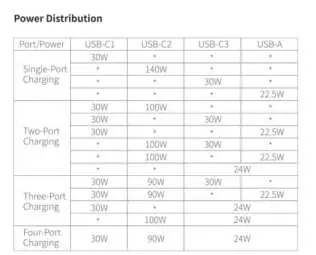
The total output power of the charger is 150W Max. The power distribution changes dynamically depending on how many ports are in use. For example, single-port charging on USB-C2 can provide up to 140W, while using multiple ports will split the power output between them (e.g., 30W, 90W, 24W configurations). Refer to the power distribution table in the manual for specific wattage outputs per port combination.
Specifications
Input: 12-24V=18A MaxTotal Output Power: 150W MaxCable Length: 1m/3.3ftUSB-A Output: 5.0V=3.0A/9.0V=2.0A/10.0V=2.25A/12.0V=1.5AUSB-C1 Output: 5.0V=3.0A/9.0V=3.0A/12.0V=2.5AUSB-C2 Output: 5.0V=3.0A/9.0V=3.0A/12.0V=3.0A/15.0V=3.0A/20.0V=5.0A/28.0V=5.0A MaxUSB-C3 Output: 5.0V=3.0A/9.0V=3.0A/12.0V=2.5A
Safety Notes
- Do not place this product near a heat source or use it in a high-temperature and humid environment.
- If the power supply or components are faulty, do not dismantle or repair the device yourself; contact UGREEN after-sales service for support.
- Keep out of the reach of children.
- Dispose of this product according to local laws and regulations; it cannot be disposed of as household waste.
Manufacturer information
UGREEN
Practical help
Common problems
Output power is reduced
The device features over-temperature protection. If the internal temperature reaches the preset protection value, the output power will be automatically reduced.
Device is faulty
Do not dismantle or repair the device yourself. Please contact UGREEN after-sales service for support.
Before use
- Verify the vehicle power socket provides 12-24V input.
- Ensure you are using a charging cable that matches the rated charging power of your device.
- Check that the environment is not high-temperature or humid.
- Ensure the charger is kept out of the reach of children.
Images and diagrams
- The diagram illustrates the connection of various devices (tablets, phones, laptops) to the specific USB-C and USB-A ports on the charger.
Model compatibility
- Use a charging cable that matches the rated charging power of the device to ensure fast and safe charging.

Manual page author
David Miller
Documentation analyst
Organizes user manual content into clear summaries, with attention to model details, product context, and everyday usability.