Lighting / Fixtures
Utilitech 16-FT Plug-in Color-Changing LED Indoor Strip Light User Guide
Quick guide for the Utilitech 16-FT Plug-in Color-Changing LED Indoor Strip Light. Includes installation steps, remote control operation, cutting instructions, and troubleshooting tips.
Table of contents
Quick guide from the manual
This LED strip light is designed for indoor use only. Before installation, ensure all parts are present and undamaged. Do not look directly at the LED light source. The system supports linking up to 2 units maximum. Always ensure the power is disconnected before installation or maintenance.
Package Contents
- LED Strip Light
- Controller
- Power Adapter
- Remote Control
- Jumpers (x2)
- Mounting Clips (x8) and Screws (x8)
Installation
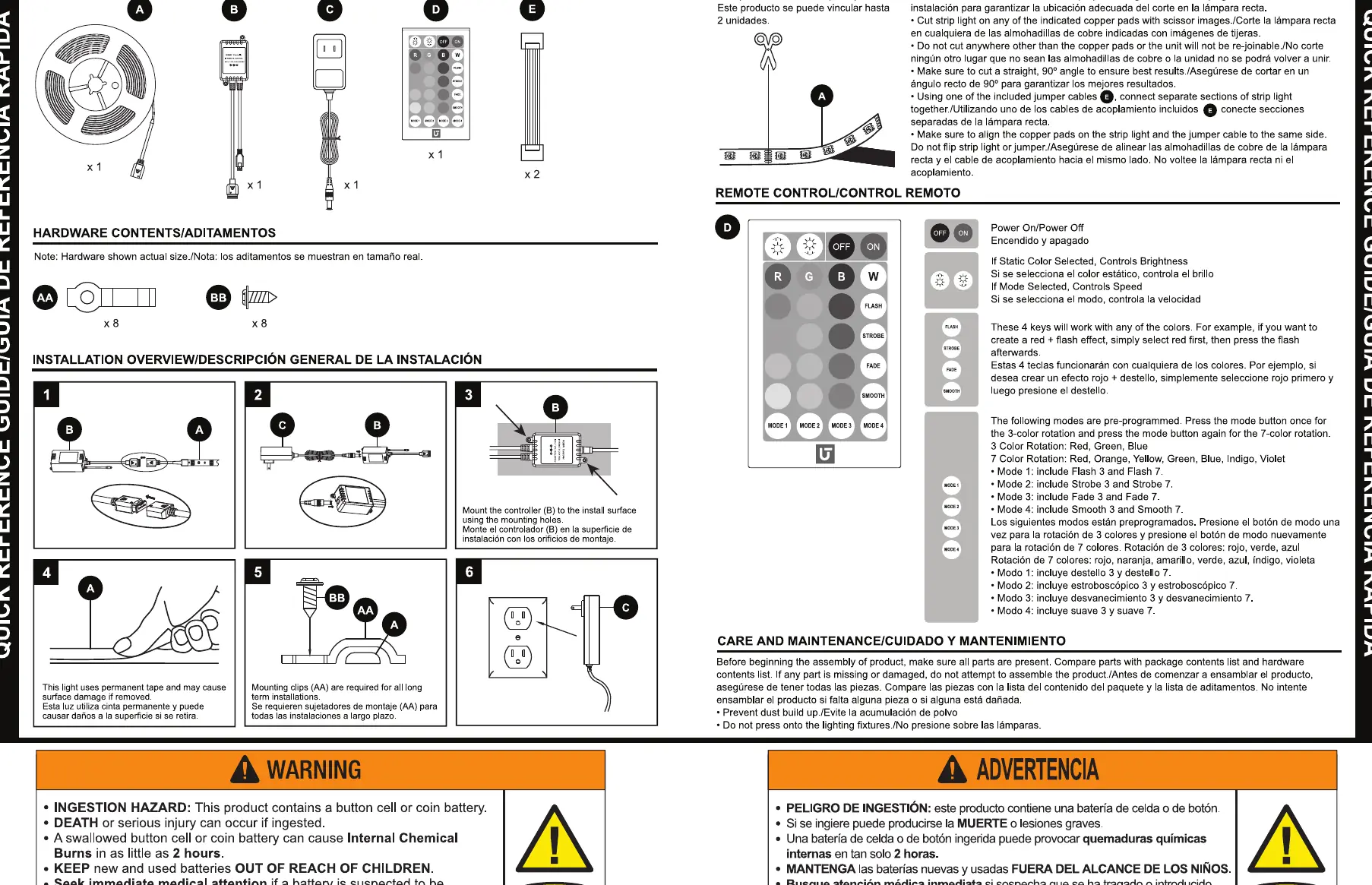
- Connect the LED strip (A) to the controller (B).
- Connect the power adapter (C) to the controller (B).
- Mount the controller (B) to the installation surface using the mounting holes.
- Ensure the surface is clean before applying the strip using the pre-attached tape.
- For long-term installations, use the provided mounting clips (AA) and screws (BB).
- Plug the power adapter (C) into a 120V wall outlet.
Cutting and Rejoining
The strip can be cut to size. Only cut on the indicated copper pads using scissors. Ensure cuts are made at a 90-degree angle. If rejoining, use the provided jumper cables to connect separate sections. Ensure the copper pads align correctly when connecting.
Remote Control Operation
The remote control allows for color selection and mode changes. Remove the battery insulation sheet before first use. The remote has a maximum range of 20 feet (6.09m).
- Color Selection: Use the color buttons to change the strip color.
- Brightness: Adjust brightness using the dedicated buttons.
- Modes: Press the mode button to cycle through pre-programmed modes, including 3-color rotation, 7-color rotation, strobe, fade, and smooth transitions.
Troubleshooting
- Strip does not turn on: Ensure the power adapter is securely plugged into a 120V receptacle.
- Remote not responding: Ensure the battery is installed correctly, the insulation sheet is removed, and you are within 20 feet of the controller.
Care and Maintenance
Prevent dust buildup on the lighting fixtures. Do not press on the LED lights. If the product is damaged, do not attempt to use it.
Manufacturer information
Utilitech
Practical help
Common problems
Strip does not turn on
Ensure the power adapter is securely plugged into a 120V wall outlet.
Remote control not responding
Check that the battery is installed, the insulation sheet is removed, and the user is within 20 feet (6.09m) of the controller.
Before use
- Verify all package contents are present.
- Remove the battery insulation sheet from the remote control.
- Inspect the strip and controller for any damage.
- Ensure the installation surface is clean.
Specs in practice
- Max Linkable
- You can link up to 2 units of this strip light together.
- Remote Range
- The remote control operates effectively up to 20 feet (6.09m).
- Battery Type
- Uses a 3V button cell battery.
Images and diagrams
- Installation overview shows the sequence of connecting the strip, controller, and power adapter.
- Cutting guide illustrates the specific copper pads where the strip can be safely cut.
Model compatibility
- For indoor use only.
- Do not link more than 2 sets together.

Manual page author
Michael Turner
Technical manual editor
Reviews PDF manuals for structure, safety notes, and practical product details so readers can find the right information quickly.