HVAC / Ventilation Systems
Utilitech 10000mAh Portable Battery
Quick guide for the Utilitech 10000mAh Portable Battery. Includes technical specifications, LED indicator status, safety guidelines, and maintenance tips for optimal performance.
Table of contents
Manual images
Click an image to enlargeQuick guide from the manual
This document provides essential information for the Utilitech 10000mAh Portable Battery. The device is designed for charging mobile electronics via USB-A and USB-C ports. Key operational requirements include maintaining an ambient temperature between 50-80°F (10-27°C) and ensuring proper ventilation during use. If the battery becomes warm during operation, this is considered normal.
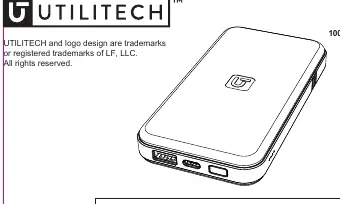
What is in the box
- 10000mAh Portable Battery
- 1 ft USB-A to C Cable
- Instruction Manual
Product Specifications
Performance may vary based on environmental conditions and usage over time.
- Capacity: 10000mAh
- Dimensions: 2.75 x 5.1 x 0.7 in. (70 x 130 x 17 mm)
- Input (USB-C): 5V 3A, 9V 2A
- Output (USB-A): 5V 2.4A (12W Max)
- Output (USB-C): 5V 3A, 9V 2.22A (20W Max)
- Total Output: 5V 3A (15W Max when using USB-A+C)
LED Capacity Indicators
The battery features LED indicators to display the remaining charge level:
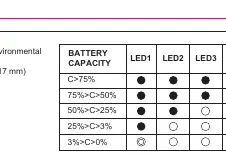
- C > 75%: 4 LEDs lit
- 75% > C > 50%: 3 LEDs lit
- 50% > C > 25%: 2 LEDs lit
- 25% > C > 3%: 1 LED lit
- 3% > C > 0%: 0 LEDs lit
Care and Maintenance
- Avoid frequent charging and discharging.
- Avoid overcharging the battery.
- Keep the charging port clean.
- Avoid exposure to high and low temperatures.
- Do not store the battery fully charged or fully discharged.
Safety Information
Warning: The battery pack contains a lithium-polymer battery which is flammable. Failure to follow these instructions may result in fire, explosion, or electrical shock.
- Do not modify, disassemble, open, drop, crush, puncture, or shred the battery.
- Keep the battery and charger dry; do not operate with wet hands.
- Do not operate near heat sources, heat vents, or in direct sunlight.
- Keep out of reach of children.
- If the battery leaks, stop use immediately and avoid contact with skin or eyes. If contact occurs, wash with water and seek medical attention.
Troubleshooting
If the battery pack and charger become warm during operation, this is normal. To prevent overheating, ensure the area around the battery is ventilated and do not place objects on or around the device while in use.
Manufacturer information
Utilitech
Practical help
Common problems
Battery pack and charger become warm during operation
This is normal. Ensure the area is well-ventilated and do not place objects on or around the device.
Before use
- Verify all contents are present (Battery, USB-A to C cable).
- Ensure the operating environment is between 50-80°F (10-27°C).
- Check that the charging port is clean and free of debris.
- Do not store the battery fully charged or fully discharged.
Specs in practice
- USB-C Output
- Supports up to 20W fast charging for compatible devices.
- USB-A Output
- Supports up to 12W charging.
- Total Output (A+C)
- When both ports are used simultaneously, the combined output is limited to 15W.
Images and diagrams
- The LED indicator table shows the relationship between the number of lit LEDs and the remaining battery capacity percentage.
- 4 LEDs indicate >75% capacity, while 0 LEDs indicate <3% capacity.
Model compatibility
- The device is compatible with USB-A and USB-C charging cables.
- Performance decreases over time and with use.

Manual page author
Emily Carter
User documentation editor
Prepares concise manual descriptions and highlights the most useful setup, operation, and maintenance information for readers.