Health / Laboratory Equipment
VanGuard 1400 Series Microscope User Manual
Comprehensive user manual for the VanGuard 1400 Series compound microscopes. Includes assembly instructions, setup for brightfield and phase contrast models, operation guides, maintenance procedures, and technical specifications.
Table of contents
Quick Guide from the Manual
This manual provides instructions for the VanGuard 1400 Series compound microscopes, including brightfield (1420BR, 1421BR, 1430BR, 1431BR) and phase contrast (1423PH, 1433PH) models. Key procedures include assembly, condenser centering, phase contrast alignment, and routine maintenance.
Assembly
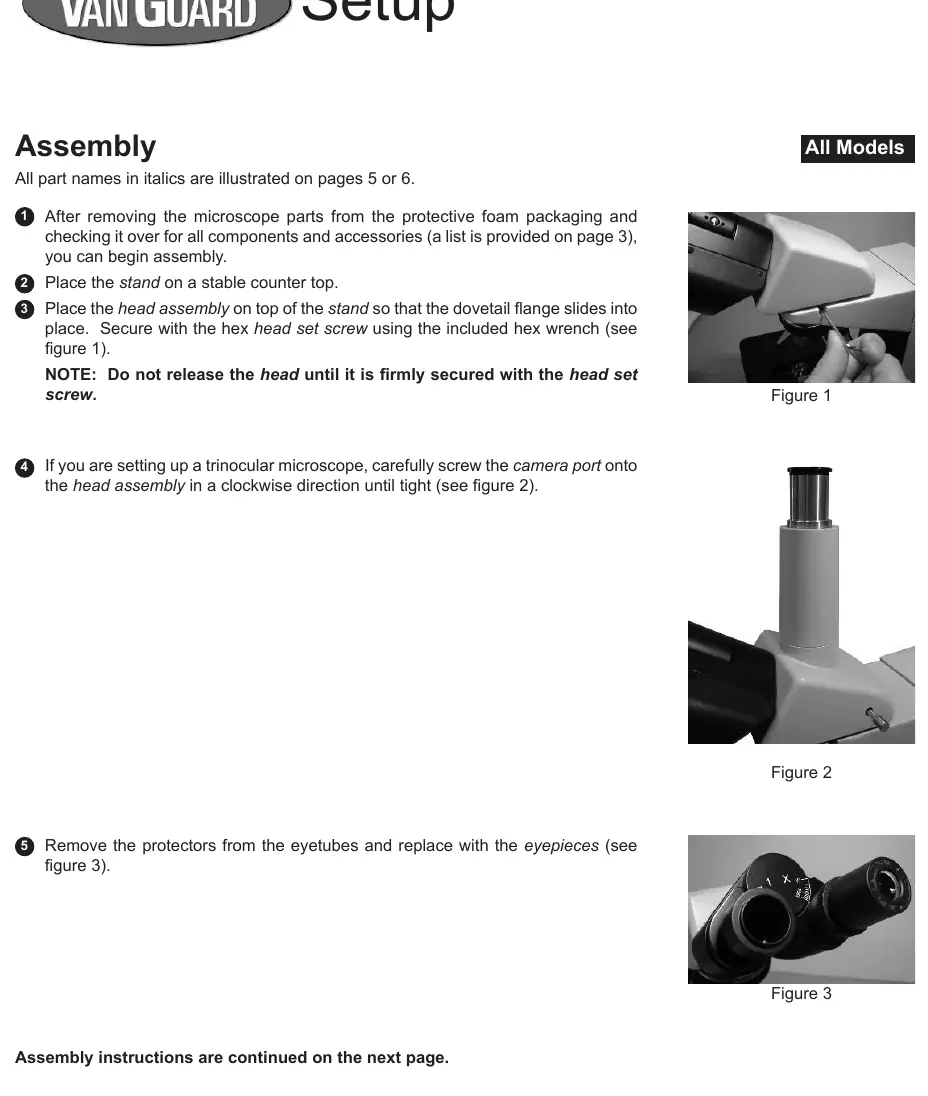
- Place the stand on a stable surface.
- Attach the head assembly to the stand using the hex head set screw.
- For trinocular models, screw the camera port onto the head assembly.
- Install eyepieces into the eyetubes.
- Install objectives into the nosepiece by twisting counterclockwise.
- Install the condenser assembly into the condenser mount.
- Connect the power cord and turn on the substage illuminator.
Setup and Alignment
Centering the Condenser (Brightfield Models)
Proper condenser alignment is essential for optimal illumination:
- Rotate the nosepiece to the 10X objective.
- Raise the substage assembly fully.
- Open the aperture iris diaphragm.
- Close the field iris diaphragm to the smallest setting.
- Focus the resulting hexagon using the coarse/fine focus controls.
- Center the hexagon in the field of view using the condenser centering knobs.
Aligning Phase Contrast Annulus Rings (Phase Contrast Models)
- Turn on the illuminator and place a slide on the stage.
- Rotate the nosepiece to the 10X objective and the phase annulus turret to the "10" setting.
- Replace an eyepiece with the phase contrast centering telescope.
- Focus the telescope until the rings are visible.
- Use the condenser centering knobs to align the two rings of light until they are centered upon one another.
Operation
Focusing and Stage Controls
The microscope features coaxial coarse and fine focus controls. The focusing tension control knob allows for adjustment of the focus knob resistance. The mechanical stage X-Y controls provide precise sample positioning. The up-stop mechanism can be set to prevent the stage from crashing into the objective.
Using the Camera Port
Trinocular models feature a 70/30 split sliding prism. Pulling the prism slider out diverts 70% of the light to the camera port, while 30% remains for the eyepieces.
Maintenance
Replacing the Lamp
- Unplug the microscope and allow the lamp to cool.
- Lay the microscope on its back and open the trap door on the bottom of the base.
- Remove the old lamp and insert the new one (20W Halogen, Part No. 1400-20WHL).
Replacing the Fuse
- Unplug the microscope.
- Remove the 5 screws securing the back panel.
- Locate the circuit board on the rear cover and replace the blown fuse (0.25A, 250V, Part No. 1400-FS1).
Contact Information
For parts, accessories, or service, contact your dealer or VanGuard Microscopes at 1-800-423-8842. Business hours are 7:00 a.m. - 5:00 p.m. Central Standard Time. Email: [email protected] or [email protected]. Website: veegee.com.
Official resources from the manual
Practical help
Common problems
Lamp not turning on
Check power connection, ensure variable lighting control is set to the highest setting, and check/replace the fuses.
Image not focused
Verify diopter adjustment, ensure the objective is clean, and check that the up-stop mechanism is not preventing the stage from reaching the focal point.
Phase rings not aligned
Use the phase contrast centering telescope to align the rings as described in the setup section.
Before use
- Verify all components are present (stand, head, objectives, condenser).
- Ensure the microscope is placed on a stable, level surface.
- Check that the lamp is cool before attempting any maintenance.
- Verify the power supply is compatible (110V).
Specs in practice
- 1.25 N.A. Abbe Condenser
- Standard condenser for brightfield imaging providing high-resolution light control.
- 2 Microns/Division
- Fine focus graduation allowing for precise vertical adjustments.
Images and diagrams
- Figure 5: Overview of microscope parts and controls.
- Figure 8A-8D: Visual guide for the condenser centering process.
- Figure 7A-7B: Visual guide for aligning phase contrast rings.
Model compatibility
- 1423PH and 1433PH models require phase contrast alignment.
- 1420BR, 1421BR, 1430BR, and 1431BR are brightfield models.

Manual page author
Emily Carter
User documentation editor
Prepares concise manual descriptions and highlights the most useful setup, operation, and maintenance information for readers.