HVAC / Ventilation Systems
User Manual for Vent-Axia Sentinel Kinetic 200Z, 200ZH, 300ZH MVHR Unit
Quick guide for the Vent-Axia Sentinel Kinetic 200Z, 200ZH, and 300ZH MVHR units. Includes operation, maintenance, filter replacement, and troubleshooting steps.
Quick answers from the manual
Quick answer
- The Sentinel Kinetic 200Z/200ZH/300ZH is an MVHR unit operated via a wired remote control. It provides continuous ventilation with heat recovery and features boost/purge modes and summer bypass functionality. p. 3, 4
Key actions
- Reset filter message p. 8, 13
- Activate Boost mode p. 4, 10
- Activate Purge mode p. 4, 10
First start
- Switch on power at the mains isolator. p. 6
Show 5 more answers Show less
Problems and fixes
Fault Code 01
Supply Fan not running.
p. 17
Fault Code 04
PCB 24 V fuse (FS1) failure.
p. 17Error codes
| Code | Meaning | Action | Pages |
|---|---|---|---|
| 01 | Supply Fan not running | Contact service provider | p. 17 |
| 02 | Extract Fan not running | Contact service provider | p. 17 |
Maintenance and reset
- Reset filter message p. 8, 13
Technical specifications
| Parameter | Value | Meaning | Pages |
|---|---|---|---|
| Rated Power | 175W (200Z/ZH) / 180W (300ZH) | Maximum power input | p. 5 |
| IP Rating | IP22 | Ingress protection rating | p. 5 |
Where to find it in the PDF
- Product Description p. 3, 4
- Maintenance p. 13, 14, 15, 16
Table of contents
Manual images
Click an image to enlargeQuick guide from the manual
The Vent-Axia Sentinel Kinetic 200Z, 200ZH, and 300ZH are Mechanical Ventilation with Heat Recovery (MVHR) units designed for continuous 24-hour exhaust ventilation. This document covers operation, monitoring, and maintenance. Important Safety: Do not remove the unit covers as high voltage is present. Ensure the unit is installed and used in accordance with the instructions.
Product Description
These units are designed for energy-efficient ventilation in houses and similar dwellings. They feature a Summer By Pass (SBP) to provide energy-free heating or cooling depending on indoor and outdoor temperatures. The 200ZH and 300ZH models include an integral humidity sensor.
Wired Remote Control
The unit is operated via a wired remote control display. Key functions include:
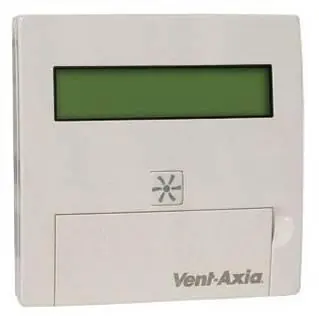
- SET button: Adjust and save settings.
- Up/Down arrows: Navigate screens and adjust values.
- Asterisk button: Activate Boost mode (1 press: 30 mins, 2 presses: 60 mins, 3 presses: continuous, 4 presses: normal). Press and hold for 5 seconds to activate/cancel Purge mode.
Operation and Monitoring
The unit is designed to run continuously. Startup screens display firmware version, language, control mode, and sensor status. During normal operation, the display shows airflow status. If the unit is in Summer Bypass mode, the display will alternate. Users can set the clock, summer mode, and target indoor temperature via the menu.
Maintenance
Regular maintenance is required to ensure efficiency:
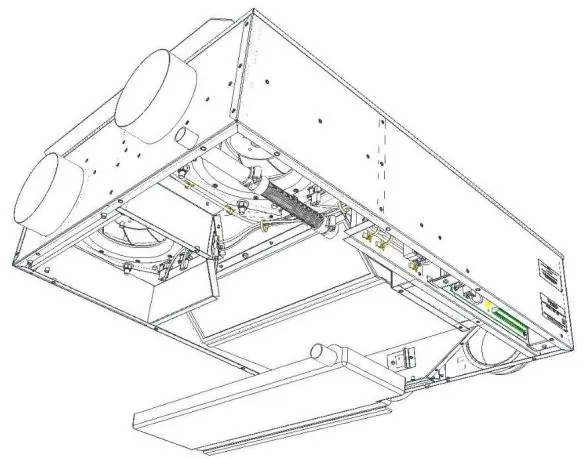
- Filter Maintenance: When the unit displays "Check filters", remove the two filter cover plates, clean or replace the filters, and reset the message by holding the Up and Down buttons for 5 seconds.
- 12 Monthly Maintenance: Inspect motors for dust, check the condensate drain tube, and ensure all fastenings are tight.
- Heat Exchanger: The heat exchanger cell can be removed for cleaning in warm water with mild detergent.
Troubleshooting
If a problem occurs, check the Fault Code displayed on the remote control. Common codes include 01 (Supply Fan not running), 02 (Extract Fan not running), and 04 (PCB 24V fuse failure). Contact your service provider if issues persist.
Practical help
Common problems
Supply Fan not running
Check Fault Code 01 on the display and contact your service provider.
Filters dirty
Clean or replace filters when the 'Check filters' message appears. Reset the message by holding the Up and Down buttons for 5 seconds.
Unit not running / Room too cold
If the internal temperature drops below 5°C, the unit stops to prevent bringing in cold air. It will restart automatically when the temperature rises.
Before use
- Ensure power is connected at the mains isolator.
- Check that the unit is in the desired operating mode (Normal/Boost/Purge).
- Verify if any fault codes are displayed on the remote control.
- Ensure the condensate drain is secure and clear of debris.
Show more Show less
Specs in practice
- Operating Temperature
- -10°C to +45°C.
Images and diagrams
- Filter access panels are located on the underside of the unit.
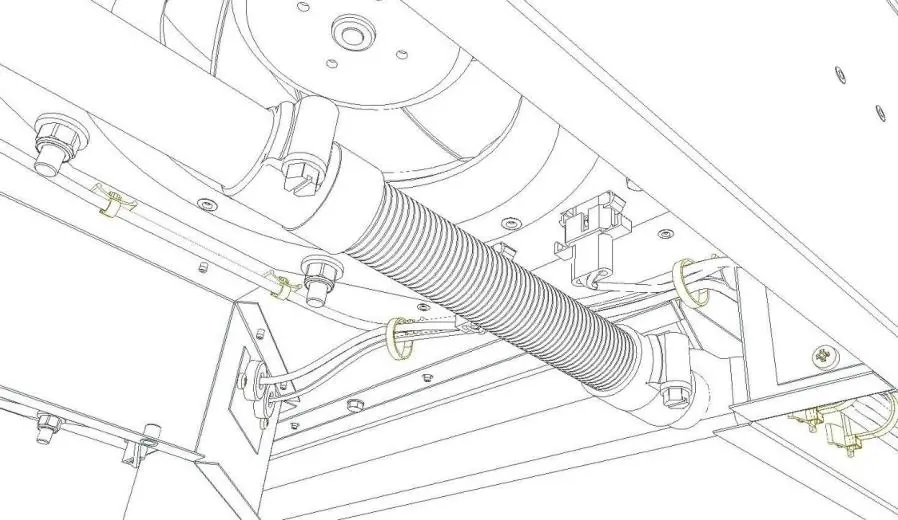
- Condensate tray removal requires loosening the jubilee clip and removing the security strap (on 300ZH models).
Model compatibility
- Compatible with Vent-Axia plug-in integral humidity sensor (Part No. 441838).

Manual page author
Emily Carter
User documentation editor