Home Appliances / Dehumidifiers
User Manual for Abestorm NeatyFresh Pro Crawl Space Fan
Quick guide for the Abestorm NeatyFresh Pro Crawl Space Fan. Includes installation instructions, operation settings, technical specifications, and troubleshooting tips for maintaining optimal crawl space humidity.
Quick answers from the manual
Quick answer
- The Abestorm NeatyFresh Pro is a crawl space fan designed to reduce humidity and prevent decay under houses. It features adjustable fan speeds, humidity/temperature control, and a durable DC motor. p. 2
Key actions
- Turn the unit ON/OFF p. 8
- Reset the unit p. 11
First start
- Connect the probe and power, then hold the Power/Menu button for 3-5 seconds to turn on. p. 6, 7, 8
Show 4 more answers Show less
Problems and fixes
Unit not running/reset needed
Unplug power, wait for fans to stop, plug back in.
p. 11
LCD screen atomized
Turn off equipment until water evaporates.
p. 3, 4Maintenance and reset
- Reset ROUTING and CYCLIC timers by power cycling the unit. p. 11
Technical specifications
| Parameter | Value | Meaning | Pages |
|---|---|---|---|
| Dimensions | 18 x 9 x 1.7 in | Standard size | p. 3 |
| Rated Power | 8.5W | Power consumption | p. 3 |
| Rated Voltage | 110V-230V, 50/60Hz | Electrical requirements | p. 3 |
| Weight | 4.7 lbs | Machine net weight | p. 3 |
Where to find it in the PDF
- Product Description p. 2
- Technical Parameters p. 3
- Installation p. 4, 5
- Operation p. 8, 9, 10
Table of contents
Manual images
Click an image to enlargeQuick guide from the manual
The Abestorm NeatyFresh Pro Crawl Space Fan is designed to circulate fresh outdoor air under houses and porches. By reducing high humidity in the crawl space, it helps prevent the premature decay of support columns, joists, and floors, while also mitigating issues like mold, termite activity, and odors. The unit is controlled by a circuit board that starts the fan when relative humidity exceeds the selected set value.
Installation
The fan must be installed by a qualified installer in accordance with local codes and the International Residential/Electrical Code. Improper installation can lead to fire, electrical shock, or personal injury.
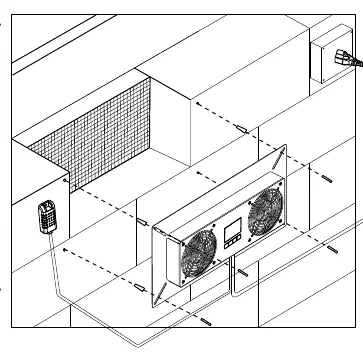
- Positioning: Install in the crawl space behind existing foundation ventilation openings. Vents should be within three feet of every corner of the building. Ensure the electrical control box and motor face the inside of the crawl space.
- Tools Needed: 5/16" nut roller or Phillips screwdriver. If installing on bricks or foundation blocks, use a 5-stroke 16-inch masonry bit.
- Mounting: Remove existing vent covers. Place the fan over the vent. If using a base block or brick, mark the four corners of the metal panel, drill 5/16" holes, install wall anchors, and secure with screws. If using a wooden frame, install rims or meshes on existing vents and secure the fan panel with screws, washers, and nuts.
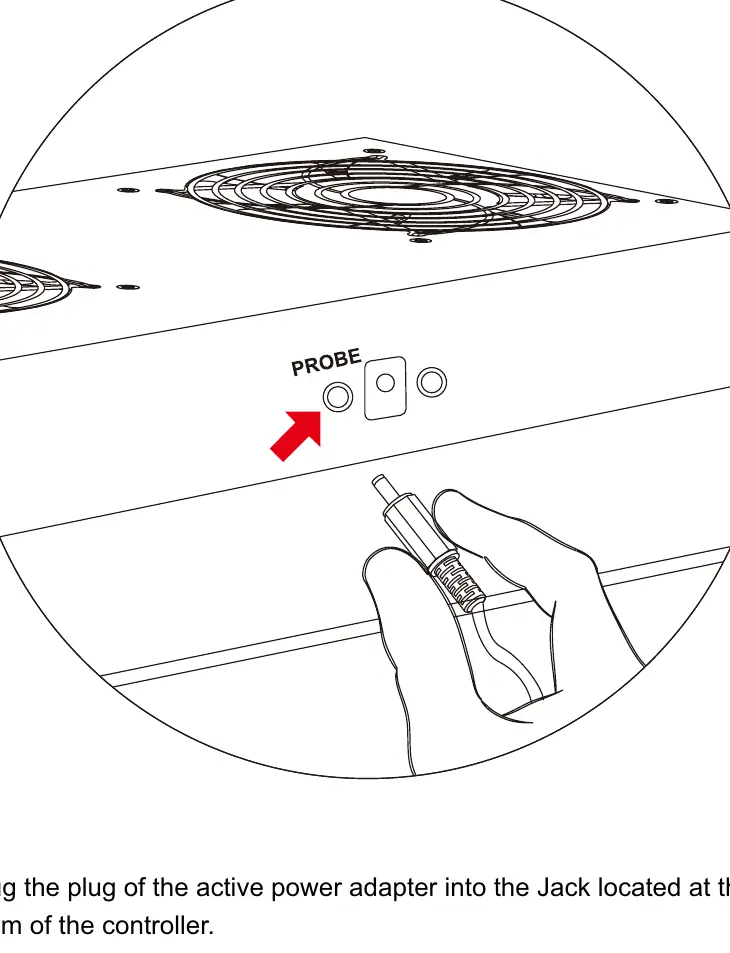
- Probe Installation: Insert the temperature and humidity probe connector into the designated port at the bottom of the fan unit.
Operation
The unit features an LCD display and four control buttons:
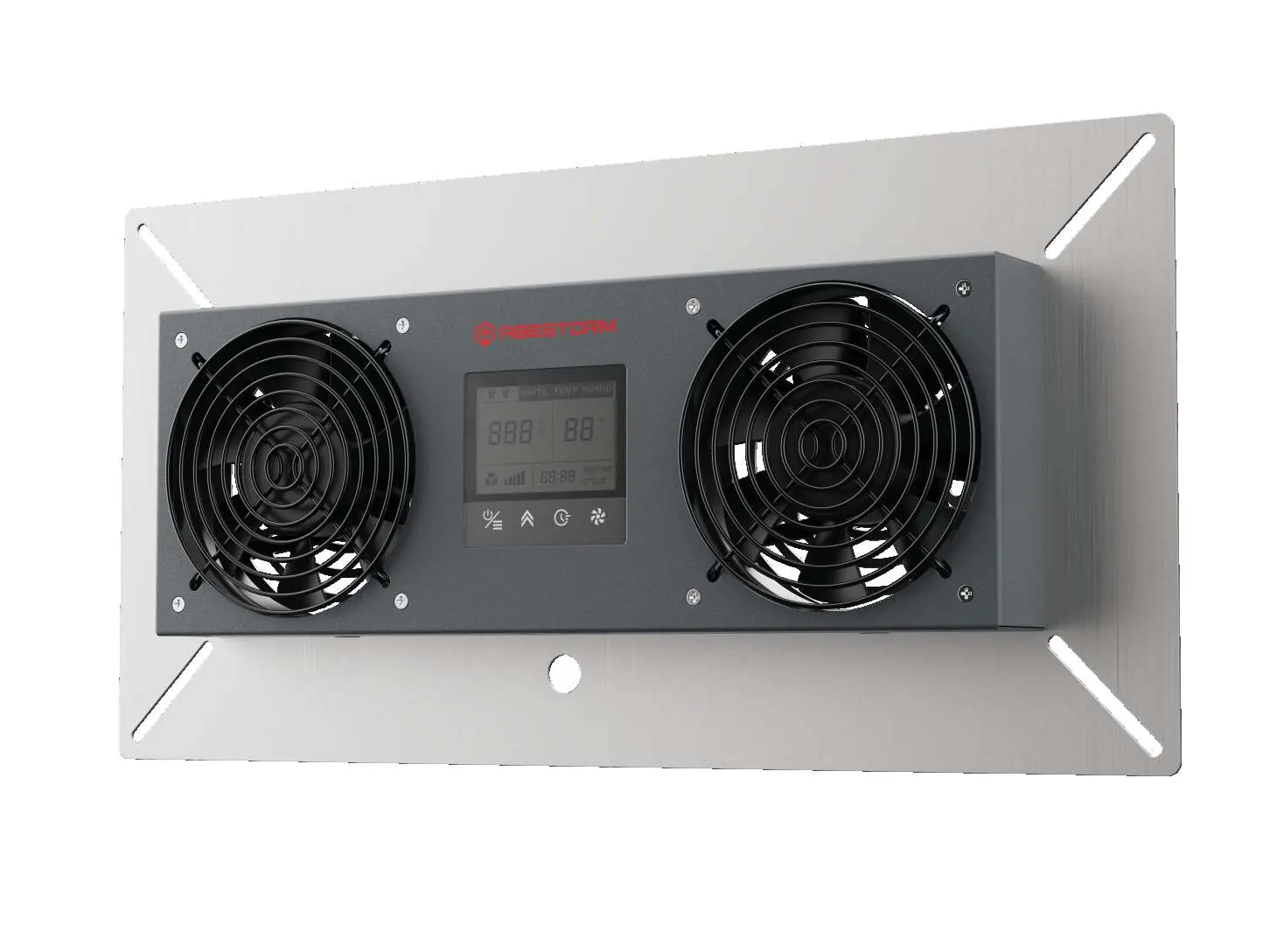
- Power/Menu Button: Press and hold for 3-5 seconds to turn the unit ON/OFF. Press once to cycle through menus (Units, Temp, Humidity).
- Up Button: Increases the selected value.
- Time Button: Press once to set ROUTING (running time). Press a second time to set CYCLIC (standby time). Use the Up button to adjust these values.
- Fan Speed Button: Adjusts fan speed from 1-5. Press for 5 seconds to start automatic humidity/temperature adjustment.
Troubleshooting
- Resetting: To reset the ROUTING and CYCLIC timers, unplug the power adapter, wait for the fans to stop, and plug it back in.
- Continuous Operation (CO) Mode: To run the fan continuously, unplug the humidity sensor probe. The screen will display dashes for temperature and humidity.
- LCD Atomization: If the screen is atomized due to excessive humidity, turn off the equipment until the water evaporates.
Safety and Maintenance
- Do not use in areas prone to water intake (outdoors, near sprinklers, pools, or bathtubs).
- Do not disassemble the product yourself.
- Clean the surface with a soft, wet cloth. Do not use friction, volatile cleaning agents, or solvents.
- Always disconnect power before installation or maintenance.
Manufacturer information
Abestorm
Practical help
Common problems
Unit needs a reset of timers
Unplug the power adapter, wait for the fans to stop completely, and then plug it back in.
Need to run fan continuously (CO mode)
Unplug the humidity sensor probe from the unit. The screen will show dashes.
LCD screen is atomized/foggy
Turn off the equipment and allow the water to evaporate.
Before use
- Ensure installation is performed by a qualified installer.
- Verify the unit is not installed in areas prone to water intake (e.g., outdoors, near pools).
- Ensure the temperature and humidity probe is installed in the same space as the equipment.
- Disconnect power supply before starting installation or maintenance.
- Check that the electrical environment is suitable.
Show more Show less
Specs in practice
- Rated Voltage
- 110V-230V, 50/60Hz.
Images and diagrams
- The probe connects to the port labeled 'PROBE' at the bottom of the fan unit.
- The fan panel is secured to the wall using four screws at the corners of the metal frame.
- The LCD screen displays fan speed, humidity, temperature, and timer status.
Model compatibility
- Compatible with standard foundation ventilation openings.
- Requires 5/16" holes for masonry installation.
- Compatible with 110V-230V power sources.

Manual page author
Emily Carter
User documentation editor