Electronics / Cables & Adapters
User Manual for Vention 20W Universal Travel Adapter FJC
Quick guide for the Vention 20W Universal Travel Adapter (Model FJC). Learn how to use the universal plug, replace the fuse, and understand compatibility and safety warnings.
Quick answers from the manual
Quick answer
- The Vention 20W Universal Travel Adapter (FJC) is a multi-plug charger with USB-C and USB-A ports. It does not convert voltage, so ensure your devices are compatible with the local power grid. p. 3
Key actions
- Replace the fuse p. 4
- Configure the plug p. 5
Problems and fixes
Overload protection triggered
Replace the blown fuse with a new 8A fuse.
p. 4Show 2 more answers Show less
Technical specifications
| Parameter | Value | Meaning | Pages |
|---|---|---|---|
| Total Output | 20W | Maximum power for all USB ports combined. | p. 3 |
| Rated Current | 8A | Maximum current capacity. | p. 3 |
Where to find it in the PDF
- Specifications p. 3
- Product Overview p. 4
- How to Use p. 5
Table of contents
Manual images
Click an image to enlargeQuick Guide
The Vention 20W Universal Travel Adapter (Model FJC) is a compact, all-in-one charging solution designed for international travel. It features a universal socket and multiple USB ports (1x USB-C, 2x USB-A). Important: This device does not convert voltage. Ensure your connected appliances are compatible with the local power grid voltage before use.
Product Overview
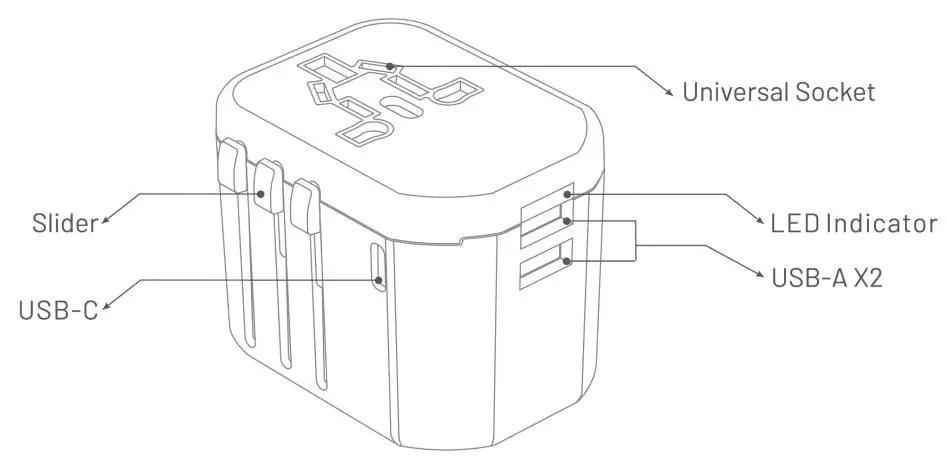
The adapter includes a slider mechanism to extend the appropriate plug type for your destination. It also features an LED indicator and a fuse compartment for overload protection.
How to Use the Adapter
To use the adapter, slide the specific plug slider down completely until it locks into place. To retract the plug, press the square button and slide it back.
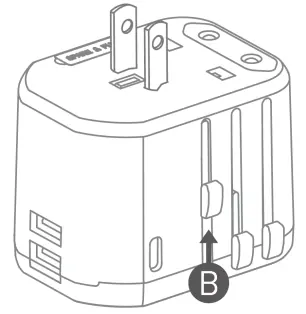
- USA plug (America, Canada, Japan, Taiwan): Slide down completely and ensure the two contact blades are in the parallel "||" position.
- AUS plug (Mainland China, Australia, New Zealand): Slide down completely and rotate the contact blades to the "\/" shape.
- UK plug (United Kingdom, Hong Kong, Malaysia, Singapore): Slide down completely.
- EU plug (European Union): Slide down completely.
Replacement of the Fuse
If the adapter is overloaded, the internal fuse will cut off the power supply. To replace it:
- Remove the small cover on the top of the adapter to access the fuse.
- Remove the old fuse.
- Insert a new 8A fuse.
Specifications
- Input: 100-240V ~ 50/60Hz, max. 600mA
- Total Output: Max. 20W
- Rated Current: Max. 8A
- USB-C Output: 5V⎓3A, 9V⎓2.22A, 12V⎓1.67A
- USB-A Output: 5V⎓3A, 9V⎓2.22A, 12V⎓1.67A
Safety Warnings
- This adapter does not convert voltage.
- Do not use with devices requiring more than 1840W at 230V or 880W at 110V.
- If three devices are charging simultaneously and the power exceeds 20W, remove one device to charge individually.
- Do not expose to liquid, moisture, or humidity.
- Keep away from children.
- For indoor use only.
Manufacturer information
Vention
Practical help
Common problems
Device not charging
Ensure the total power output does not exceed 20W. If three devices are charging simultaneously and power exceeds 20W, remove one device.
No power output
Check if the fuse has blown due to overload. Replace the fuse with a new 8A type.
Before use
- Verify that your appliance's input voltage matches the local power network voltage.
- Ensure the total power demand of your devices is under 1840W (at 230V) or 880W (at 110V).
- Select the correct plug configuration for your destination country.
- Ensure the adapter case is not damaged.
Show more Show less
Specs in practice
- Rated Current
- Maximum 8A current capacity for the connected appliance.
- Total Output
- Maximum 20W combined power for all USB ports.
Images and diagrams
- Slider: Used to extend and retract the specific plug type.
- Universal Socket: Accepts various international plug types.
- Fuse Cover: Located on the top, removable for fuse replacement.
Model compatibility
- Suitable for cameras, iPads, iPhones, MacBooks, Android smartphones, power banks, game consoles, shavers, and GPS.

Manual page author
David Miller
Documentation analyst