Power / Power Banks
User Manual for Vention 20000mAh Power Bank TF-D22
Quick guide for the Vention 20000mAh Power Bank (TF-D22). Learn how to charge your devices, maintain the battery, and understand safety precautions.
Quick answers from the manual
Quick answer
- To charge your device, connect the charging cable to your device and then to one of the USB ports on the power bank. To recharge the power bank, connect it to a power adapter using the USB-C port. p. 1
Key actions
- Charge the power bank fully before first use. p. 1
- Perform a full charge cycle every 2-3 months. p. 1
First start
- Charge the power bank to 100% before using it for the first time. p. 1
Maintenance and reset
- Clean with a dry, soft cloth. p. 1
Technical specifications
| Parameter | Value | Meaning | Pages |
|---|---|---|---|
| Capacity | 20000mAh | Total battery capacity | p. 1 |
| Input (USB-C) | 5V-3A (18W Max) | Maximum input power for recharging | p. 1 |
| Output (USB-A1/USB-A2) | 5V-3A, 9V-2A, 12V-1.5A; 10V-2.25A (22.5W Max) | Maximum output power for charging devices | p. 1 |
Where to find it in the PDF
- User Manual p. 1
Table of contents
Manual images
Click an image to enlargeQuick guide from the manual
This power bank is designed to charge mobile devices. For optimal performance, ensure the power bank is fully charged before its first use. Perform a full charge cycle (0% to 100%) every 2-3 months to maintain battery health.
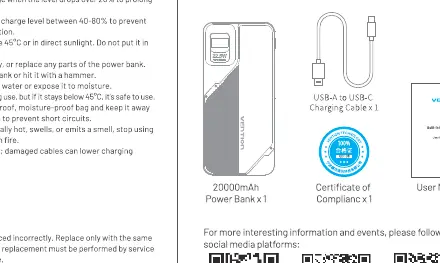
Product Overview
The device features the following components:
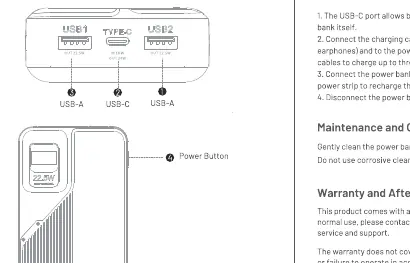
- USB1 and USB2: Output ports for charging devices.
- USB-C: Input/Output port.
- Power Button: Used to activate the power bank.
Instructions for Use
- The USB-C port allows both charging other devices and recharging the power bank itself.
- Connect the charging cable to your device (such as a smartphone or earphones) and to the power bank.
- Connect the power bank to an adapter and plug it into a powered outlet or power strip to recharge the power bank.
- Disconnect the power bank once charging is complete.
Maintenance and Cleaning
Clean the power bank with a dry, soft cloth. Do not use corrosive cleaners, as these may damage the casing or internal components.
Important Safety Tips
- Do not immerse the power bank in water or expose it to moisture.
- Do not expose the power bank to temperatures above 45°C or direct sunlight.
- Do not disassemble, modify, or attempt to repair the power bank.
- Do not drop, hit, or strike the power bank.
- If the power bank swells, emits a smell, or leaks, stop using it immediately and keep it away from fire.
- Keep the device away from metal objects to prevent short circuits.
Manufacturer information
Vention
Practical help
Common problems
Power bank not charging
Ensure the power source is active and the cable is securely connected to the USB-C port.
Device not charging
Check if the cable is properly connected to both the power bank and the device. Ensure the power bank has sufficient charge.
Before use
- Charge the power bank fully before the first use.
- Ensure you are using a compatible charging cable.
- Check the power bank for any physical damage before use.
Specs in practice
- Total Output
- 5V-3A (15W Max) when multiple devices are connected simultaneously.
Images and diagrams
- The diagram identifies the USB1, USB2, and USB-C ports.
- The power button is located on the side of the device.
Model compatibility
- Compatible with devices requiring USB-A or USB-C charging.
- Supports fast charging up to 22.5W Max on specific outputs.

Manual page author
Michael Turner
Technical manual editor
Reviews PDF manuals for structure, safety notes, and practical product details so readers can find the right information quickly.