Power / Batteries & Chargers
Vention USB-C Fast Charging Cable
Quick guide for the Vention USB-C fast charging cable. Learn how to properly connect, maintain, and safely use your cable for optimal performance and longevity.
Table of contents
Quick Start Guide
To use your Vention USB-C cable, simply insert one end into your device's charging port and the other end into a compatible power adapter, power bank, or computer USB port. Ensure your power adapter's output matches the requirements of your device for optimal charging performance.
Product Overview
This high-quality cable is designed for fast charging and durability. It is compatible with a wide range of devices, including smartphones, tablets, and digital cameras.
Usage Instructions
Follow these steps to ensure proper operation:
- Insert one end of the cable into the charging interface of your device.
- Insert the other end into your power source (power adapter, computer, or power bank).
- Verify that the power output of your adapter is compatible with your device to achieve the best charging performance.
Maintenance and Safety
To maintain the longevity of your cable and ensure safe operation, follow these guidelines:
- Cleaning: Clean the cable regularly using a soft, damp cloth.
- Handling: Avoid contact with sharp objects that could scratch or damage the surface.
- Storage: When not in use, store the cable properly. Avoid twisting, squeezing, or pulling the cable excessively.
- Safety Warnings: Do not bend the cable excessively to avoid damaging internal wiring. Keep the cable away from high temperatures, humidity, or corrosive environments. Always use an original or standard power adapter. Stop using the cable immediately if it becomes damaged or malfunctions.
Manufacturer information
Vention
Practical help
Common problems
Device is not charging or charging slowly
Verify that the power adapter output is sufficient and compatible with your device.
Cable appears damaged or frayed
Stop using the cable immediately to avoid potential damage to your devices.
Before use
- Check the cable for any physical damage or exposed wiring.
- Ensure the power adapter is a standard, functioning unit.
- Verify that the device charging port is clean and free of debris.
- Confirm the power adapter output matches the device requirements.
Images and diagrams
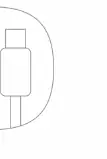
- The diagram illustrates the standard USB-C to USB-C connector configuration.
Model compatibility
- Compatible with various devices including smartphones, tablets, and digital cameras.
- Requires a compatible power adapter for fast charging functionality.

Manual page author
Michael Turner
Technical manual editor
Reviews PDF manuals for structure, safety notes, and practical product details so readers can find the right information quickly.