Electronics / Cables & Adapters
User Manual for Vention FK0 10000mAh Power Bank
Quick guide for the Vention FK0 10000mAh Power Bank. Learn how to use the built-in cable, wireless charging, and maintain your device safely.
Table of contents
Quick Guide
The Vention FK0 is a 10000mAh power bank featuring wireless charging, a built-in USB-C cable, and a digital display. To turn on the power bank, press the power button once. Ensure the device is charged before first use.
Product Overview
The device includes the following components:
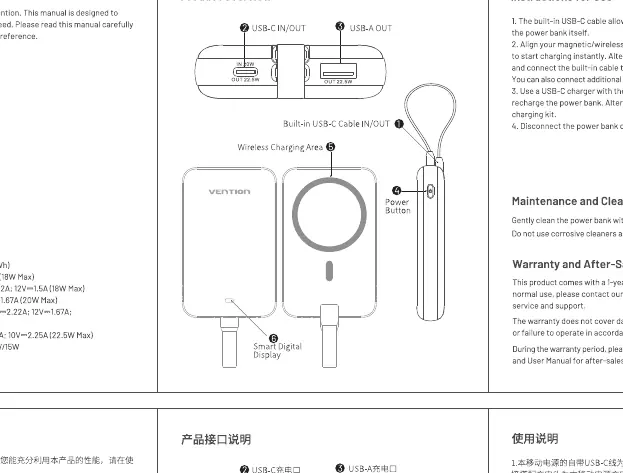
- USB-C IN/OUT: Port for charging the power bank or external devices.
- USB-A OUT: Port for charging external devices.
- Built-in USB-C Cable: Integrated cable for charging devices.
- Wireless Charging Area: Place your device here for wireless charging.
- Power Button: Press once to activate the power bank.
- Smart Digital Display: Indicates battery level.
Charging Instructions
Wired Charging: Use the built-in USB-C cable or the USB-A/USB-C ports to connect your devices. The power bank can charge multiple devices simultaneously.
Wireless Charging:
- Align your magnetic/wireless charging device with the wireless charging area on the power bank.
- Press the power button once to turn on the power bank.
- The device will begin charging automatically.
Maintenance and Safety
To ensure safe operation and longevity of the power bank, follow these guidelines:
- Do not store the power bank in direct sunlight or environments above 45°C.
- Do not disassemble, modify, or repair the unit.
- Keep the device dry; do not immerse in water.
- Stop using the device immediately if it becomes swollen, leaks, or emits a strange smell.
- Clean the surface with a dry cloth; do not use corrosive cleaners.
- If the power bank warms up during use, this is normal, but stop use if it becomes excessively hot.
Specifications
- Model: FK0
- Capacity: 10000mAh (3.85V/38.5Wh)
- Input (USB-C): 5V-3A, 9V-2A, 12V-1.5A
- Output (USB-C): 5V-3A, 9V-2.22A, 12V-1.67A
- Output (USB-A): 5V-3A, 9V-2A, 12V-1.5A
- Wireless Output: 5W/7.5W/10W/15W
- Total Output: 5V-3A (15W Max)
Manufacturer information
Vention
Practical help
Common problems
Device not charging wirelessly
Ensure the device is properly aligned with the wireless charging area and press the power button once to activate the power bank.
Power bank is warm during use
It is normal for the power bank to warm up during operation. However, if it becomes excessively hot, stop using it immediately.
Swelling or leakage
Stop using the power bank immediately and dispose of it according to local regulations.
Before use
- Ensure the power bank is fully charged.
- Verify your device is compatible with wireless charging.
- Check that the charging cable is securely connected to the port.
- Press the power button once to activate the unit before charging.
Specs in practice
- 10000mAh Capacity
- The total energy storage capacity of the power bank.
- 15W Wireless Output
- The maximum power delivery for wireless charging, depending on the device.
- USB-C IN/OUT
- A versatile port that can be used to charge the power bank itself or to charge other devices.
Images and diagrams
- The diagram illustrates the location of the USB-C IN/OUT port, USB-A output, built-in cable, wireless charging area, power button, and digital display.
Model compatibility
- Supports wireless charging for compatible devices.
- Can charge multiple devices simultaneously using wired and wireless methods.

Manual page author
Emily Carter
User documentation editor
Prepares concise manual descriptions and highlights the most useful setup, operation, and maintenance information for readers.