Tools / Pipe Tools
VEVOR 12V Lithium Ion Drain Auger User Manual
Quick guide for the VEVOR 12V Lithium Ion Drain Auger (Model CDC504-12). Includes setup, battery charging, operation, cable replacement, and troubleshooting.
Table of contents
Manual images
Click an image to enlargeQuick guide from the manual
The VEVOR 12V Lithium Ion Drain Auger is designed to clear obstructions in sinks, bathtubs, and toilets. It is suitable for pipes with a diameter between 0.75 and 2 inches. Always wear appropriate personal protective equipment, including safety glasses and heavy-duty leather work gloves, when operating this tool.
Know your product
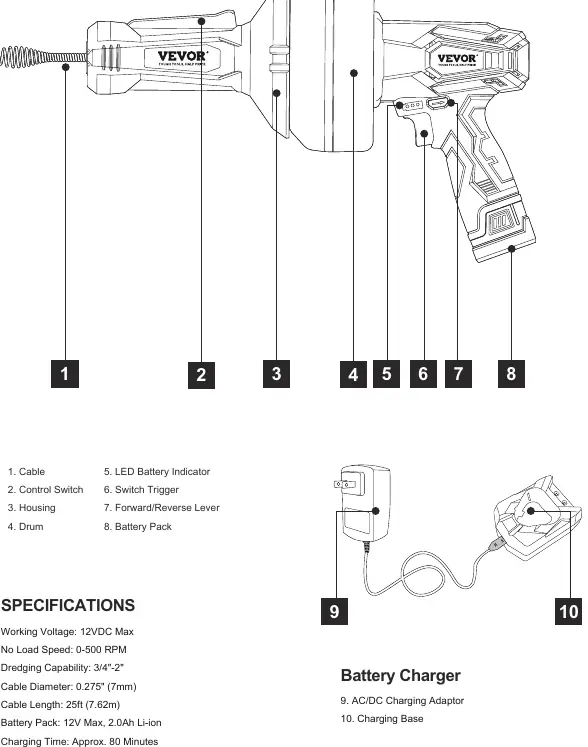
The tool consists of a cable, drum, variable speed switch trigger, forward/reverse lever, and a removable 12V battery pack. The battery gauge indicator on the tool shows the charge level: Red (low), Red/Yellow (middle), and Red/Yellow/Green (full).
Battery charging
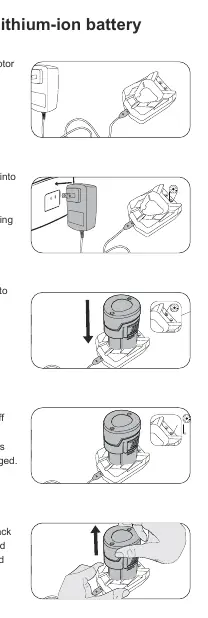
The battery is shipped in a low-charge state and requires charging before first use. Allow 4-5 charging cycles for the battery to reach optimum performance. To charge, connect the AC/DC adapter to the charging base, plug into a power outlet, and insert the battery. A red LED indicates charging; a green LED indicates a full charge.
Operation
Manual feed: Lock the switch trigger by placing the forward/reverse lever in the center position. Hold the tool body with one hand and manually feed the cable into the drain.
Switch trigger feed: Place the lever in the forward or reverse position. Press and hold the operation switch on the front handle, then squeeze the switch trigger to advance or retract the cable.
Clearing obstructions: Feed the cable slowly until it hits an obstruction. Advance the cable by squeezing the trigger while holding the operation switch to allow the tip to bore into the obstruction. If the cable stops rotating, release the trigger to avoid kinking or damaging the cable.
Maintenance
Clean the cable after each use with a clean cloth and warm soapy water as it is retracted. If the tool will not be used for a long time, apply butter to the cable surface to prevent rust. To replace the cable, unscrew the 4 installation screws on the drum, loosen the fixing screws, pull out the old cable, insert the new one, and reassemble.
Troubleshooting
- Variable speed trigger is locked: Ensure the forward/reverse lever is not in the center position.
- Cable not advancing/retracting: Ensure the operation switch on the front handle is pressed and held.
- Battery short runtime: Ensure the battery is fully charged; it may take several cycles to reach full capacity.
- Sparking in air vents: A small amount of sparking is normal and does not indicate a problem.
Manufacturer information
VEVOR
Practical help
Common problems
Variable speed trigger is locked
Ensure the forward/reverse lever is in the correct position (left for forward, right for reverse). If it is in the middle, the trigger is locked.
Cable cannot be advanced or retracted
Ensure you are pressing and holding the operation switch on the front handle while using the switch trigger.
Battery has short runtime
Ensure the battery is fully charged. It may take 4-5 charging cycles to reach optimum runtime.
Battery pack cannot be charged
Check if the charger is plugged into a power source and all connections are firm. Check LED indicators on the charger.
Before use
- Charge the battery pack fully before first use.
- Wear ANSI-approved safety glasses and heavy-duty leather work gloves.
- Ensure the work area is clean and well-lit.
- Check that the forward/reverse lever is in the desired position.
- Remove any adjusting keys or wrenches from the tool.
Specs in practice
- Working Voltage
- 12VDC Max
- No Load Speed
- 0-500 RPM
- Dredging Capability
- 3/4 inch to 2 inch pipe diameter
- Cable Length
- 25 feet (7.62 meters)
- Charging Time
- Approximately 80 minutes
Images and diagrams
- 2. Control Switch
- 5. LED Battery Indicator
- 6. Switch Trigger
- 7. Forward/Reverse Lever
- 8. Battery Pack
Model compatibility
- Suitable for sink, bathtub, and toilet drains.
- Not for use in pipes containing drain cleaning chemicals.
- Not for use in pipes obstructed by roots.

Manual page author
Emily Carter
User documentation editor
Prepares concise manual descriptions and highlights the most useful setup, operation, and maintenance information for readers.