Industrial / Material Handling
User Manual for VEVOR 2024DB Stair Climbing Cart
Quick guide for the VEVOR 2024DB Stair Climbing Cart. Includes assembly instructions, safety warnings, load capacity specifications, and maintenance tips.
Quick answers from the manual
Quick answer
- The VEVOR 2024DB is a stair-climbing cart with a maximum load capacity of 88lbs on flat ground and 60lbs when climbing stairs. p. 3
Key actions
- Assemble front wheels by pushing them into the leg and securing with washers and screws. p. 5
- Assemble rear wheels by sliding the axle through the frame and securing with springs and washers. p. 6
Problems and fixes
Removing wheels
Press the black button in the center of the outside of the wheel inward to separate it from the iron pipe.
p. 6Maintenance and reset
- Avoid prolonged sun exposure to prevent aging. Fold the cart when not in use for long periods. p. 7
Technical specifications
| Parameter | Value | Meaning | Pages |
|---|---|---|---|
| Maximum Load (Flat Ground) | 88lbs | Weight limit on flat surfaces | p. 3 |
| Maximum Load (Climb Stairs) | 60lbs | Weight limit on stairs | p. 3 |
Where to find it in the PDF
- Safety Instructions and Parameters p. 3
- Components List p. 4
- Assembly Instructions p. 5, 6
Table of contents
Manual images
Click an image to enlargeQuick guide from the manual
The VEVOR 2024DB is a stair-climbing cart designed for transporting items. Please adhere to the following safety guidelines:
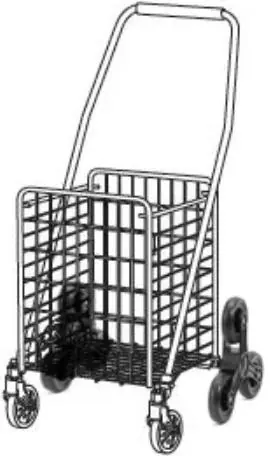
- Do not place the cart near flammable materials.
- It is strictly forbidden to carry people under any condition.
- Exercise caution when going up and down stairs.
- Overloading is strictly prohibited.
- Do not move too fast when passing through pothole areas.
Components
The package includes the following parts:
- A: Cart Frame
- B: Spring
- C: Wrench
- D: Axle
- E: Front Wheel
- F: Nuts
- G: Washer
- H: Small Washer
- I: Rear Wheel
- Elastic Binding Rope
Assembly
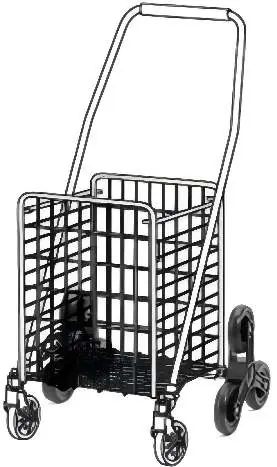

Assemble the front wheels
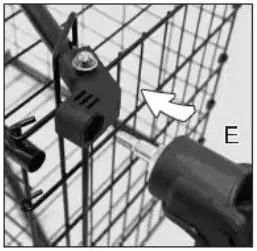
- Push the front wheel E into the front leg. Align the angle of the connecting part so the hex head screw on the axis of the front wheel can be pushed into the leg.
- Place the small washer H and Washer G on the short shaft of the front wheel E in turn, then insert the screw F.
- Tighten the screw F using the provided wrench C.
Assemble the rear wheels
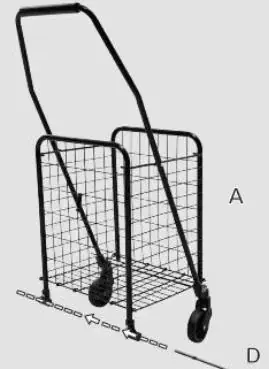
- Unfold the shopping cart frame A to expose the back leg. Slide the long axle D through the hole in each back leg.
- Place both sides of the back wheel into spring B and washer H.
- Insert parts D directly into the center of the wheel. Ensure it is fixed and cannot be pulled out.
Maintenance
- Avoid prolonged exposure to the sun to prevent aging.
- Fold the cart when it is not used for a long time.
- Keep children away from the cart to prevent them from using it as a toy.
To remove the wheels, locate the black button in the center of the outside of the wheel and press it inward to separate the wheel from the iron pipe.
Manufacturer information
VEVOR
Practical help
Common problems
Wheel removal
Locate the black button in the center of the outside of the wheel and press it inward to separate the wheel from the iron pipe.
Before use
- Ensure the cart is not overloaded (88lbs flat / 60lbs stairs).
- Check that all wheels are securely attached.
- Verify the cart is not near flammable materials.
- Ensure the cart is not used to carry people.
Specs in practice
- Maximum Load (Flat Ground)
- 88lbs
- Maximum Load (Climb Stairs)
- 60lbs
Images and diagrams
- The structure diagram identifies the handle, hoop, climbing wheel, and universal wheel.
Model compatibility
- Not suitable for carrying people.
- Avoid moving too fast on uneven surfaces or pothole areas.

Manual page author
Michael Turner
Technical manual editor
Reviews PDF manuals for structure, safety notes, and practical product details so readers can find the right information quickly.