HVAC / Water Heaters
Commissioning Guide for Viessmann Vitodens 100-W/111-W Gas Condensing Boiler
Quick commissioning guide for Viessmann Vitodens 100-W and 111-W gas condensing boilers. Includes step-by-step setup, parameter configuration, and interface navigation.
Table of contents
Quick guide from the manual
This document outlines the commissioning process for the Viessmann Vitodens 100-W and 111-W gas condensing boilers. It is intended for initial setup using the control panel. For detailed installation instructions, please refer to the full Installation & Service Instructions manual.
User interface
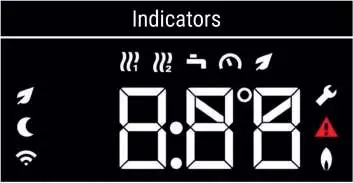
The control panel allows for navigation and monitoring of the boiler status. The display provides indicators for heating circuits, DHW temperature, system pressure, WiFi connection, and fault status. Use the Menu, Up/Down arrows, and OK buttons to navigate and confirm settings.
Commissioning steps
To begin commissioning, ensure the boiler is in Access Point (AP) mode by pressing the Menu button for 4 seconds. Follow these steps to configure the system:
- C.1 Filling programme: Select ON to move the diverter valve for filling, or OFF (default) to skip.
- C.2 Venting programme: Select ON to run the pump in intervals (up to 20 mins) to vent the system, or OFF (default) to skip.
- C.3 Gas Type: Select 2 for natural gas (default) or 3 for liquid gas.
- C.5 Flue System Type: Select the appropriate type (1-4) based on your installation (room air dependent or room sealed).
- C.6 Flue System Length: Adjust the length in meters. The default is 1m; add 1m for every flue bend.
- C.7 Operating Mode: Choose the mode: 1 (time program), 4 (weather compensation), 13 (constant operation/switch live - default), or 14 (OpenTherm).
- C.8 Hydraulic/System Scheme: Select 1 (combi/system boiler) or 3 (system boiler with cylinder sensor - default).
- C.9 Activating Switch Live: Only available if C.7 is set to 4. Select 1 to activate.
- C.10 EM-EA1 settings: Default is 0 (no function).
- C.11-C.12 Date and Time: Use arrows to adjust and OK to confirm each setting.
- C.13 Summer/Winter Time: Select ON for automatic changeover or OFF (default) for constant time.
- C.15 Vitotrol 200-E: Only available if C.7 is set to 4. Select ON to activate.
Completing commissioning
After completing the final step, an arrow will appear indicating commissioning is complete. Press OK to confirm and start the flue gas sensor check. The boiler will restart and display 'FST' while it carries out the check and fires for a few seconds. Once completed, the set temperature will appear, and the boiler is ready to run.
Controls and monitoring
The ViGuide application is available for remote monitoring, internet connectivity, and guided spare part replacement. You can also register your installation via the Viessmann PartnerPortal.
Manufacturer information
Viessmann Climate Solutions
Practical help
Common problems
Boiler not ready for setup
Ensure you are in Access Point (AP) mode by pressing the menu button for 4 seconds.
Venting takes too long
The venting program runs in intervals and can take up to 20 minutes to complete.
Flue length calculation
The default setting is 1m. You must add 1m of length for every flue bend in your installation.
Before use
- Ensure the boiler is powered on.
- Identify if you are using natural gas (2) or liquid gas (3).
- Determine your flue system type (1-4) and total length.
- Decide on the operating mode (e.g., time program, weather compensation).
- Have the installation manual ready for advanced settings.
Specs in practice
- C.3 Gas Type
- 2 for natural gas, 3 for liquid gas.
- C.7 Operating Mode
- 1: time program, 4: weather compensation, 13: constant operation, 14: OpenTherm.
- C.8 Hydraulic Scheme
- 1: combi/system boiler, 3: system boiler with cylinder sensor.
Images and diagrams
- The control panel features a digital display with icons for heating circuits, DHW temperature, system pressure, and fault status.
- Navigation uses Menu, Up/Down arrows, and OK buttons.
Model compatibility
- ViGuide application is required for internet connectivity and remote monitoring.
- Vitotrol 200-E is only compatible when C.7 is set to 4 (weather compensation).

Manual page author
Michael Turner
Technical manual editor
Reviews PDF manuals for structure, safety notes, and practical product details so readers can find the right information quickly.