HVAC / Water Heaters
User Manual for Viessmann Vitodens 100-W/111-W/111-F Gas Boiler
Comprehensive user manual for the Viessmann Vitodens 100-W, 111-W, and 111-F gas boilers. Includes instructions for operation, setting heating and hot water programs, troubleshooting, and maintenance.
Table of contents
Manual images
Click an image to enlargeQuick Guide
This manual provides instructions for operating the Viessmann Vitodens 100-W, 111-W, and 111-F gas boilers. The system is controlled via a touch display. Key indicators include the Lightguide: a slowly pulsing light indicates standby mode, while a rapidly blinking light indicates a system fault.
Safety Instructions
Danger: Improper work on the heating system can lead to life-threatening accidents. Only authorized professionals should perform installation, gas, or electrical work. Do not open the device or remove covers. If you smell gas, do not smoke, do not operate electrical switches, close the gas shut-off valve, open windows and doors, and leave the danger zone immediately.
Operation
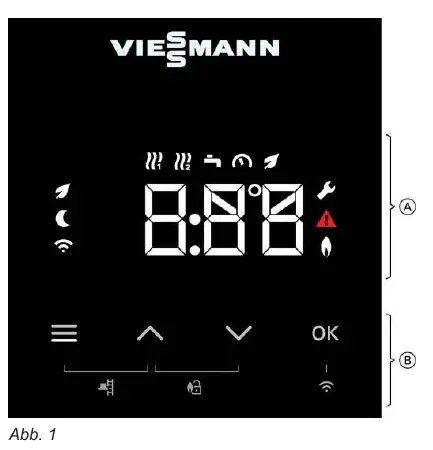
The boiler is operated using the integrated touch display. You can navigate menus using the arrow keys and confirm selections with the OK button. The system can also be connected to the internet via WLAN for remote control using the ViCare app.
Operating Modes
The system supports several operating modes configured by your installer:
- Weather-compensated operation: Flow temperature is adjusted based on outside temperature.
- Constant operation: Flow temperature remains constant, controlled by time programs.
- Room-temperature-controlled operation: Heating is switched on/off based on room temperature.
Settings
You can adjust heating and hot water settings through the main menu:
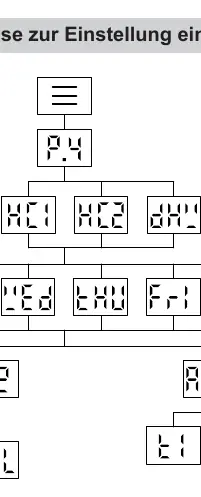
- Time Programs: Define time phases for heating and hot water to suit your schedule.
- Temperature Levels: Choose between Normal, Reduced, and Comfort levels.
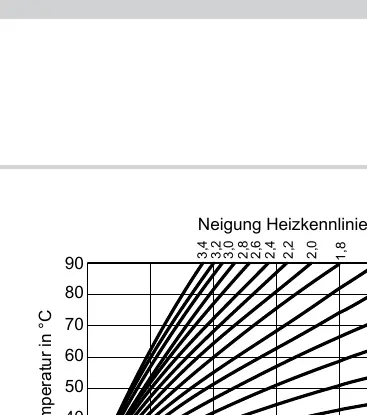
- Heating Curve: Adjusts the relationship between outside temperature and flow temperature (only in weather-compensated mode).
Troubleshooting
If a fault occurs, a warning symbol and error code will appear on the display. Do not attempt to reset the system repeatedly. If the burner is locked, you may attempt to unlock it by holding the arrow keys for 4 seconds. If the fault persists, contact your heating contractor.
Maintenance
Regular maintenance is essential for safe and efficient operation. It is recommended to have the system inspected by an authorized professional at least every two years. You can clean the exterior of the unit with a standard household cleaner and a microfiber cloth.
Manufacturer information
Viessmann Climate Solutions
Practical help
Common problems
Rooms are too cold
Check if the heating system is switched on. Verify settings on the controller or room thermostat. Ensure the fuel supply is open.
No hot water
Check if the heating system is switched on. Verify hot water temperature settings. Ensure the gas supply is open.
Error code or blinking warning symbol
Note the error code displayed. Do not reset repeatedly. Contact your heating contractor for analysis.
Before use
- Ensure the gas shut-off valve is open.
- Verify the power supply is switched on.
- Check the system pressure (should be at least 1.0 bar).
- Ensure the boiler is not in 'OFF' mode.
Specs in practice
- Heating Curve
- Determines the flow temperature based on outside temperature. Higher values provide higher flow temperatures.
- Normal Temperature
- The standard comfort temperature level for your rooms.
- Reduced Temperature
- An energy-saving temperature level used during the night or periods of absence.
Images and diagrams
- The control panel features a touch interface with a navigation area (menu, arrows, OK) and a function area displaying status icons like heating circuits, hot water, and system pressure.
Model compatibility
- Requires a 2.4 GHz WLAN connection for ViCare app remote control features.

Manual page author
David Miller
Documentation analyst
Organizes user manual content into clear summaries, with attention to model details, product context, and everyday usability.