HVAC / Thermostats & Controls
Operating Instructions for Viessmann Vitotrol 200-E Remote Control
Quick guide for the Viessmann Vitotrol 200-E remote control. Learn how to adjust room temperatures, set time programs, manage DHW heating, and troubleshoot common issues.
Quick answers from the manual
Quick answer
- The Vitotrol 200-E is a wired remote control for Viessmann heat generators, allowing users to manage up to 4 heating circuits, adjust room and DHW temperatures, and set time programs. p. 9, 11
Key actions
- Adjust room temperature p. 17
- Set time program p. 15
- Activate holiday program p. 20
First start
- Commissioning must be performed by an authorized contractor; settings are transferred from the heat generator control unit. p. 9
Problems and fixes
Rooms too cold
Check operating program, room temperature settings, and time program.
p. 26Maintenance and reset
- Clean surfaces with a non-scouring domestic cleaning agent. p. 28
Technical specifications
| Parameter | Value | Meaning | Pages |
|---|---|---|---|
| Permissible ambient temperature | 0 °C to 40 °C | Operating temperature range for the installation room. | p. 9 |
Where to find it in the PDF
- Safety instructions p. 2, 3, 4
- Operating the remote control p. 11, 12, 13
- Troubleshooting p. 26, 27
Table of contents
Manual images
Click an image to enlargeQuick guide from the manual
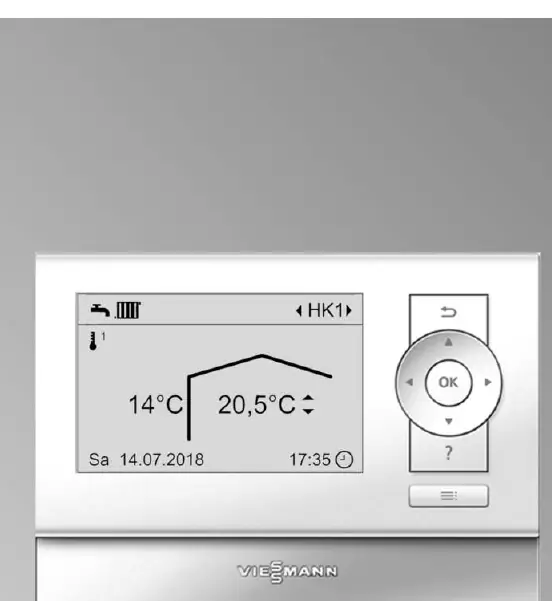
The Vitotrol 200-E is a wired remote control designed for Viessmann heat generators. It allows users to manage up to 4 heating circuits, adjust room and domestic hot water (DHW) temperatures, and configure time programs for efficient heating. The device features an illuminated graphic display and two control levels: Standard and Extended.
Safety instructions
Danger: Incorrectly executed work on the heating system can lead to life-threatening accidents. Always follow these precautions:
- Never open the appliance or remove the cladding.
- Do not touch hot surfaces of uninsulated pipes or flue pipes.
- If you smell gas: Do not smoke, do not switch electrical appliances on or off, close the gas shut-off valve, open windows, and evacuate the area.
- If water escapes from the appliance, switch off the heating system at the external isolator (fuse box) and notify your contractor.
- Ensure ambient temperatures in the installation room are between 0 °C and 35 °C.
Operating the remote control
The remote control offers two menu levels:
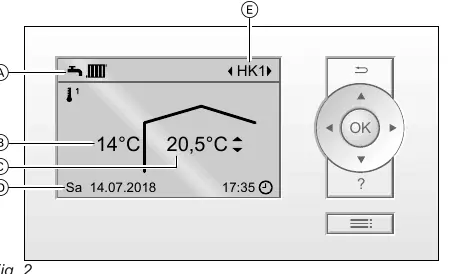
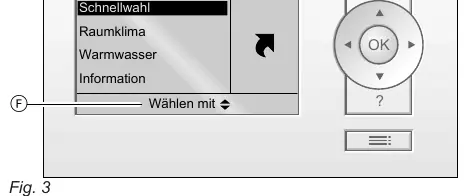
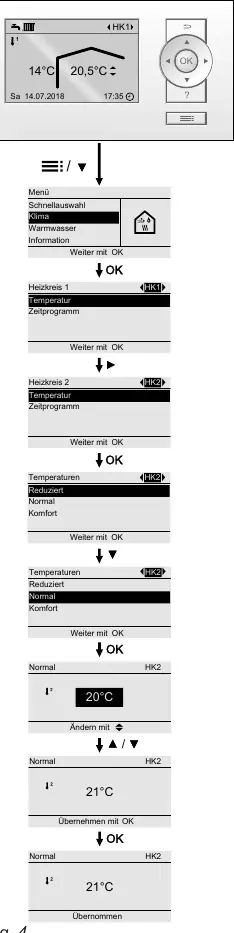
- Standard menu: Used for basic adjustments like room temperature and heating circuit selection.
- Extended menu: Used for all settings, including holiday programs, time programs, and display settings.
Use the cursor keys to scroll through menus and the OK button to confirm selections. If no settings are adjusted for a few minutes, the display will enter screensaver mode.
Central heating and DHW settings
You can set three room temperature levels for each heating circuit:
- Reduced: For night or absences.
- Standard: For daytime comfort.
- Comfort: For when you want to be particularly cozy.
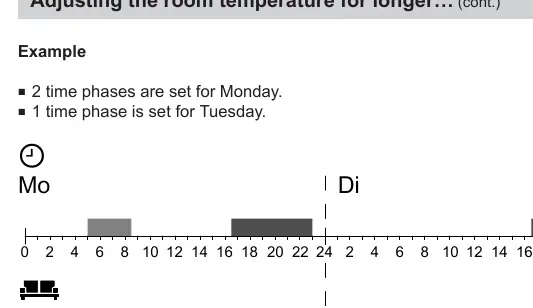
Time programs: You can define time phases for central heating and DHW heating to ensure the system operates only when needed. You can set these individually for each day of the week or for the whole week.
Holiday programs: Use the "Holiday program" to save energy during long absences. Use "Holidays at home" if you are staying home for a few days but want to maintain a comfortable temperature without changing your regular time program.
Troubleshooting
If the system develops a fault, a symbol will flash on the display. Do not acknowledge fault messages repeatedly. Contact your heating contractor if the cause cannot be identified. Common issues include:
- Rooms too cold: Check if the operating program is enabled and verify room temperature/time program settings.
- Rooms too hot: Check if "Holidays at home" is active or if settings are too high.
- No hot water: Check DHW operating program and temperature settings.
Maintenance
The appliance surfaces can be cleaned with a commercially available, non-scouring domestic cleaning agent.
Manufacturer information
Viessmann Climate Solutions
Practical help
Common problems
Rooms are too cold
Check if central heating is enabled, verify room temperature settings, and check the time program for the 'Indoor environment'.
Rooms are too hot
Check room temperature settings and ensure 'Holidays at home' is not active.
No hot water
Ensure DHW heating is enabled and check the DHW time program.
Fault or Service message displayed
Check the heat generator control unit for specific fault details and notify your contractor.
Before use
- Ensure the control unit is connected and configured correctly.
- Verify the heating system has been commissioned by an authorized contractor.
- Check that the system is not in standby mode.
- Ensure ambient temperature in the installation room is between 0 °C and 35 °C.
Specs in practice
- Comfort mode
- A temporary override to heat rooms to the comfort temperature, independent of the time program.
- Holiday program
- An energy-saving mode for long absences that reduces room temperature and switches off DHW heating.
Images and diagrams
- The standard menu display shows the current outside temperature, room temperature, and the selected heating circuit.
- The extended menu provides access to all system settings, including holiday and time programs.
Model compatibility
- Compatible with Viessmann heat generators.
- Requires connection to the heat generator control unit.

Manual page author
David Miller
Documentation analyst
Organizes user manual content into clear summaries, with attention to model details, product context, and everyday usability.