HVAC / Thermostats & Controls
Operating Instructions for Viessmann Vitotrol 100-E Wireless Remote Control
Quick guide for the Viessmann Vitotrol 100-E wireless remote control. Learn how to set time programs for room and DHW heating, adjust temperature levels, and understand display symbols.
Table of contents
Quick guide from the manual
The Vitotrol 100-E is a wireless remote control designed for managing a single heating circuit. It allows users to set time programs for room heating and domestic hot water (DHW), adjust temperature levels, and monitor system status. Important: Wireless signals can interfere with electronic medical devices such as pacemakers, hearing aids, and defibrillators. Users with such equipment should avoid the immediate vicinity of the device.
Overview of controls
The device features an LCD display and operating buttons:
- Settings button: Access the menu.
- Arrow buttons: Scroll through menus and adjust values.
- OK button: Confirm selections or changes.
- Extended heating button: Confirm the function for extended heating or extending the time phase once.
- Temperature level button: Select set room temperatures.
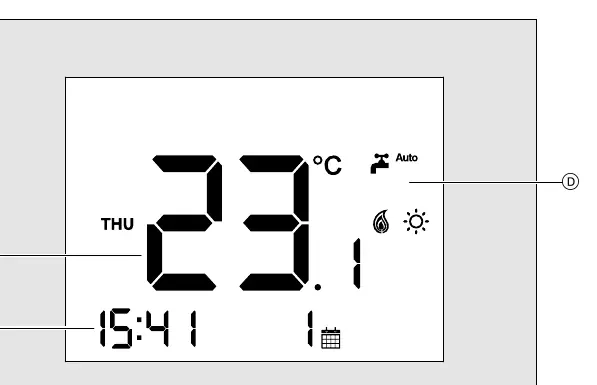
The display shows the current time, room temperature, and various status symbols, including heating active, frost protection, and battery status.
Settings menu
Access the menu by pressing the Settings button. Available settings include:
- SCHEDULE: Time program for room heating.
- TIME DATE: Set time and date formats.
- DHW: Domestic Hot Water heating (on/off, schedule, setpoint).
- TEMP PROF: Temperature levels (Reduced, Normal, Comfort).
- DEV INFO: Device information (battery level, signal range, software version).
- LANGUAGE: Change display language.
- CHILDLOCK: Lock out controls.
- RESET: Reset the device.
Time programs
You can define time phases for both room heating and DHW heating to optimize energy usage.
Room heating
You can set up to 4 time phases per day. For each phase, define a start time, end time, and temperature level (Normal or Comfort). Outside these phases, the system defaults to the Reduced temperature level.
DHW heating
Similar to room heating, you can set time phases for DHW heating to ensure hot water is available when needed. Follow the menu path: Settings > DHW > DHW SCHED to configure.
Safety and maintenance
Protect the device from moisture, dust, liquids, vapours, direct sunlight, and thermal radiation. Only operate the device inside closed buildings and never in rooms with an explosion risk. If the device is damaged, do not start it up. Use only spare parts supplied or approved by Viessmann.
Manufacturer information
Viessmann Climate Solutions
Practical help
Common problems
Fault symbol appears on display
Check the system for faults as indicated by the heating appliance.
Replace battery symbol appears
Replace the batteries in the device.
Wireless interference
Ensure the device is not placed near electronic medical devices like pacemakers.
Before use
- Ensure the device is installed in a closed building.
- Check the appliance for external damage before startup.
- Ensure minimum clearances are maintained for reliable signal transmission.
- Check battery status via the DEV INFO menu.
- Verify that the device is not located in an area with explosion risks.
Images and diagrams
- The overview of controls diagram identifies the LCD screen, operating buttons, and display symbols.
- The time program diagrams illustrate the step-by-step process for setting start and end times for heating phases.
Model compatibility
- Compatible with Viessmann heating systems.
- Wireless signals may interfere with medical devices; maintain distance if necessary.

Manual page author
David Miller
Documentation analyst
Organizes user manual content into clear summaries, with attention to model details, product context, and everyday usability.