Sports / Fitness
VirtuFit MB200 Pedal Exerciser User Manual
Quick start guide and user manual for the VirtuFit MB200 pedal exerciser. Includes assembly, folding instructions, console operation, resistance adjustment, and maintenance tips.
Table of contents
Manual images
Click an image to enlargeQuick Guide
The VirtuFit MB200 is a compact pedal exerciser designed for domestic use. Before starting, ensure the unit is placed on a solid, level surface and that you have consulted your doctor if you have health concerns. The maximum user weight is 100 kg. Always wear clean sports shoes and keep children and pets away during use.
Assembly
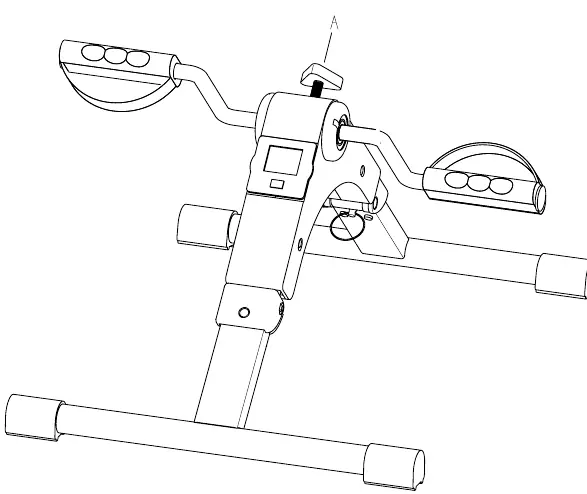
Step 01: If any parts are missing, check the packaging and polystyrene foam, as some bolts and screws may be pre-attached to the unit. Ensure the hex head spanner is fully inserted into the bolt before applying force to prevent the socket bolt head from turning. Verify that all bolts and screws are properly tightened before use.
Folding and Unfolding
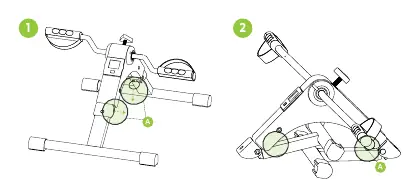
The unit can be folded for storage. To fold or unfold, pull the pin (A) to release the mechanism, adjust the legs, and reinsert the pin (A) to secure the position. Always ensure the unit is stable and steady before use.
Resistance Adjustment
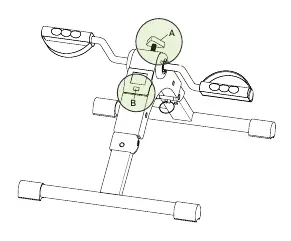
Use the resistance knob (A) to adjust the intensity of your workout. Turning the knob to the left increases resistance, while turning it to the right decreases it. Press the red button (B) on the computer to start exercising. It is recommended to start with minimal resistance and increase it gradually.
Console Operation
The console tracks your workout data. Press the MODE button to select a function. Press and hold MODE for at least 4 seconds to reset all values.
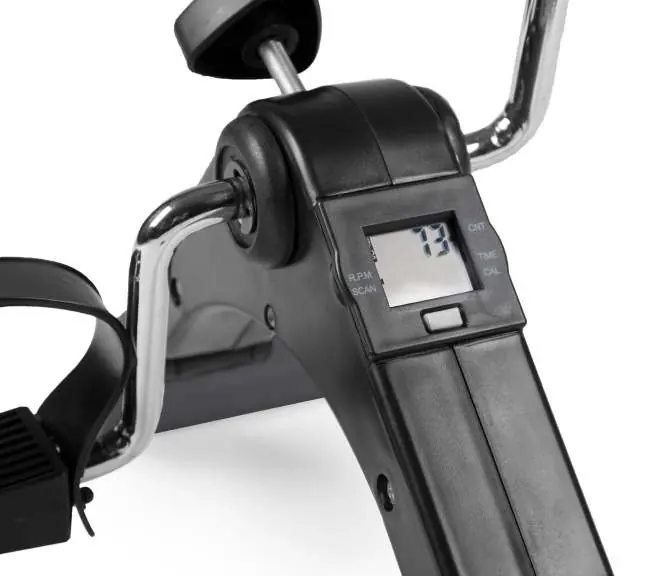
- TIME: Displays elapsed workout time.
- COUNT: Displays the number of steps/revolutions.
- REPS/MIN: Displays revolutions per minute.
- CALORIES: Displays total calories burned.
- SCAN: Automatically cycles through all functions every 5 seconds.
The console uses a 1.5V AG13 battery. If the screen is unreadable, remove the battery, wait 15 seconds, and reinsert it correctly.
Maintenance
Regular maintenance extends the life of your device. Clean the unit after each use to remove sweat and dust. Inspect all bolts and nuts connected to moving parts semi-annually and tighten them if necessary. Store the unit in a dry, safe place away from heat and water.
Training Guidelines
A successful training program includes a warm-up, the actual training, and a cool-down. Warm up for 2-5 minutes before starting. Stretching exercises (toe touch, hamstring stretch, etc.) should be held for 15-30 seconds after the workout to reduce the risk of injury.
Manufacturer information
VirtuFit
Practical help
Common problems
Display is unreadable or only partially visible
Remove the battery, wait 15 seconds, and reinsert it correctly.
Resistance knob is difficult to turn
Ensure the knob is not overtightened and check for any obstructions in the resistance mechanism.
Unit is unstable during use
Ensure the unit is on a flat, level surface and that all bolts and screws are fully tightened.
Before use
- Check that all bolts and screws are properly tightened.
- Ensure the unit is placed on a solid, level surface.
- Verify the battery is inserted correctly in the console.
- Ensure the pin (A) is securely locked in place for the desired configuration (folded or unfolded).
- Wear clean sports shoes.
Specs in practice
- Max User Weight
- 100 kg
- Battery Type
- 1.5V AG13
- Operating Temperature
- 10°C to 35°C
Images and diagrams
- Pin (A): Used to lock the legs in the folded or unfolded position.
- Resistance Knob (A): Turn left to increase resistance, right to decrease.
- Red Button (B): Located on the computer, used to start the workout.
Model compatibility
- Designed for indoor domestic use only.
- Do not place on thick carpets as this may hinder ventilation.
- Keep away from water and heat sources.

Manual page author
David Miller
Documentation analyst
Organizes user manual content into clear summaries, with attention to model details, product context, and everyday usability.