Sports / Fitness
User Manual for VirtuFit CTR 1.2i Elliptical Trainer
Quick guide for the VirtuFit CTR 1.2i elliptical trainer. Includes assembly steps, console operation, maintenance tips, and troubleshooting.
Table of contents
Manual images
Click an image to enlargeQuick guide from the manual
The VirtuFit CTR 1.2i is a home-use elliptical trainer designed for one person at a time, with a maximum user weight capacity of 115 kg. Ensure the machine is placed on a solid, level surface with 1-2 meters of clearance behind it. Do not place the unit on thick carpet as it may hinder ventilation. The device is intended for indoor use only, in an environment with a temperature between 10°C and 35°C.
Assembly Instructions
The assembly process consists of 6 steps. Ensure all bolts and nuts are tightened securely. If parts are missing, check the packaging and the unit itself, as some components may be pre-attached.
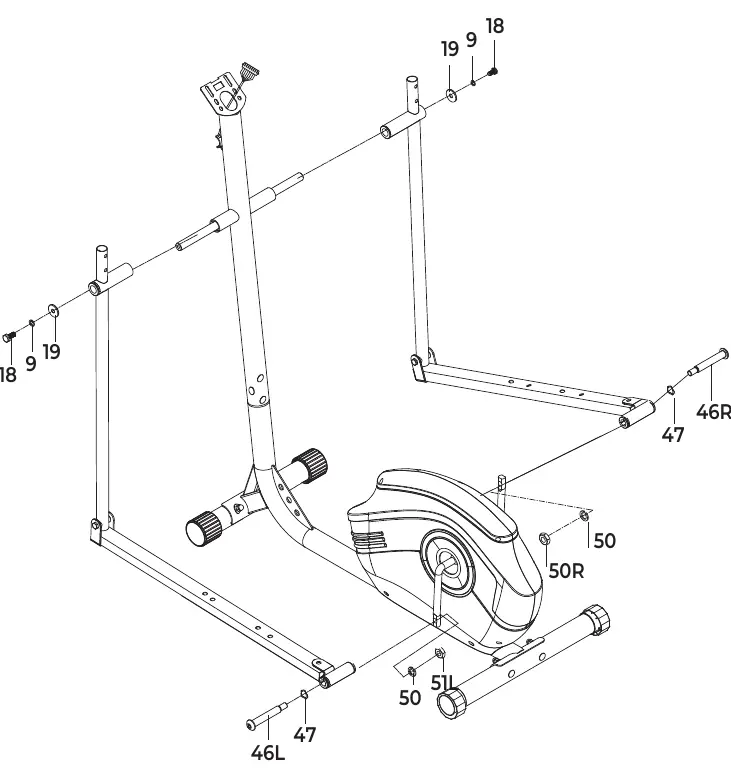
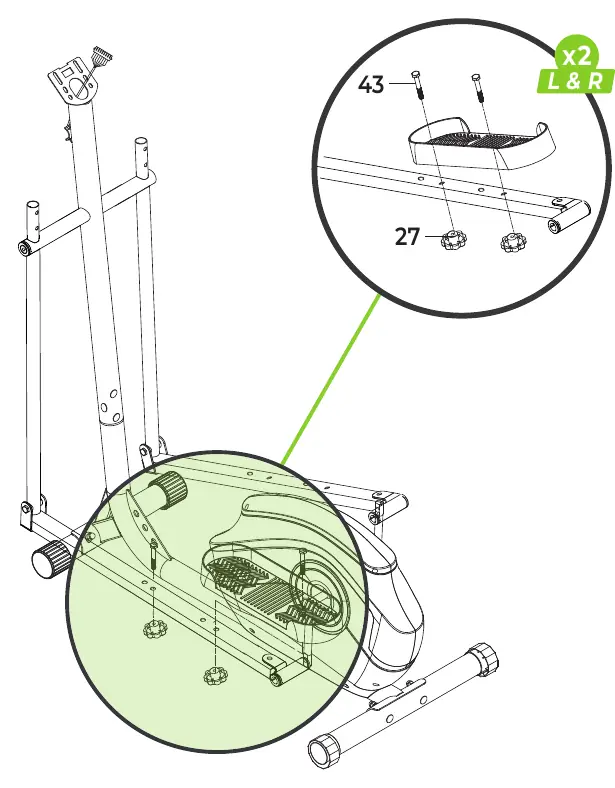
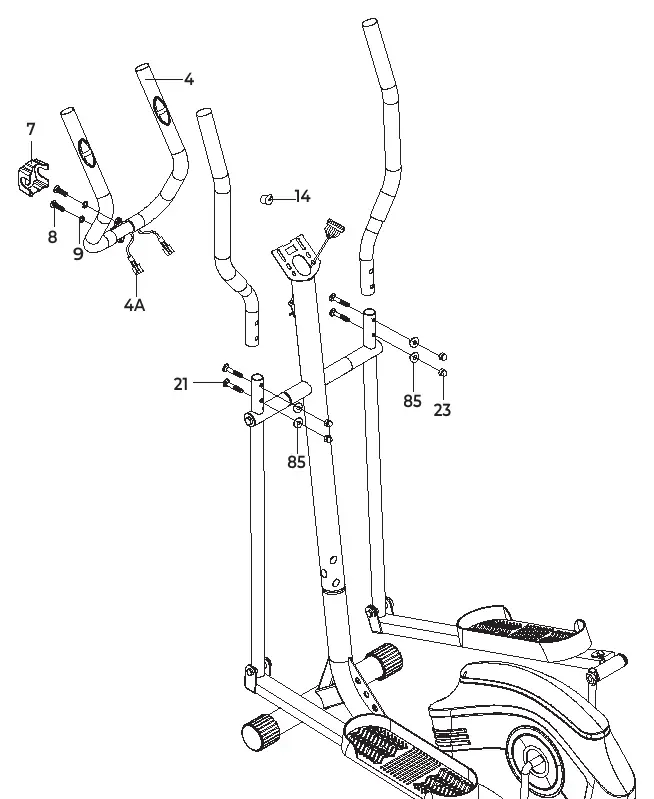
- Step 01: Attach stabilizers to the main frame.
- Step 02: Connect the upright post to the main frame.
- Step 03: Attach the handlebars and connecting arms.
- Step 04: Install the pedals.
- Step 05: Assemble the handlebar grips and sensors.
- Step 06: Connect the console and final covers.
Console Operation
The console features a display and several buttons to control your workout. Use the MODE button to select functions and hold it to reset values. The SCAN function cycles through all metrics every 5 seconds.
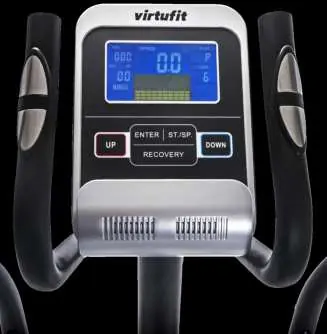
- Functions: Time, Speed, Distance, ODO (total distance), Calories, and Pulse.
- Pulse Measurement: Place palms on both sensors for 6-7 seconds to display heart rate in BPM.
- Programs: Use UP/DOWN to select programs P1-P10, press ENTER to confirm, and START/STOP to begin.
Training Guidelines
A complete training session should include a warm-up, the main workout, and a cool-down. Warm up for 2-5 minutes with light cardio or stretching to prepare muscles and reduce injury risk. Stretching exercises (Toe touch, Hamstring stretch, etc.) should be held for 15-30 seconds.
Maintenance and Troubleshooting
Regular maintenance extends the life of your equipment. Clean the unit after every use to remove sweat and dust. Lubricate moving parts annually with acid-free petroleum jelly or silicone spray.
- Display issues: Check sensor and console cable connections.
- Squeaking: Ensure all bolts and nuts are tight; apply silicone spray if needed.
- Sensors not working: Ensure hands are slightly damp and maintain constant pressure. Check handlebar cable connections.
For service requests, visit the VirtuFit website or contact them via the service form. Always have your service number (ITS number) ready.
Manufacturer information
VirtuFit
Practical help
Common problems
Display does not show any values
Check that the sensor and console cables are properly attached and undamaged. If the issue persists, carefully bend the sensor.
Device squeaks
Check that all bolts and nuts are tight. Apply silicone spray to moving parts if necessary.
Hand sensors not working properly
Wash and dry hands thoroughly. Ensure constant pressure on sensors. Check handlebar cables for damage and proper connection.
Before use
- Ensure the machine is assembled on a solid, level surface.
- Check that all nuts and bolts are tight before use.
- Ensure there is 1-2 meters of space behind the machine.
- Wear clean sports shoes.
- Consult a physician before starting an exercise program.
Specs in practice
- Max user weight
- 115 kg
- Operating temperature
- 10°C to 35°C
- Storage temperature
- 5°C to 45°C
Images and diagrams
- Assembly steps 01-06 show the sequence of attaching stabilizers, upright post, handlebars, and pedals.
- Fig. A shows the console layout and buttons.
- Fig. B shows the program profiles P1-P10.
- Fig. C shows stretching exercises.
Model compatibility
- Compatible with third-party fitness apps like Kinomap, iConsole, and FitShow.

Manual page author
David Miller
Documentation analyst
Organizes user manual content into clear summaries, with attention to model details, product context, and everyday usability.