Furniture / Home Furnishing
Assembly Guide for Wayfair ADRL3098 Power Reclining Sectional Console
Quick assembly and setup guide for the Wayfair ADRL3098 Power Reclining Sectional Console. Includes component lists, assembly steps for legs and power, and instructions for using the integrated control panel features like Bluetooth, USB...
Table of contents
Manual images
Jump to the sectionQuick guide from the manual
This document provides assembly instructions for the Wayfair ADRL3098 Power Reclining Sectional Console. Please note that the product is shipped in multiple boxes, which may arrive in different batches. Wait until you have received all boxes before beginning assembly. If you have questions, contact support at [email protected] or call 901-347-2181.
Component list
The console and sectional pieces are packed in separate boxes. Ensure you have the following components for the Console (Box 4):
- Seat Frame (D-1)
- Seat Cushions (x4)
- Power Cord
- Sofa Legs (x4)
Other boxes (1, 2, 3, 5) contain the respective Left Recliner, Middle Seats, Corner Seat, and Right Recliner components.
Assembly instructions
Follow these steps to assemble the console:
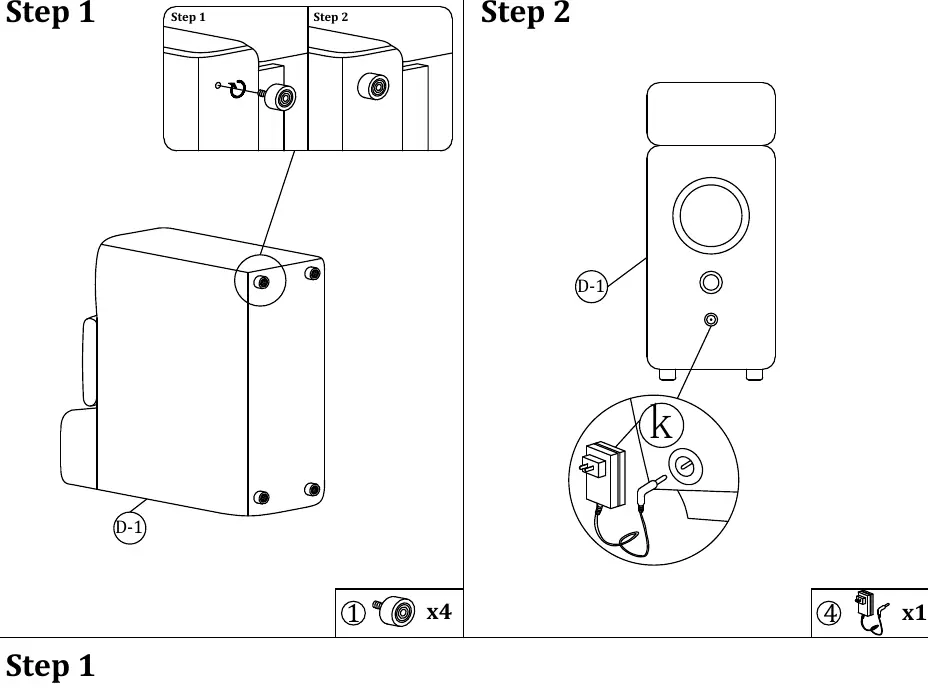
- Leg Installation: Locate the four mounting points on the bottom of the Seat Frame (D-1). Screw the four Sofa Legs into the designated holes.
- Power Connection: Locate the power port on the back of the console. Connect the Power Cord to the port.
Connecting sectional pieces
When assembling the full sectional, follow these guidelines:
- Order: Assemble the sectional from right to left.
- Connection: Use the provided metal brackets on the sides of the seat frames to lock the pieces together.
Control panel operation
The console features an integrated control panel for media and charging. Functions include:
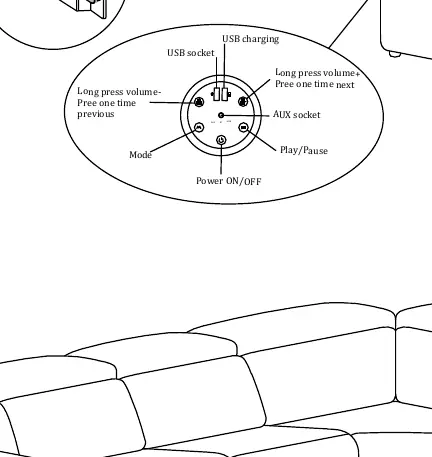
- Power ON/OFF: Toggle the system power.
- USB Charging: Use the USB socket for charging devices.
- Media Control: Includes Play/Pause, Mode selection (AUX, BT, USB), and Volume control.
- Volume: Long press for volume adjustment; press once for next/previous track.
Manufacturer information
Wayfair LLC
Practical help
Common problems
Missing parts or boxes
The product is shipped in multiple boxes which may arrive in different batches. Please wait until all boxes have been delivered before starting assembly.
Power not working
Ensure the power cord is securely connected to the port on the back of the console and that the power source is active.
Before use
- Verify that you have received all boxes (Box 1 through Box 5).
- Identify the Console components (Box 4) before starting.
- Ensure you have sufficient space to assemble the sectional from right to left.
- Check that all sofa legs are screwed in tightly.
Images and diagrams
- The control panel is located on the console and features a circular interface for volume, track navigation, and mode selection.
- Sectional pieces connect using side-mounted metal brackets.
Model compatibility
- Assemble the sectional pieces from right to left.

Manual page author
David Miller
Documentation analyst
Organizes user manual content into clear summaries, with attention to model details, product context, and everyday usability.