Tools / Soldering Stations
Weller WSR 200 Series Safety Rest User Guide
Quick guide for the Weller WSR 200 series safety rest. Includes assembly instructions, usage tips, and compatibility information for various soldering tools.
PDF source: Deutsch · summary: English
Quick answers from the manual
Quick answer
- The Weller WSR 200 series is a range of safety rests for soldering irons. Assembly involves attaching the metal support bracket to the base using the provided screw. p. 2
Key actions
- Assemble the safety rest p. 2
- Clean the soldering tip p. 3
First start
- Unpack the unit and attach the metal support bracket to the base using the screw. p. 2
Show 2 more answers Show less
Maintenance and reset
- Replace the cleaning sponge or metal wool when they become worn. p. 3
Where to find it in the PDF
- Model Compatibility p. 1
- Assembly p. 2
- Usage and Maintenance p. 3
Table of contents
Manual images
Click an image to enlargeQuick guide from the manual
This document provides assembly and usage instructions for the Weller WSR 200 series safety rests. These stands are designed to safely hold soldering irons and include integrated cleaning options for soldering tips.
Assembly
Follow these steps to assemble your safety rest:
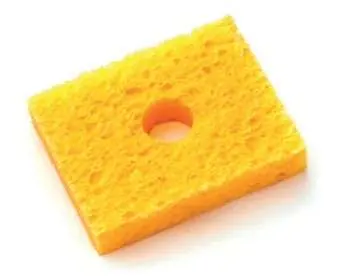


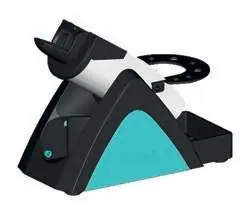
- Unpack: Ensure all components are present, including the base, the metal support bracket, and cleaning materials (sponge/metal wool).
- Attach Bracket: Align the metal support bracket with the base.
- Secure: Insert the screw through the bracket into the base and tighten it securely to ensure stability.
Usage and maintenance
The safety rest is designed to keep your soldering iron secure when not in use. To maintain the soldering tip:
- Use the integrated cleaning sponge or metal wool to remove oxidation and debris from the soldering tip.
- Replace the sponge or metal wool if they become worn or ineffective.
Connecting multiple rests
If you are using multiple soldering tools, you can connect several WSR safety rests together. Use the provided connector pieces to link the bases of the stands side-by-side for a stable, unified workstation.
Compatibility
The WSR 200 series includes various models, each compatible with specific Weller soldering tools. Please verify your specific model (WSR 200 through WSR 211) against the compatibility list on page 1 of the manual to ensure it matches your soldering iron.
Manufacturer information
Weller Tools
Practical help
Common problems
Unstable safety rest
Ensure the metal support bracket is correctly aligned and the screw is fully tightened to the base.
Soldering tip not cleaning properly
Check the condition of the cleaning sponge or metal wool. Replace if they are heavily contaminated or worn out.
Before use
- Unpack all components from the box.
- Identify your specific WSR model number.
- Verify that your soldering iron is compatible with the specific WSR model (see page 1).
- Ensure you have a stable, flat surface for placement.
Show more Show less
Images and diagrams
- Page 2 illustrates the assembly process, showing how to attach the metal bracket to the base.
- Page 3 demonstrates the correct way to clean a soldering tip using the sponge or metal wool.
- Page 3 shows how to connect multiple safety rests together using connector pieces.
Model compatibility
- WSR 200: WTP 90, WP 120, WXP 120, WXMP, WXUP, WXUPS MS
- WSR 201: WSP 80, WXP 80, WP 80
- WSR 202: WSP 150, WP 200
- WSR 203: WMRT

Manual page author
Michael Turner
Technical manual editor