Home Appliances / Dryers
User Manual for Whirlpool WDH 103CD MBME Dryer
Comprehensive user guide for the Whirlpool WDH 103CD MBME dryer. Includes installation instructions, operation procedures, maintenance tips, and troubleshooting steps.
Table of contents
Manual images
Click an image to enlargeQuick Guide from the Manual
This dryer is designed for household use. Before operating, ensure the appliance is installed on a flat, stable surface and has been left to rest for 12 hours after transport. Always clean the lint filters after every drying cycle and empty the water tank if not using the direct drain option. The appliance uses R290 refrigerant, which is flammable; ensure the room is well-ventilated.
Installation
The dryer must be installed by two or more persons. Ensure the room has adequate ventilation (open door, grid, or slot larger than 500 cm2). If installing under a worktop, maintain a 10 mm gap above and 15 mm on the sides. Do not install near heat sources or behind lockable/sliding doors that restrict full opening. If stacking on a washing machine, you must use an appropriate stacking kit available through After-Sales Service.
Preparation
Sort laundry by type and thickness. Do not dry items soiled with oil, alcohol, petrol, or other flammable substances. Remove all objects from pockets. Close zippers, hooks, and buttons before loading. Do not exceed the maximum load capacity (10 kg).
Operation
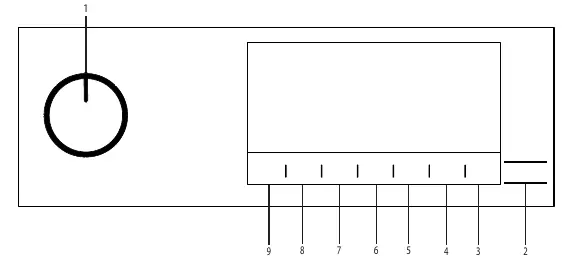
Use the Control Panel to select programs. The dryer features various cycles, including Steam programs for wrinkle reduction and odor removal. To start, plug in the machine, load laundry, select a program, and press the Start/Stand-by button. You can delay the start using the End Time function or activate the Child Lock by pressing the Audible Warning button for 3 seconds.
HomeWhiz Function
The dryer can be controlled remotely via the HomeWhiz app. Install the app, turn on Bluetooth, and follow the in-app instructions to add the dryer. You can enable/disable Wi-Fi by holding the Remote Control button for 3 seconds.
Maintenance and Cleaning
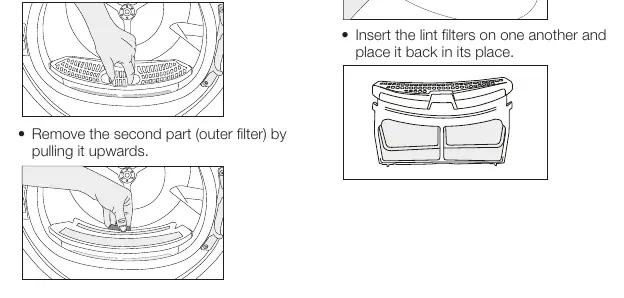
- Lint Filters: Clean the internal and external filters after every drying cycle.
- Water Tank: Empty after every session unless using the direct discharge hose.
- Sensor: Clean the metal surfaces of the humidity sensor with a soft cloth dampened with vinegar 4 times a year.
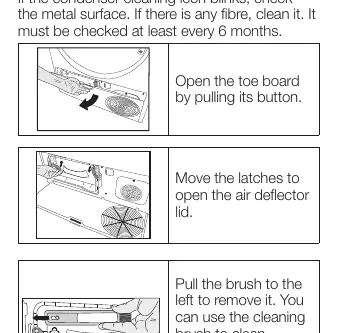
- Condenser: Check and clean the condenser at least every 6 months. Use the provided brush to clean the metal surface in an up-down direction.
Troubleshooting
If the dryer takes too long, clean the lint filters and condenser, or check for blocked ventilation. If the machine does not start, ensure the plug is connected, the door is closed, and the child lock is deactivated. If the water tank warning flashes, empty the tank.
Manufacturer information
Whirlpool Corporation
Practical help
Common problems
Drying takes too long
Clean lint filters and condenser, check for blocked ventilation, or spin laundry at a higher speed in the washing machine.
Laundry damp after drying
Check program selection, clean filters/condenser, or reduce the load.
Dryer does not start
Check power plug, ensure door is closed, check child lock, or press Start/Pause.
Water tank warning flashes
Empty the water tank.
Before use
- Ensure the dryer is installed on a flat, stable surface.
- Wait 12 hours after transport before operating.
- Check that the power plug is connected.
- Clean lint filters before starting.
- Ensure the water tank is empty.
Specs in practice
- Energy Class
- A++.
Images and diagrams
- Control Panel: Shows buttons for On/Off, Start/Pause, Remote Control, End Time, Steam, Low Temp, Audible Warning, Wrinkle Prevention, and Dryness Level.
- Lint Filters: Two-part filter system (inner and outer) located in the loading door area.
Model compatibility
- Stacking: Only possible with an appropriate stacking kit available through After-Sales Service.
- Steam Programs: Not suitable for wool, leather, or clothes with metal parts.

Manual page author
Emily Carter
User documentation editor
Prepares concise manual descriptions and highlights the most useful setup, operation, and maintenance information for readers.