Electronics / Remote Controls
User Manual for Xiaomi Mi Smart Standing Fan 2 Lite
Comprehensive user guide for the Xiaomi Mi Smart Standing Fan 2 Lite. Includes step-by-step assembly instructions, operation modes, app connectivity, Wi-Fi setup, and troubleshooting steps.
Quick answers from the manual
Quick answer
- The Xiaomi Mi Smart Standing Fan 2 Lite is a smart fan controlled via buttons on the unit or the Mi Home/Xiaomi Home app. It features 3 speed modes, 90-degree oscillation, and a delayed turn-off timer. p. 4, 6, 7, 8
Key actions
- Reset Wi-Fi p. 8, 9
- Enable Child Lock p. 9
First start
- Assemble the fan according to the installation steps, plug into a power outlet, and connect to the Mi Home app. p. 4, 5, 6, 7
Problems and fixes
Wi-Fi is unable to connect
Connect to a 2.4 GHz Wi-Fi network; reset Wi-Fi if the fan is offline for more than half an hour.
p. 10Maintenance and reset
- Reset Wi-Fi by holding the power and speed buttons simultaneously. p. 9
Where to find it in the PDF
- Safety Instructions p. 2, 3
- Installation p. 4, 5, 6, 7
- Operation p. 7, 8, 9
Table of contents
Manual images
Click an image to enlargeQuick guide from the manual
This manual provides instructions for the Xiaomi Mi Smart Standing Fan 2 Lite. Key operations include assembly, connecting to the Mi Home/Xiaomi Home app, and basic fan control. Always ensure the fan is properly assembled before connecting to power. Do not use the fan in humid environments or if the power cord is damaged.
Package Contents
Ensure all parts are present before assembly:
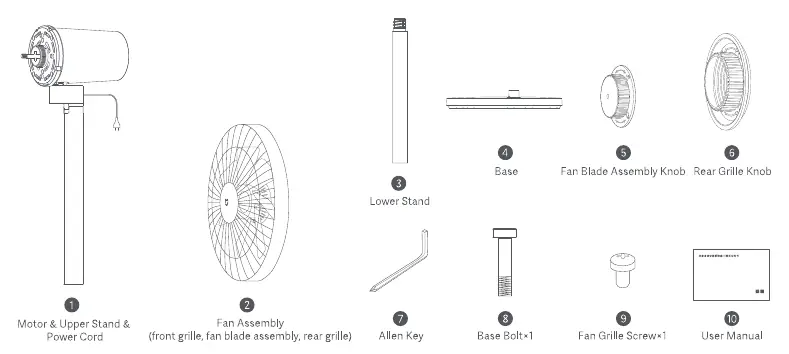
- Motor & Upper Stand with Power Cord
- Fan Assembly (Front grille, fan blade assembly, rear grille)
- Lower Stand
- Base
- Fan Blade Assembly Knob
- Rear Grille Knob
- Allen Key
- Base Bolt
- Fan Grille Screw
- User Manual
Installation Instructions
Follow these steps to assemble your fan:
- Step 1: Base installation. Connect the lower stand to the upper stand, then install onto the base. Insert the base bolt into the bottom of the base and tighten clockwise using the included Allen Key.
- Step 2: Open the fan assembly. Turn the front grille counterclockwise to loosen, then remove the front grille and take out the fan blade assembly.
- Step 3: Install the rear grille. Align the rear grille with the motor, ensuring the arrow points up. Secure it with the rear grille knob by turning it clockwise.
- Step 4: Install the fan blade assembly. Align the center hole of the fan blade assembly with the motor shaft. Install the fan blade assembly knob and turn counterclockwise to fix it.
- Step 5: Install the front grille. Align the front grille with the rear grille and turn clockwise until securely fastened.
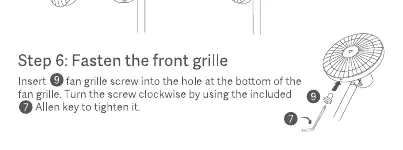
- Step 6: Fasten the front grille. Insert the fan grille screw into the hole at the bottom of the grille and tighten with the Allen Key.
How to Use
Power and Speed
Plug the power cord into a power outlet. Press the power button to turn the fan on or off. Use the speed adjustment button to cycle between Slow (1), Medium (2), and Fast (3) speeds.
Modes and Oscillation
- Switching mode: Press and hold the speed button to switch between direct breeze and sleep mode.
- Oscillation: Press the oscillation button to enable or disable 90-degree oscillation.
- Delayed Turn-off: Press the timer button to cycle through delayed turn-off times (1, 2, 3 hours, or disabled).
Smart Features
To connect to the Mi Home/Xiaomi Home app, scan the QR code in the manual. To reset Wi-Fi, simultaneously press and hold the power and speed buttons until you hear a beep. You can enable or disable the Child Safety Lock via the app.
Troubleshooting
If the fan does not work, ensure it is connected to power, properly assembled, and the child lock is disabled. If Wi-Fi fails to connect, ensure you are using a 2.4 GHz network and the fan is not offline for more than half an hour.
Manufacturer information
Xiaomi Corporation
Practical help
Common problems
Fan does not work
Check power connection, ensure proper assembly of blades/grilles, and check if Child Lock is enabled in the app.
Wi-Fi connection failure
Ensure the router is 2.4 GHz (5 GHz is not supported) and reset the Wi-Fi connection if the fan has been offline for over 30 minutes.
Fan blades are stuck
Unplug the fan immediately and remove any foreign objects obstructing the blades.
Before use
- Verify all package contents are present.
- Ensure the power outlet meets the fan's requirements.
- Assemble the fan completely before connecting to power.
- Do not use in hot or humid environments like bathrooms.
- Ensure the front and rear grilles are securely installed.
Specs in practice
- Delayed Turn-off
- Programmable timer for 1, 2, or 3 hours.
Images and diagrams
- Assembly sequence: Base -> Lower Stand -> Upper Stand -> Motor -> Rear Grille -> Fan Blade -> Front Grille.
- Alignment marks on grilles must be matched for secure fastening.
Model compatibility
- Requires 2.4 GHz Wi-Fi network.
- Compatible with Mi Home/Xiaomi Home app.

Manual page author
David Miller
Documentation analyst
Organizes user manual content into clear summaries, with attention to model details, product context, and everyday usability.