Computers / Keyboards Input
User Guide for Xiaomi Focus Pen
Quick start guide for the Xiaomi Focus Pen. Learn how to pair, charge, replace the tip, and use the buttons with your compatible tablet.
Quick answers from the manual
Quick answer
- To pair and charge the Xiaomi Focus Pen, attach it horizontally to the center of the long side of your compatible tablet (Xiaomi Pad 6S Pro 12.4) with Bluetooth enabled. p. 3
Key actions
- Pairing and Charging p. 3
- Replacing the tip p. 2
Problems and fixes
Stylus not working
Check if the device is charged and Bluetooth is enabled on the tablet.
p. 3Show 2 more answers Show less
Technical specifications
| Parameter | Value | Meaning | Pages |
|---|---|---|---|
| Operating Temperature | 0°C to 40°C | Safe operating range | p. 3 |
| Bluetooth Power | 6 dBm | Maximum radio-frequency power | p. 4 |
Where to find it in the PDF
- Quick Start Guide p. 1, 3
- Safety Information p. 3, 4
Table of contents
Manual images
Click an image to enlargeQuick Start Guide
The Xiaomi Focus Pen is designed for use with the Xiaomi Pad 6S Pro 12.4. To begin using the device, follow the instructions below.
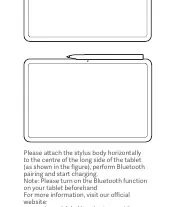
Pairing and Charging
To pair and charge your stylus, attach the stylus body horizontally to the center of the long side of your tablet. Ensure that the Bluetooth function on your tablet is turned on before attaching the stylus.
Product Overview
The stylus features three buttons and a replaceable tip:

- Focus Button: Located at the top.
- Secondary Button: Located in the middle.
- Primary Button: Located at the bottom.
- Tip: The writing end of the stylus.
Replacing the Pen Tip
If the pen tip becomes worn or damaged, it can be replaced. The package includes a spare pen tip. To replace it, gently pull out the old tip and insert the new one.
Important Safety Information
Read all safety information before using your device:
- Operating Temperature: The device operates within a range of 0°C to 40°C. Using the device outside this range may cause damage.
- Battery Safety: Do not attempt to replace the built-in battery yourself. Do not disassemble, hit, crush, or burn the battery. If the battery appears deformed or damaged, stop using it immediately.
- Handling: Keep the device dry. Do not attempt to repair the device yourself; contact Mi customer support or an authorized repair center.
- Usage: This device is not a toy. If children use the device, they should be supervised and warned about potential hazards.
- Medical Interference: Maintain a minimum distance of 15 cm from pacemakers and other medical equipment to avoid interference.
Regulatory Information
This device complies with EU and UK regulations regarding radio equipment and hazardous substances. It operates in the 2.4 GHz Bluetooth band with a maximum power of 6 dBm. For full declarations of conformity, visit www.mi.com/en/certification.
Official resources from the manual
Manufacturer information
Xiaomi Corporation
Practical help
Common problems
Stylus not pairing or charging
Ensure Bluetooth is enabled on your tablet and the stylus is attached horizontally to the center of the long side of the tablet.
Stylus tip is worn
Gently pull out the old tip and replace it with the spare tip included in the package.
Before use
- Ensure your tablet (Xiaomi Pad 6S Pro 12.4) is compatible.
- Turn on the Bluetooth function on your tablet.
- Attach the stylus horizontally to the center of the long side of the tablet.
Show more Show less
Specs in practice
- Operating Temperature
- 0°C to 40°C. Using outside this range may damage the device.
- Bluetooth Frequency
- 2.4GHz band, 6 dBm maximum radio-frequency power.
Images and diagrams
- The stylus features a Focus Button, Secondary Button, and Primary Button.
- The tip is replaceable by pulling it out gently.

Manual page author
Michael Turner
Technical manual editor