Mobile / Smartphones
User Manual for Xiaomi Redmi 10C Smartphone
Quick start guide for the Xiaomi Redmi 10C smartphone. Learn how to set up your device, install SIM cards, and follow important safety and regulatory guidelines.
Table of contents
Manual images
Click an image to enlargeQuick Start Guide
To turn on your Redmi 10C, long press the power button. Follow the on-screen instructions to configure the device for the first time.
Device Overview
The device features the following physical controls and ports:
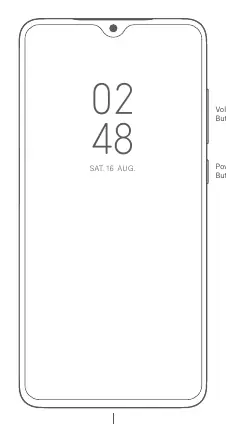
- Volume Buttons: Located on the side of the device.
- Power Button: Located on the side of the device.
- USB Type-C Port: Located at the bottom of the device for charging and data transfer.
SIM Card Tray
The device supports dual nano-SIM cards and a Micro SD card. When using both SIM card slots, either card can be set as the primary card for data. Do not insert non-standard SIM cards into the slot as this may cause damage.

Safety Precautions
- Operating Temperature: Use the device within the range of 0°C to 40°C.
- Battery Safety: Do not attempt to replace the built-in battery yourself. Do not disassemble, hit, crush, or burn the battery.
- Charging: Use only authorized cables and power adapters. Do not charge the device for more than 12 hours.
- Medical Interference: Maintain a minimum distance of 15 cm between the phone and pacemakers or other medical devices.
- Environment: Do not use the phone in explosive atmospheres, petrol stations, or during thunderstorms.
Regulatory Information
This device complies with EU and FCC regulations regarding RF exposure and safety. The device has an electronic label for certification information, which can be accessed via Settings > About phone > Certification.
Manufacturer information
Xiaomi Corporation
Practical help
Common problems
Device not charging or charging slowly
Use only the included or authorized cable and power adapter. Do not charge for more than 12 hours.
Battery damage or overheating
Do not disassemble, hit, crush, or burn the battery. If the battery appears deformed, stop using it immediately.
Interference with medical devices
Maintain a minimum distance of 15 cm between the phone and pacemakers. Use the phone on the ear opposite to the pacemaker.
Before use
- Charge the device using an authorized adapter.
- Insert nano-SIM cards into the SIM tray.
- Ensure the environment is within 0°C to 40°C.
- Follow on-screen setup instructions upon first boot.
Specs in practice
- Operating Temperature
- 0°C to 40°C. Using the device outside this range may cause damage.
Images and diagrams
- Page 2 illustrates the location of the Volume Buttons, Power Button, and USB Type-C Port.
- Page 3 illustrates the layout of the SIM Card Tray, showing the positions for two Nano-SIM cards and one Micro SD card.
Model compatibility
- Dual 4G SIM is offered by select telecom operators and may not be available in all regions.
- VoLTE is only supported by telecom operators in certain regions.
- The device is restricted to indoor use only when operating in the 5150 to 5350 MHz frequency range.

Manual page author
David Miller
Documentation analyst
Organizes user manual content into clear summaries, with attention to model details, product context, and everyday usability.