Computers / Tablets
Redmi Pad Quick Start Guide
Quick start guide for the Redmi Pad tablet. Includes setup instructions, safety precautions, and regulatory information.
Quick answers from the manual
Quick answer
- To turn on your Redmi Pad, long press the power button and follow the on-screen instructions to configure the device. p. 3
Key actions
- Turn on the device p. 3
First start
- Follow on-screen instructions p. 3
Show 3 more answers Show less
Problems and fixes
Device malfunction
Contact Mi customer support or bring your device to an authorized repair center.
p. 4Technical specifications
| Parameter | Value | Meaning | Pages |
|---|---|---|---|
| Operating Temperature | 0°C to 40°C | Safe operating range | p. 4 |
Where to find it in the PDF
- Quick Start Guide p. 3
Table of contents
Quick guide from the manual
To turn on your Redmi Pad, long press the power button. Follow the on-screen instructions to configure the device for the first time.
Device Overview
The device features the following physical controls and ports:
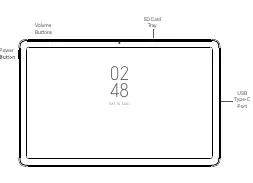
- Power Button: Used to turn the device on or off.
- Volume Buttons: Used to adjust the sound level.
- SD Card Tray: Slot for inserting an SD card.
- USB Type-C Port: Used for charging and data transfer.
Getting Started
After turning on the device, follow the on-screen prompts to set up your language, Wi-Fi connection, and user account. For more information, visit the official website at www.mi.com/global/service/userguide.
Important Safety Information
Read all safety information before using your device to prevent injury or damage:
- Operating Temperature: The device operates between 0°C and 40°C. Using it outside this range may damage the device.
- Battery Safety: Do not attempt to replace the built-in battery yourself. Only use authorized accessories and chargers.
- Charging: Disconnect the adapter after charging is complete. Do not charge for more than 12 hours.
- Handling: Keep the device dry. Do not disassemble, hit, crush, or burn the battery.
- Repairs: Do not attempt to repair the device yourself. Contact Mi customer support or an authorized repair center if the device malfunctions.
Regulatory and Compliance
This device complies with FCC and EU regulations regarding radio frequency exposure (SAR). Ensure the power adapter meets the requirements of Clause 6.4.5 in IEC/EN 62368-1. For detailed certification information, go to Settings > About tablet > Certification.
Official resources from the manual
Manufacturer information
Xiaomi Corporation
Practical help
Common problems
Device will not turn on
Ensure the device is charged using the included cable and adapter. Long press the power button.
Battery appears deformed or damaged
Stop using the device immediately and contact an authorized repair center.
Before use
- Charge the device using the included cable and power adapter.
- Ensure the operating environment is between 0°C and 40°C.
- Keep the device dry.
- Do not connect incompatible devices.
Show more Show less
Specs in practice
- Operating Temperature
- The safe temperature range for device operation is 0°C to 40°C.
- SAR (Specific Absorption Rate)
- A measure of the rate at which energy is absorbed by the human body when exposed to a radio frequency electromagnetic field.
Images and diagrams
- The device layout includes volume buttons on the top edge, a power button on the side, an SD card tray on the top edge, and a USB Type-C port on the side.
Model compatibility
- Use only authorized accessories compatible with your device.
- Connect other devices according to their instruction manuals.

Manual page author
Emily Carter
User documentation editor