Computers / Mobile Computers
Zebra ET4X Series Android 14 Release Notes
Official release notes and update guide for Zebra ET4X series tablets running Android 14. Includes mandatory OS update instructions, new features, resolved issues, and device compatibility details.
Table of contents
Manual images
Click an image to enlargeQuick guide from the manual
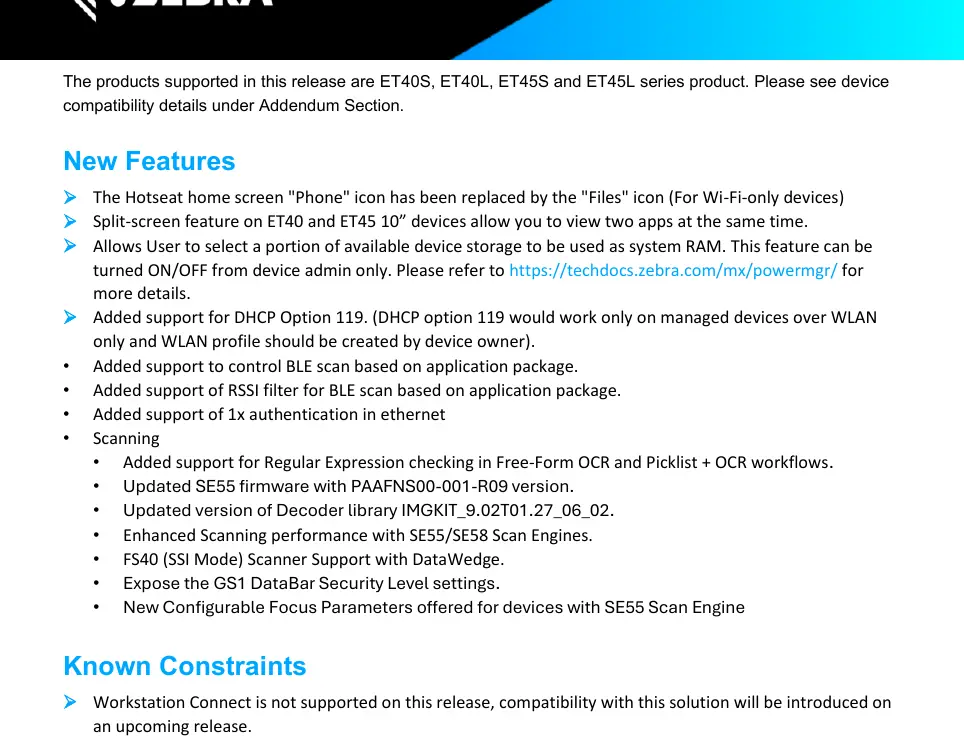
This document provides release notes for the Android 14 NGMS software update (version 14-09-18.00-UN-U180-STD-GSE-04) for the Zebra ET4X series. This update is mandatory for users upgrading from Android 13 or Android 11. Please ensure you follow the specific OS update installation requirements provided below to avoid compatibility issues.
OS Update Installation Requirements
To successfully upgrade your device to the Android 14 BSP software, follow the steps corresponding to your current OS version:
Update from Android 13 to Android 14
- Step 1: Ensure the device has the A13 September 2024 LG BSP Image or a greater A13 BSP version installed (available on the Zebra portal).
- Step 2: Proceed with the upgrade to the A14 BSP release.
Update from Android 11 to Android 14
- Step 1: Ensure the device has the A11 October 2024 LG BSP Image or a greater A11 BSP version installed (available on the Zebra portal).
- Step 2: Proceed with the upgrade to the A14 BSP release.
New Features
This release introduces several enhancements across the system:
- Scanning Framework: Added support for Zebra USB Scanner (SNAPI), RFD90 with SF, and SR570 Scan Engine. Integrated R04 firmware for SE5500 and added support for Regular Expression checking in Free-Form OCR.
- Battery Management: Implemented a shelf mode feature to reduce leakage voltage when the device is stored for extended periods.
- OSX/System: Added UIManager Quick tiles action support and split-screen feature on 10-inch ET40 and ET45 devices.
- Connectivity: Added support for WLAN TLS 1.3 and DHCP Option 119 (on managed devices).
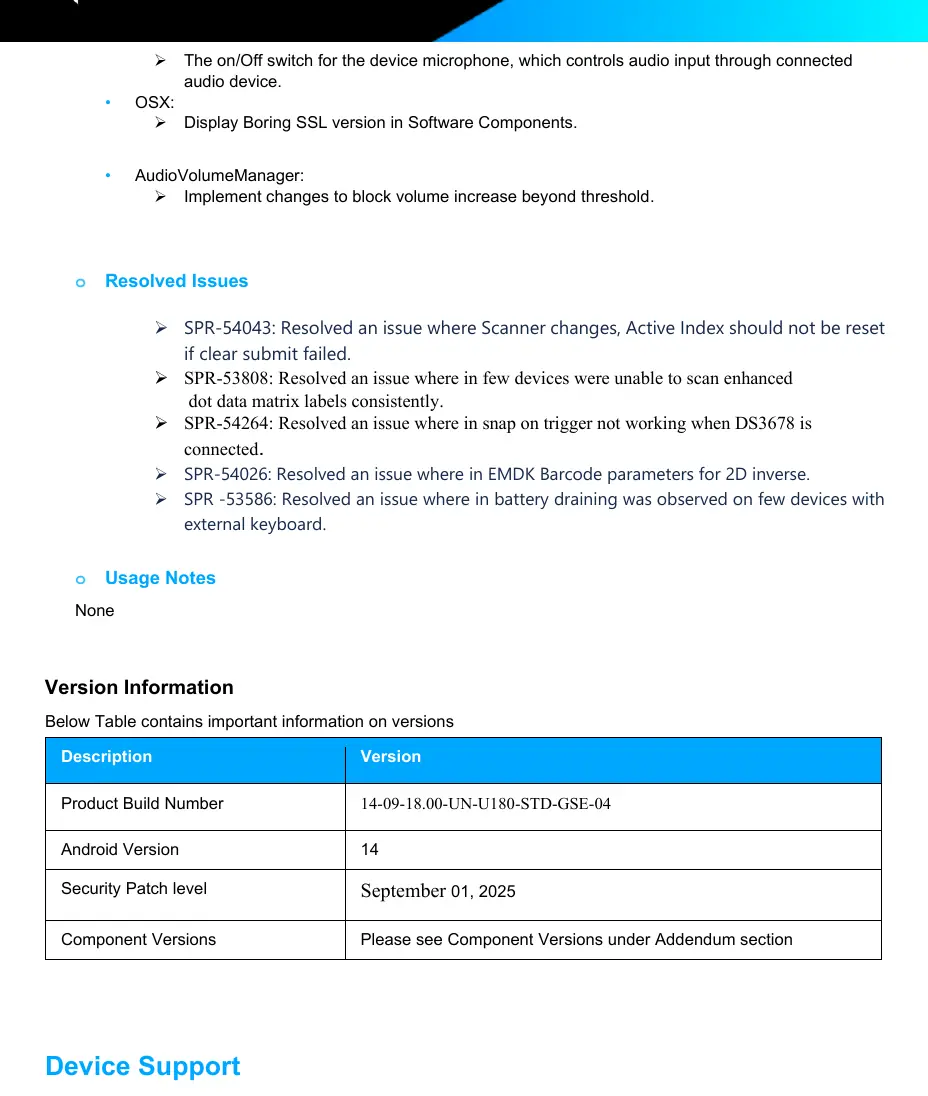
Resolved Issues
This update addresses various reported issues, including:
- Fixes for ET45 charging issues on slot cradles.
- Resolution for Wi-Fi disconnection issues caused by the network connection manager.
- Fixes for camera darkness issues when using Scandit.
- Resolution for NFC card readability issues on the back of ET45 tablets.
- Fixes for device enrollment issues with SOTI MobiControl MDM.
Device Compatibility
This software release is approved for the following ET4X series products:
- ET40S
- ET40L
- ET45S
- ET45L
Manufacturer information
Zebra Technologies
Practical help
Common problems
Device not charging on slot cradle
Resolved in this update (SPR-55973). Ensure your device is updated to the latest BSP.
Wi-Fi disconnected unexpectedly
Resolved in this update (SPR-56650). Update to the latest software version.
Unable to scan enhanced dot data matrix labels
Resolved in this update (SPR-53808). Ensure scanning framework is updated.
Device skipping blocklisted APs
Resolved in this update (SPR-57286). Update to the latest software version.
Before use
- Verify your device model is part of the ET4X series (ET40S, ET40L, ET45S, ET45L).
- Check current OS version (A13 or A11).
- Download the required LG BSP Image from the Zebra portal before attempting the upgrade.
- Ensure the device is charged before starting the update process.
- Back up critical data before performing an OS update.
Specs in practice
- Android SDK Level
- 34 (Android 14)
- Linux Kernel
- 5.4.281
- Security Patch Level
- September 01, 2025
Model compatibility
- Workstation Connect is not supported in this release.
- Setup Wizard Bypass feature has been discontinued on Android 13 and later due to Google privacy requirements.

Manual page author
Michael Turner
Technical manual editor
Reviews PDF manuals for structure, safety notes, and practical product details so readers can find the right information quickly.