Electronics / Speakers & Soundbars
User Manual for Zebronics ZEB-BUDDY 400 DJ Speaker
Quick guide for the Zebronics ZEB-BUDDY 400 DJ Speaker. Learn how to pair Bluetooth, use TWS mode, operate USB/SD/FM modes, and charge your speaker.
Quick answers from the manual
Quick answer
- The ZEB-BUDDY 400 is a trolley DJ speaker with Bluetooth, USB, mSD, AUX, and TWS functionality. It features a 220W output and includes wireless microphones. p. 1, 2
Key actions
- Pairing Bluetooth p. 6
- Using TWS Mode p. 6, 7
- Charging p. 7
Technical specifications
| Parameter | Value | Meaning | Pages |
|---|---|---|---|
| Output Power | 220W | p. 3 | |
| Charging Time | 5h | Time to fully charge | p. 3 |
| Playback Time | 3h | At 50% volume (LED off) | p. 3 |
Show 1 more answers Show less
Where to find it in the PDF
- Features & Safety p. 2
- Specifications p. 3
- Controls p. 4, 5
- Operation p. 6, 7
Table of contents
Manual images
Click an image to enlargeQuick guide from the manual
The Zebronics ZEB-BUDDY 400 is a trolley DJ speaker designed for versatile audio playback. Key operations include Bluetooth pairing, TWS (True Wireless Stereo) mode for connecting two speakers, and playback via USB, mSD, or AUX. Ensure the speaker is charged using a 5V/2A adapter before first use.
Product Overview and Features
The speaker includes the following features:
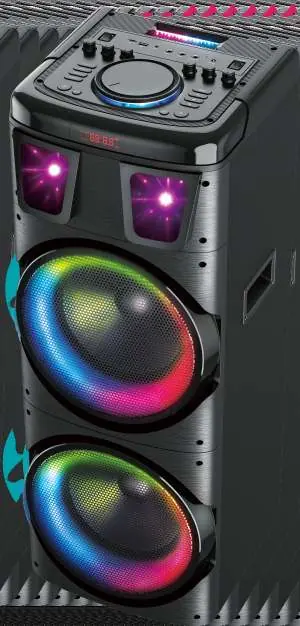
- Bluetooth v5.0 connectivity
- USB and mSD card support (up to 32GB)
- AUX input
- TWS Function
- 6.3mm Microphone and Guitar inputs
- Volume, Bass, and Treble controls
- RGB Lights with control switch
Buttons and Remote Control
The top control panel features 24 controls, including:
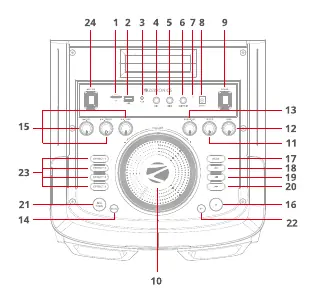
- Power ON/OFF Switch
- Volume, Treble, and Bass controls
- Input Mode selection (BT/USB/mSD/FM/AUX)
- Playback controls (Play/Pause, Prev/Next)
- Mic/Guitar controls (Volume, Echo, Tone)
- RGB Light Control
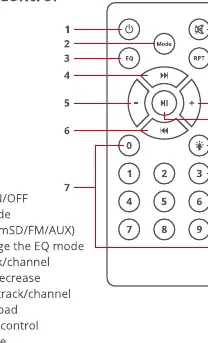
The included remote control allows for power management, mode selection, EQ adjustments, volume control, and track navigation.
Operation
Bluetooth Pairing
- Power ON the speaker; you will hear an indication tone for BT mode.
- Enable Bluetooth on your phone or tablet.
- Search for "ZEB-BUDDY 400" in the list of available devices and connect.
TWS Function
- Switch ON two ZEB-BUDDY 400 speakers.
- Press and hold the Mode button for 5-10 seconds on one speaker to activate TWS mode.
- After a few seconds, both speakers will connect.
- Search for "ZEB-BUDDY 400" on your mobile device to connect to the paired speakers.
- To exit TWS mode, press and hold the Mode button for 5-10 seconds on either speaker.
USB/mSD and FM Radio
- USB/mSD: Insert the drive into the respective port. The speaker will automatically detect and play tracks.
- FM Radio: Switch to FM mode using the Mode button, then press Play-Pause to auto-scan available channels.
Charging
Use a DC 5V/2A adapter to charge the speaker. The RED LED will remain ON while charging and will turn OFF once the speaker is fully charged.
Safety and Maintenance
- Avoid using the product in high-temperature or high-humidity environments.
- Do not disassemble the product, as this will void the warranty.
- Turn off the speaker when not in use.
Practical help
Common problems
Speaker not connecting via Bluetooth
Ensure the speaker is in BT mode and search for 'ZEB-BUDDY 400' on your device.
TWS mode not working
Switch on two speakers, then press and hold the Mode button for 5-10 seconds on one speaker to activate TWS mode.
Before use
- Charge the speaker fully before first use
- Ensure the environment is not high temperature or high humidity
- Keep the speaker turned off when not in use
Show more Show less
Specs in practice
- Output Power
- 220W RMS
- Charging Time
- 5 hours
- Playback Time
- 3 hours at 50% volume (LED off)
Images and diagrams
- The control panel features 24 numbered controls including volume, bass, treble, and mode selection.
- The remote control includes 12 functions for power, mode, EQ, and playback control.
Model compatibility
- Supports USB/mSD up to 32GB
- Bluetooth v5.0
- Supports MP3 format

Manual page author
Michael Turner
Technical manual editor