Electronics / Microphones
1Mii DS200Pro Bluetooth Audio Adapter User Guide
Quick setup guide for the 1Mii DS200Pro Bluetooth Audio Adapter. Learn how to connect, pair with your audio device, and use dual-pairing mode.
Table of contents
Quick guide from the manual
This guide provides the essential steps to set up and operate your 1Mii DS200Pro Bluetooth Audio Adapter. The device allows you to stream audio wirelessly to your speakers or audio system.
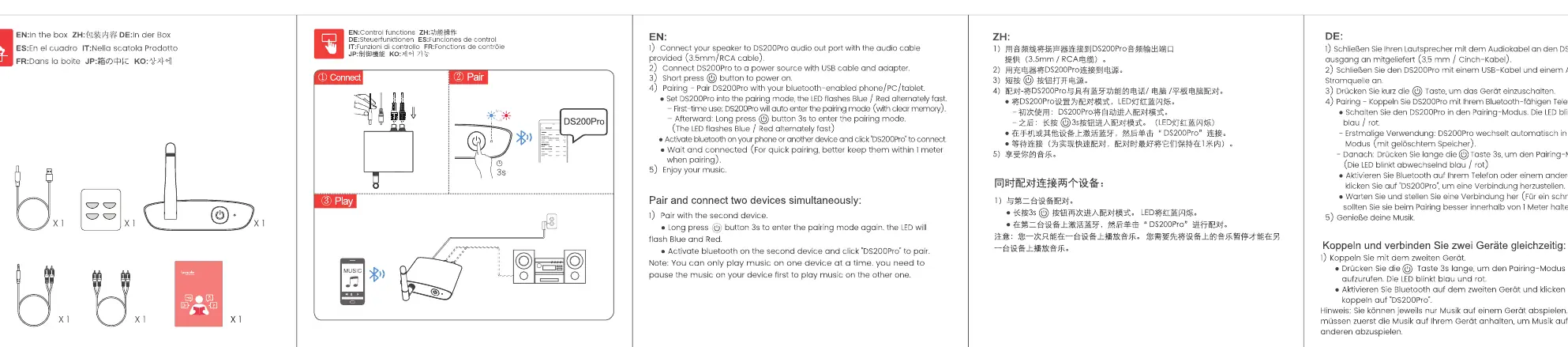
Connection and Setup
- Connect: Plug the 3.5mm audio cable into your audio device and connect the USB cable for power.
- Pair: Long press the power button to enter pairing mode. The LED indicator will flash blue and red.
- Connect via Bluetooth: Activate Bluetooth on your phone, tablet, or computer and select DS200Pro from the list to connect.
- Play: Once connected, you can start enjoying your music.
Pairing Two Devices Simultaneously
The DS200Pro supports connecting to two devices at the same time:
- Pair the first device as described above.
- Put the DS200Pro back into pairing mode (long press the power button until the LED flashes blue and red).
- Pair the second device on your other phone or tablet.
- Select DS200Pro on the second device to connect.
- You can now pause music on the first device and play on the other.
Control Functions
The device features a power button used for:
- Power On/Off: Short press the power button.
- Pairing Mode: Long press the power button to initiate pairing.
Practical help
Common problems
Device not entering pairing mode
Ensure you are performing a long press on the power button until the LED flashes blue and red.
Cannot connect a second device
Ensure the first device is successfully paired, then put the adapter back into pairing mode (long press power) before attempting to pair the second device.
Before use
- Ensure you have the 3.5mm audio cable and USB power cable provided.
- Verify your audio device has a 3.5mm input port.
- Ensure your smartphone or tablet has Bluetooth enabled.
- Keep the adapter within range of your Bluetooth source device.
Images and diagrams
- Connect: Shows the 3.5mm cable connection to the audio device and USB power connection.
- Pair: Illustrates the long press action on the power button to trigger the blue/red flashing LED.
- Play: Indicates the successful connection state.
Model compatibility
- Compatible with most devices supporting Bluetooth audio streaming (phones, tablets, PCs).

Manual page author
David Miller
Documentation analyst
Organizes user manual content into clear summaries, with attention to model details, product context, and everyday usability.