Electronics / Audio
User Manual for Audiority Distortion 1 mkII Audio Plugin
Quick guide for the Audiority Distortion 1 mkII plugin. Learn about installation, activation, pedal controls, circuit types, and system requirements.
Table of contents
Manual images
Click an image to enlargeQuick Guide
The Audiority Distortion 1 mkII is an analog-modeled simulation of the classic BOSS DS-1 distortion stompbox. It is available as an audio plugin in AAX, AU, CLAP, VST2, and VST3 formats. Before using the plugin, ensure your system meets the requirements: Windows 7 64-bit or later, or macOS 10.13 (Intel) / 11.0 (Silicon) or later, with at least 4GB of RAM and a 1024x768 screen resolution.
Installation and Activation
Upon first installation, the plugin will run in Demo Mode, which outputs 3 seconds of silence every minute. To activate the plugin:
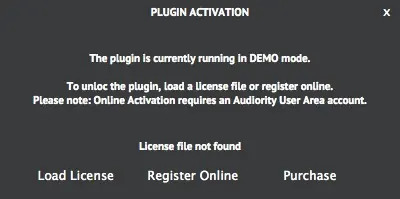

- Offline Activation: Purchase the plugin to receive a license file via email. Click the Audiority logo in the plugin interface, select Register, and click Load License to import your file.
- Online Activation: If you have an Audiority User Area account, click the Audiority logo, select Register, and enter your credentials in the Online Activation window to automatically activate the plugin.
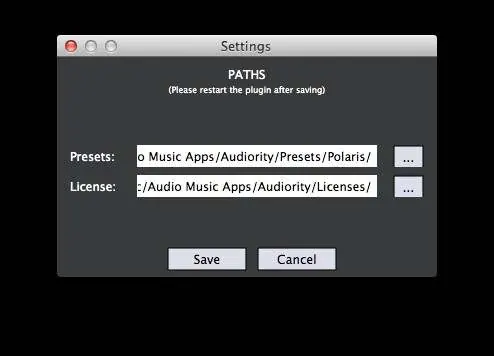
- User Paths: You can manage preset and license file paths by selecting Settings from the logo menu. Do not move the Settings folder from its default location.
Plugin Parameters
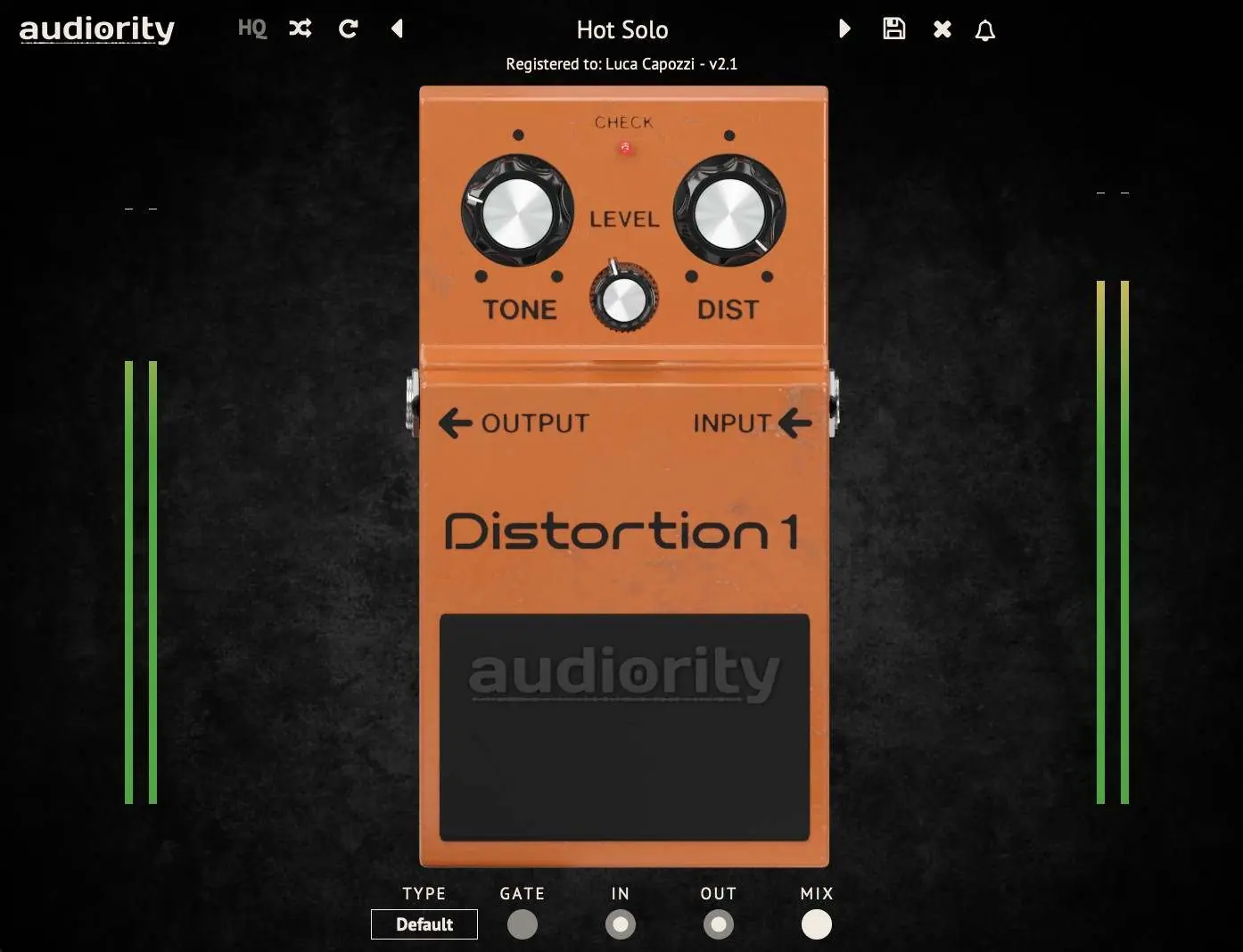
The interface is divided into the Toolbar, Pedal Controls, and Global Controls.
Toolbar
The top toolbar allows you to manage presets, register the plugin, and adjust global settings. The HQ button enables oversampling to reduce aliasing during signal saturation. Use the Randomize and Reset buttons to experiment with presets.
Pedal Controls
- TONE: Post-distortion passive tone control. Minimum for a darker sound, maximum for a brighter sound.
- DIST: Sets the distortion amount. Minimum for light dirt (booster), maximum for full distortion.
- LEVEL: Controls the output volume of the pedal.
Global Controls (Bottom Right)
- TYPE: Switches between different circuit models.
- GATE: Adjusts the noise gate threshold.
- IN: Pre-effect gain.
- OUT: Post-effect gain.
- MIX: Dry/wet signal mixer.
Circuit Types
The plugin includes 8 different circuit mods, each with unique tonal characteristics:
- DEFAULT: Original schematic (v1.0.x).
- LC STOCK: Fuller sound based on hardware measurements.
- CGS Mod: Improved low-end response and natural asymmetric clipping.
- FAT Mod: Reduced Q2 gain with improved low-end.
- JCM Mod: Marshall-type tones with tighter low frequencies.
- K-Mod: Based on the "Seeing Eye" mod for asymmetric clipping.
- Vintage Mod: Replicates vintage MIJ-sounding DS-1.
- Bass Mod: Optimized for low-frequency instruments.
Tips
For the best results, place this plugin before your amp simulator. You can use it as a booster by setting the DIST control to minimum and using the LEVEL control to manage the output volume.
Practical help
Common problems
Plugin is outputting 3 seconds of silence every minute.
The plugin is in Demo Mode. You must load a license file or activate it online via the Audiority logo menu.
Cannot find presets or license files.
Check the file paths in the Settings menu (accessible via the Audiority logo) to ensure they point to the correct directories.
Before use
- Verify your OS is Windows 7 64-bit+ or macOS 10.13+.
- Ensure you have a compatible host (VST2, VST3, AU, CLAP, or AAX).
- Register an account on the Audiority website.
- Have your license file or redeem code ready for activation.
Images and diagrams
- The main interface provides standard stompbox controls: Tone, Level, and Dist.
- Global controls located at the bottom right include Type, Gate, In, Out, and Mix.
Model compatibility
- Compatible with Windows 7 64-bit or later.
- Compatible with macOS 10.13 (Intel) or macOS 11.0 (Silicon) or later.

Manual page author
Michael Turner
Technical manual editor
Reviews PDF manuals for structure, safety notes, and practical product details so readers can find the right information quickly.