Electronics / Audio
Audiority Flanger 117 Audio Plugin User Manual
Quick guide for the Audiority Flanger 117 audio plugin. Learn about system requirements, installation, activation, plugin parameters, and global controls.
Table of contents
Manual images
Click an image to enlargeQuick guide from the manual
The Audiority Flanger 117 is an authentic simulation of the classic MXR Flanger 117 pedal from the 70s. This plugin offers features like Through-Zero Flanging, Negative Feedback, and dynamic flanging via an envelope follower. Before using the plugin, ensure your system meets the requirements and that you have activated the software to remove the Demo Mode limitations.
System Requirements
The plugin requires a 64-bit host environment. Supported formats include VST3, AU, CLAP, and AAX.
- PC: Windows 7 64-bit or later, Intel i5 or equivalent, 4 GB RAM, screen resolution 1024x768.
- MAC (Intel): OSX 10.13 or later, Intel i5 or equivalent, 4 GB RAM, screen resolution 1024x768.
- MAC (Silicon): macOS 11.0 or later, M1 or higher, 4 GB RAM, screen resolution 1024x768.
Plugin Activation
Upon first installation, the plugin runs in Demo Mode, which outputs 3 seconds of silence every minute. You must activate the plugin to remove this limitation.
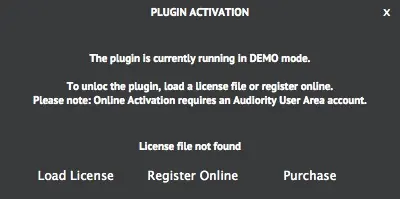
- Offline Activation: Save the license file received via email. Click the Audiority logo in the plugin, select Register, and click Load License to import the file.
- Online Activation: If registered in the Audiority User Area, enter your username/email and password directly in the plugin's activation window to activate online.
User Area and Redeem Codes
If you purchased from a dealer, you will receive a redeem code. Register an account at the Audiority website, log in to the User Area, and use the Redeem section to deposit your license. Once deposited, you can download the license file or activate the plugin online.
Plugin Parameters
The interface features four main knobs and several global controls located in the footer.
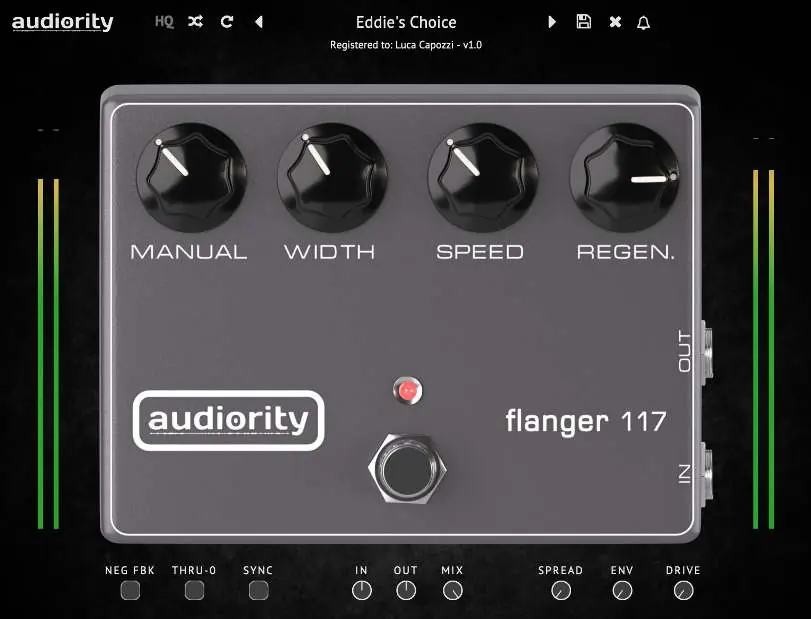
Main Knobs
- MANUAL: Sets the central point of the flanger's sweep.
- WIDTH: Adjusts the modulation depth.
- SPEED: Adjusts the LFO rate.
- REGEN.: Sets the feedback amount.
- POWER: Turns the unit on or off.
Global Controls
- INPUT / OUTPUT: Pre/Post effect gain.
- MIX: Dry/wet signal mixer.
- NEG FBK: Inverts the phase of the feedback path for a different character.
- THRU-0: Sets Through-Zero Mode.
- SYNC: Syncs the modulation speed to the host.
- SPREAD: Widens the stereo image by phase shifting the right channel LFO.
- ENV: Uses incoming audio to modulate the flanger's clock.
- DRIVE: Saturates the feedback loop (Warning: may cause self-oscillation).
Settings and Resizing
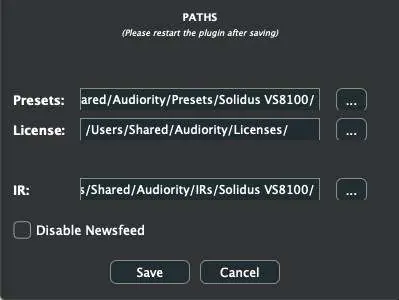
You can change the paths for Presets, License, and IR folders by selecting Settings from the logo menu. The plugin interface can be resized using the corner handle or the size options in the logo menu.
Support
For technical issues or questions, contact [email protected] or visit the official website at www.audiority.com.
Official resources from the manual
Practical help
Common problems
Plugin outputs 3 seconds of silence every minute
The plugin is in Demo Mode. You must load a license file or activate it online.
Presets or license files not found
Check the file paths in the Settings menu (accessed via the logo menu) to ensure they point to the correct folders.
Self-oscillation occurs
The DRIVE control saturates the feedback loop and may cause self-oscillation; reduce the drive level.
Before use
- Verify your OS meets the minimum requirements (Windows 7+ or macOS 10.13+).
- Ensure you have at least 4GB of RAM.
- Confirm your DAW supports VST3, AU, CLAP, or AAX 64-bit plugins.
- Register an account at the Audiority website.
- Have your redeem code or license file ready for activation.
Images and diagrams
- The main interface features four primary knobs: Manual, Width, Speed, and Regen.
- The footer contains global controls including Neg Fbk, Thru-0, Sync, Spread, Env, and Drive.
Model compatibility
- Requires 64-bit host software.
- Supports both Intel and Apple Silicon Macs.
- Not compatible with 32-bit hosts.

Manual page author
Emily Carter
User documentation editor
Prepares concise manual descriptions and highlights the most useful setup, operation, and maintenance information for readers.