Electronics / USB Hubs & Docking
Acer 11-in-1 USB C Docking Station Stand ODK580
Quick guide for the Acer 11-in-1 USB C Docking Station Stand (Model ODK580). Includes port interface details, technical specifications, compatibility requirements, and troubleshooting for display modes.
Table of contents
Manual images
Click an image to enlargeQuick guide from the manual
The Acer 11-in-1 USB C Docking Station Stand (Model ODK580) is a plug-and-play device designed to expand connectivity for laptops. It does not require driver installation for most operating systems. Ensure your host device's USB-C port supports DisplayPort Alt Mode to utilize video output features. The PD port is strictly for charging the host device and does not support data or video output.
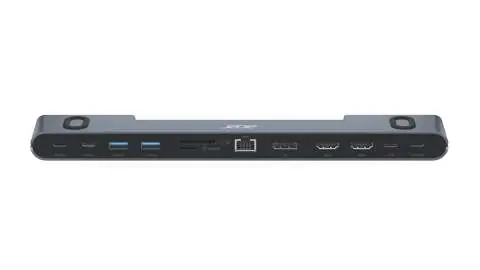
Product Interface
The docking station features 8 distinct ports for various connectivity needs:
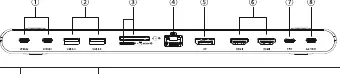
- USB-C 3.2 Port: Data transfer speed up to 10 Gbps.
- USB 3.0 Port: Data transfer speed up to 5 Gbps.
- SD/TF: Data transfer speed up to 104 MB/s.
- RJ45 Female: Network connection up to 1000 Mbps (backward compatible with 100Mbps/10Mbps).
- DP (DisplayPort): Single display up to 8K at 30Hz.
- HDMI: Two HDMI ports, each supporting single display up to 4K at 60Hz. Note: Max specs for dual-display mode with any two ports connected is 4K at 60Hz.
- USB-C Charging: PD 3.0, Max 100W. This port is for power delivery only and does not support data transfer or video output.
- USB-C Female: Connect this port to the host device.
Product Specifications
- Material: Zinc Alloy + ABS
- Compatible Systems: Windows XP or later, Linux 10.04 or later, macOS 10.2 or later
- Product Weight: 365g / 12.9 oz
- Product Size: 28 x 4.4 x 2.1 cm
- Operating Temperature: 0°C to 50°C
- Storage Temperature: -10°C to 70°C
- Humidity Range: 5% to 90% RH (no condensation)
FAQ and Troubleshooting
Driver Installation: The device is plug-and-play. If it is not recognized, check if your operating system requires manual driver installation.
Compatibility: The docking station requires a USB-C port that supports DisplayPort Alt Mode. Please confirm your laptop supports this feature.
Display Modes: The device supports Mirror Mode, Extend Mode, and Triple Extend (on Windows). Note that macOS does not support Triple Extend mode. Resolution capabilities depend on the combined capabilities of your computer, cables, and monitors.
Customer Support
For product-related issues, contact customer service:
US: (978) 230-8895 (Mon-Fri: 9am-6pm EST)DE: +0211 4187 3343 (Mon-Fri: 9am-5pm)UK: +020 3868 3233 (Mon-Fri: 9am-6pm GMT)Japan: 01-2097-9787 (Mon-Fri: 9am-6pm)AU: +61 451 8926 82 (Mon-Fri: 9am-6pm)
For Amazon purchases, email: [email protected] Temu and other purchases, email: [email protected]
Manufacturer information
Acer Inc.
Practical help
Common problems
Device not working or no video output
Confirm your laptop's USB-C port supports DisplayPort Alt Mode.
PD port not charging peripherals
The PD port is designed to charge the 'Host' device only, not peripherals.
USB 3.0 port not charging devices
The USB 3.0 port supports data transmission only and does not support charging.
Before use
- Verify your laptop's USB-C port supports DisplayPort Alt Mode.
- Ensure you are using the correct USB-C Female port to connect to the host device.
- Check that your operating system is compatible (Windows XP+, Linux 10.04+, macOS 10.2+).
- Ensure cables and monitors support the desired resolution (e.g., 4K@60Hz).
Specs in practice
- USB-C PD 3.0
- Power Delivery port, supports up to 100W charging for the host laptop.
Images and diagrams
- Ports 1-2: High-speed data transfer (USB-C and USB 3.0).
- Port 3: SD/TF card reader slot.
- Port 4: Ethernet (RJ45) network port.
- Ports 5-6: Video output (DisplayPort and HDMI).
- Port 7: Power Delivery (PD) input.
Model compatibility
- Triple-screen Extend mode is supported on Windows but not on macOS.
- Requires DisplayPort Alt Mode on the host device.
- Actual performance may vary based on equipment and cables used.

Manual page author
Michael Turner
Technical manual editor
Reviews PDF manuals for structure, safety notes, and practical product details so readers can find the right information quickly.